阿里FunASR 0.4.6 docker 镜像的一个坑
下载cpu版的0.4.6镜像后
根据阿里的文档,起一个服务
cd FunASR/runtime
nohup bash run_server_2pass.sh --certfile 0
–download-model-dir /workspace/models
–vad-dir damo/speech_fsmn_vad_zh-cn-16k-common-onnx
–model-dir damo/speech_paraformer-large_asr_nat-zh-cn-16k-common-vocab8404-onnx
–online-model-dir damo/speech_paraformer-large_asr_nat-zh-cn-16k-common-vocab8404-online-onnx
–punc-dir damo/punc_ct-transformer_zh-cn-common-vad_realtime-vocab272727-onnx
–itn-dir thuduj12/fst_itn_zh
–hotword /workspace/models/hotwords.txt &
但是这里有个坑,run_server_2pass.sh 执行下面的代码:
/workspace/FunASR/runtime/websocket/build/bin/funasr-wss-server-2pass --download-model-dir /workspace/models --model-dir damo/speech_paraformer-large_asr_nat-zh-cn-16k-common-vocab8404-onnx --online-model-dir damo/speech_paraformer-large_asr_nat-zh-cn-16k-common-vocab8404-online-onnx --vad-dir damo/speech_fsmn_vad_zh-cn-16k-common-onnx --punc-dir damo/punc_ct-transformer_zh-cn-common-vad_realtime-vocab272727-onnx --itn-dir thuduj12/fst_itn_zh --lm-dir damo/speech_ngram_lm_zh-cn-ai-wesp-fst --decoder-thread-num 16 --model-thread-num 1 --io-thread-num 1 –port 10095 --certfile --keyfile --hotword /workspace/models/hotw
这里会用到10095端口。
但其实这个镜像默认会执行
/workspace/FunASR/runtime/websocket/build/bin/funasr-wss-server --certfile …/…/…/ssl_key/server.crt --decoder-thread-num 16 --download-model-dir /workspace/models --hotword …/…/hotwords.tx --io-thread-num 1 --itn-dir thuduj12/fst_itn_zh --keyfile …/…/…/ssl_key/server.key --lm-dir damo/speech_ngram_lm_zh-cn-ai-wesp-fst --model-dir damo/speech_paraformer-large-vad-punc_asr_nat-zh-cn-16k-common-vocab8404-onnx --model-thread-num 1 –port 10095 --punc-dir damo/punc_ct-transformer_cn-en-common-vocab471067-large-onnx --vad-dir damo/speech_fsmn_vad_zh-cn-16k-common-onnx
端口也是10095
所以啊,funasr-wss-server-2pass这个服务其实外面是连不上的,测试代码连的都是funasr-wss-server。因为端口被funasr-wss-server先用了
funasr-wss-server-2pass 和 funasr-wss-server 有啥区别呢?
funasr-wss-server-2pass 据说是采用预处理的过程,优化了结果。但是接口上只支持pcm格式。从代码上看到
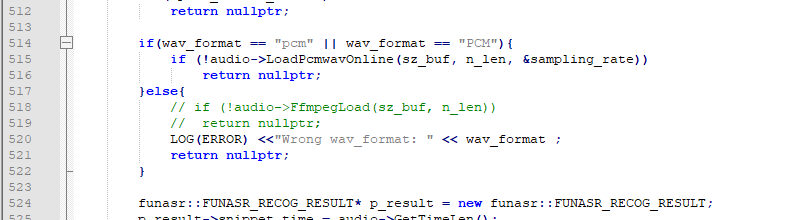
不知道为何就不支持了呢,不让薅羊毛么?
funasr-wss-server 就支持各种接口,因为使用了ffmpeg。
后面是一些关于docker的小知识:
为了让run_server_2pass.sh 能够在container 启动的时候就跑起来,并且还要保持住进程,不至于sh结束,container也跟着停。建立了如下container启动命令
docker run -d -p 10096:10095 --privileged=true -v “H:/funasrmodels:/workspace/models” --name funasr-service --restart=always registry.cn-hangzhou.aliyuncs.com/funasr_repo/funasr:funasr-runtime-sdk-cpu-0.4.6 bash -c “cd FunASR/runtime && bash run_server_2pass.sh --certfile 0 --download-model-dir /workspace/models --vad-dir damo/speech_fsmn_vad_zh-cn-16k-common-onnx --model-dir damo/speech_paraformer-large_asr_nat-zh-cn-16k-common-vocab8404-onnx --online-model-dir damo/speech_paraformer-large_asr_nat-zh-cn-16k-common-vocab8404-online-onnx --punc-dir damo/punc_ct-transformer_zh-cn-common-vad_realtime-vocab272727-onnx --itn-dir thuduj12/fst_itn_zh --hotword /workspace/models/hotwords.txt exec bash”
然后修改run_server_2pass.sh (在container的workspace\FunASR\runtime\)
download_model_dir="/workspace/models"
model_dir="damo/speech_paraformer-large-vad-punc_asr_nat-zh-cn-16k-common-vocab8404-onnx"
online_model_dir="damo/speech_paraformer-large_asr_nat-zh-cn-16k-common-vocab8404-online-onnx"
vad_dir="damo/speech_fsmn_vad_zh-cn-16k-common-onnx"
punc_dir="damo/punc_ct-transformer_zh-cn-common-vad_realtime-vocab272727-onnx"
itn_dir="thuduj12/fst_itn_zh"
lm_dir="damo/speech_ngram_lm_zh-cn-ai-wesp-fst"
port=10095
certfile="$(pwd)/ssl_key/server.crt"
keyfile="$(pwd)/ssl_key/server.key"
hotword="$(pwd)/websocket/hotwords.txt"
# set decoder_thread_num
decoder_thread_num=$(cat /proc/cpuinfo | grep "processor"|wc -l) || { echo "Get cpuinfo failed. Set decoder_thread_num = 32"; decoder_thread_num=32; }
multiple_io=16
io_thread_num=$(( (decoder_thread_num + multiple_io - 1) / multiple_io ))
model_thread_num=1
cmd_path=/workspace/FunASR/runtime/websocket/build/bin
cmd=funasr-wss-server-2pass

. ./tools/utils/parse_options.sh || exit 1;

if [ -z "$certfile" ] || [ "$certfile" = "0" ]; then
  certfile=""
  keyfile=""
fi

cd $cmd_path
exec $cmd_path/${cmd}  \
  --download-model-dir "${download_model_dir}" \
  --model-dir "${model_dir}" \
  --online-model-dir "${online_model_dir}" \
  --vad-dir "${vad_dir}" \
  --punc-dir "${punc_dir}" \
  --itn-dir "${itn_dir}" \
  --lm-dir "${lm_dir}" \
  --decoder-thread-num ${decoder_thread_num} \
  --model-thread-num ${model_thread_num} \
  --io-thread-num  ${io_thread_num} \
  --port ${port} \
  --certfile  "${certfile}" \
  --keyfile "${keyfile}" \
  --hotword "${hotword}" &

# 监控进程并自动重启的逻辑
# 日志输出函数
log() {
  echo "[$(date +'%Y-%m-%d %H:%M:%S')] $1"
}

log "开始监控 ${cmd} 进程..."

# 循环监控
while true; do
  # 检查进程是否存在(精确匹配服务进程)
  if pgrep -f "${cmd_path}/${cmd}" > /dev/null; then
    log "${cmd} 进程运行正常"
  else
    log "${cmd} 进程不存在,正在重启..."
    # 重新执行启动命令
    $cmd_path/${cmd}  \
      --download-model-dir "${download_model_dir}" \
      --model-dir "${model_dir}" \
      --online-model-dir "${online_model_dir}" \
      --vad-dir "${vad_dir}" \
      --punc-dir "${punc_dir}" \
      --itn-dir "${itn_dir}" \
      --lm-dir "${lm_dir}" \
      --decoder-thread-num ${decoder_thread_num} \
      --model-thread-num ${model_thread_num} \
      --io-thread-num  ${io_thread_num} \
      --port ${port} \
      --certfile  "${certfile}" \
      --keyfile "${keyfile}" \
      --hotword "${hotword}" &

    # 等待1秒后检查启动结果
    sleep 1
    if pgrep -f "${cmd_path}/${cmd}" > /dev/null; then
      log "${cmd} 进程重启成功"
    else
      log "错误:${cmd} 进程重启失败"
    fi
  fi
  # 每5秒检查一次
  sleep 5
done
实际上就是加上一个循环,每隔5秒就查一下funasr-wss-server-2pass这个进程还在不在,不在了就启动一个。
这样container就不会因为sh结束而退出了。

码道开发者社区,聚焦华为云码道 CodeArts 代码智能体,沉淀 Agent、Skill、鸿蒙开发实战内容,供开发者查阅资料、交流技术、分享工程实践
更多推荐



 25
25 0
0- 0


 已为社区贡献1条内容

所有评论(0)