基于Docker构建hadoop集群的配置说明
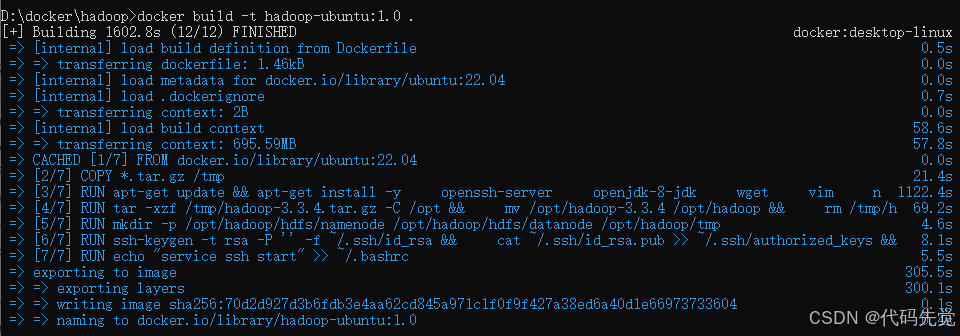
构建Dockerfile镜像
docker build -t hadoop-ubuntu:1.0 .
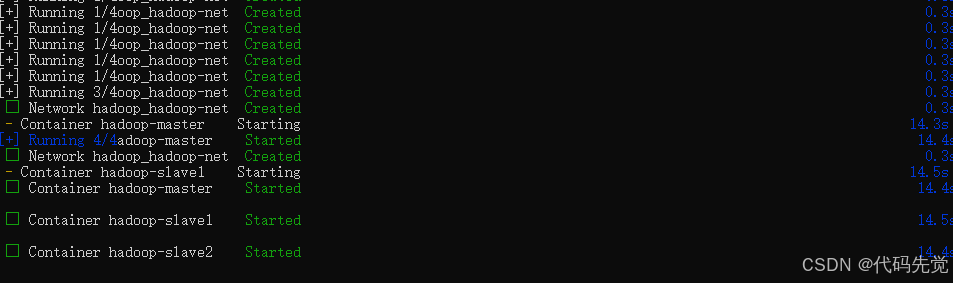
使用docker-compose定义三节点集群
docker-compose up -d
配置 Hadoop 集群
配置环境变量
vim ~/.bashrc
文件末尾添加:
export HDFS_NAMENODE_USER=root
export HDFS_DATANODE_USER=root
export HDFS_SECONDARYNAMENODE_USER=root
export YARN_RESOURCEMANAGER_USER=root
export YARN_NODEMANAGER_USER=root
让配置立即生效:
source ~/.bashrc
配置 SSH 免密登录
docker exec -it hadoop-master bash
cat ~/.ssh/id_rsa.pub

docker exec -it hadoop-slave1 bash
docker exec -it hadoop-slave2 bash
分别进入 hadoop-slave1和 hadoop-slave2容器,将上述公钥内容追加到各自的 ~/.ssh/authorized_keys文件中,并确保权限为 600
修改 Hadoop 配置文件
/opt/hadoop/etc/hadoop/core-site.xml
<?xml version="1.0" encoding="UTF-8"?>
<?xml-stylesheet type="text/xsl" href="configuration.xsl"?>
<!--
  Licensed under the Apache License, Version 2.0 (the "License");
  you may not use this file except in compliance with the License.
  You may obtain a copy of the License at

    http://www.apache.org/licenses/LICENSE-2.0

  Unless required by applicable law or agreed to in writing, software
  distributed under the License is distributed on an "AS IS" BASIS,
  WITHOUT WARRANTIES OR CONDITIONS OF ANY KIND, either express or implied.
  See the License for the specific language governing permissions and
  limitations under the License. See accompanying LICENSE file.
-->

<!-- Put site-specific property overrides in this file. -->

<configuration>
    <property>
        <name>fs.defaultFS</name>
        <value>hdfs://hadoop-master:9000</value>
    </property>
    <property>
        <name>hadoop.tmp.dir</name>
        <value>file:///opt/hadoop/tmp</value>
    </property>
</configuration>
/opt/hadoop/etc/hadoop/hdfs-site.xml
<?xml version="1.0" encoding="UTF-8"?>
<?xml-stylesheet type="text/xsl" href="configuration.xsl"?>
<!--
  Licensed under the Apache License, Version 2.0 (the "License");
  you may not use this file except in compliance with the License.
  You may obtain a copy of the License at

    http://www.apache.org/licenses/LICENSE-2.0

  Unless required by applicable law or agreed to in writing, software
  distributed under the License is distributed on an "AS IS" BASIS,
  WITHOUT WARRANTIES OR CONDITIONS OF ANY KIND, either express or implied.
  See the License for the specific language governing permissions and
  limitations under the License. See accompanying LICENSE file.
-->

<!-- Put site-specific property overrides in this file. -->

<configuration>
    <property>
        <name>dfs.replication</name>
        <value>2</value> <!-- 由于有三个节点,副本数可设为2 -->
    </property>
    <property>
        <name>dfs.namenode.name.dir</name>
        <value>file:///opt/hadoop/hdfs/namenode</value>
    </property>
    <property>
        <name>dfs.datanode.data.dir</name>
        <value>file:///opt/hadoop/hdfs/datanode</value>
    </property>
</configuration>
/opt/hadoop/etc/hadoop/mapred-site.xml
<?xml version="1.0"?>
<?xml-stylesheet type="text/xsl" href="configuration.xsl"?>
<!--
  Licensed under the Apache License, Version 2.0 (the "License");
  you may not use this file except in compliance with the License.
  You may obtain a copy of the License at

    http://www.apache.org/licenses/LICENSE-2.0

  Unless required by applicable law or agreed to in writing, software
  distributed under the License is distributed on an "AS IS" BASIS,
  WITHOUT WARRANTIES OR CONDITIONS OF ANY KIND, either express or implied.
  See the License for the specific language governing permissions and
  limitations under the License. See accompanying LICENSE file.
-->

<!-- Put site-specific property overrides in this file. -->

<configuration>
    <property>
        <name>mapreduce.framework.name</name>
        <value>yarn</value>
    </property>
</configuration>
/opt/hadoop/etc/hadoop/yarn-site.xml
<?xml version="1.0"?>
<!--
  Licensed under the Apache License, Version 2.0 (the "License");
  you may not use this file except in compliance with the License.
  You may obtain a copy of the License at

    http://www.apache.org/licenses/LICENSE-2.0

  Unless required by applicable law or agreed to in writing, software
  distributed under the License is distributed on an "AS IS" BASIS,
  WITHOUT WARRANTIES OR CONDITIONS OF ANY KIND, either express or implied.
  See the License for the specific language governing permissions and
  limitations under the License. See accompanying LICENSE file.
-->
<configuration>
    <property>
        <name>yarn.nodemanager.aux-services</name>
        <value>mapreduce_shuffle</value>
    </property>
    <property>
        <name>yarn.resourcemanager.hostname</name>
        <value>hadoop-master</value>
    </property>
</configuration>
/opt/hadoop/etc/hadoop/workers
hadoop-slave1
hadoop-slave2
docker cp workers hadoop-slave1:/opt/hadoop/etc/hadoop/
docker cp yarn-site.xml hadoop-slave1:/opt/hadoop/etc/hadoop/
docker cp hdfs-site.xml hadoop-slave1:/opt/hadoop/etc/hadoop/
docker cp mapred-site.xml hadoop-slave1:/opt/hadoop/etc/hadoop/
docker cp core-site.xml hadoop-slave1:/opt/hadoop/etc/hadoop/
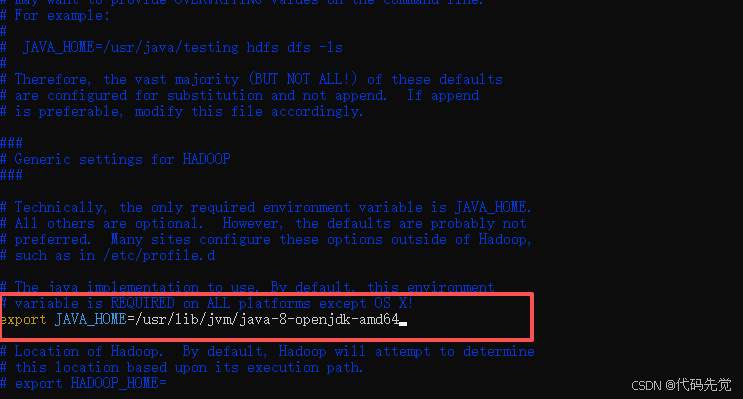
在 Hadoop 配置文件中设置 JAVA_HOME
vi /opt/hadoop/etc/hadoop/hadoop-env.sh
Export JAVA_HOME=/usr/lib/jvm/java-8-openjdk-amd64
启动与验证 HDFS 集群
格式化 HDFS(仅在首次搭建时执行)
在 hadoop-master节点上执行:
hdfs namenode -format
启动 HDFS 和 YARN 服务
在 hadoop-master节点上执行:
start-dfs.sh
start-yarn.sh
单独启动从节点:
hdfs --daemon start datanode
yarn-daemon.sh start nodemanager
验证集群状态
在 hadoop-master执行 jps,应看到 NameNode、SecondaryNameNode、ResourceManager进程。
在 hadoop-slave1和 hadoop-slave2执行 jps,应看到 DataNode、NodeManager进程。
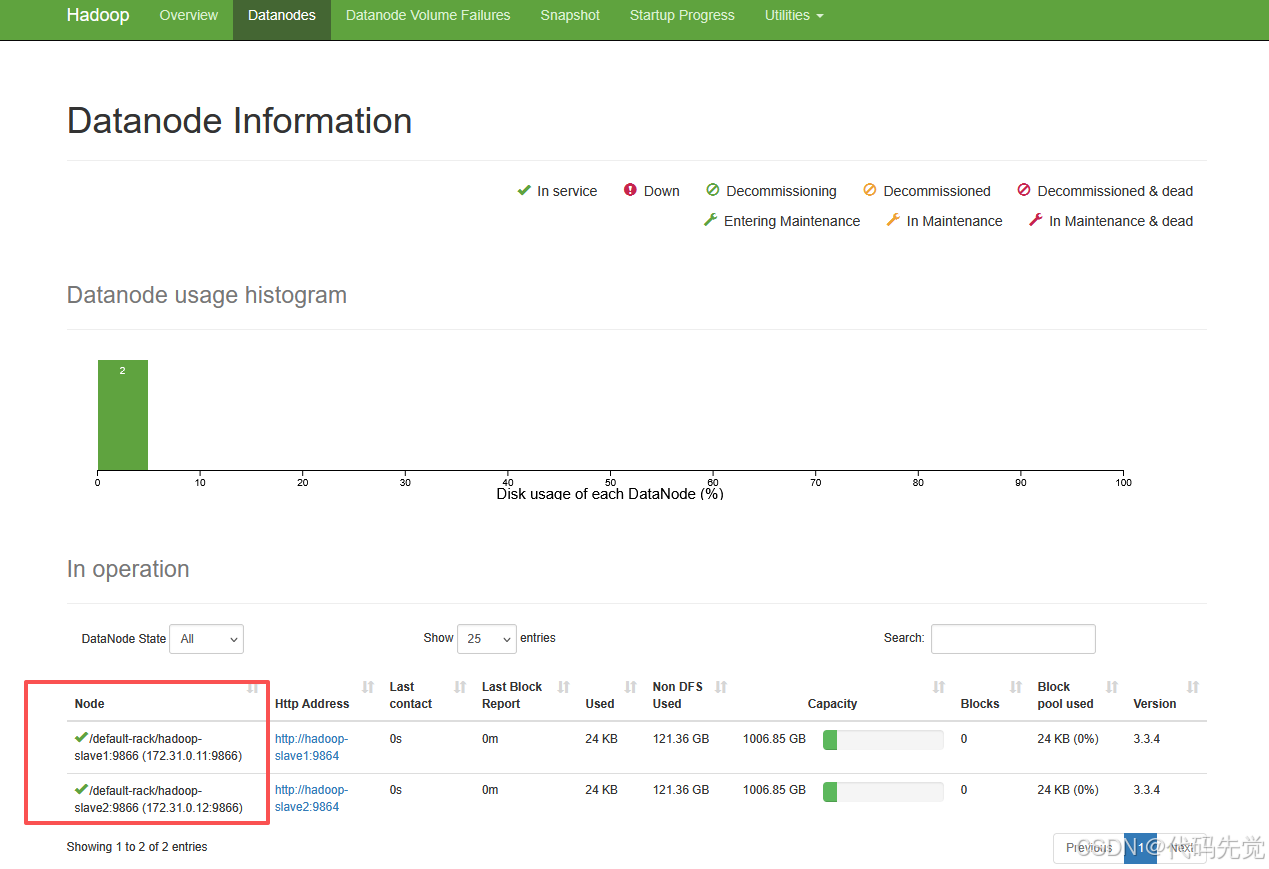
通过 Web UI 访问:在宿主机浏览器访问 http://localhost:9870(HDFS)和 http://localhost:8088(YARN)。在 HDFS Web UI 的 "Datanodes" 页面应能看到两个活跃的 DataNode
所需的配置文件和hadoop安装包下载地址:
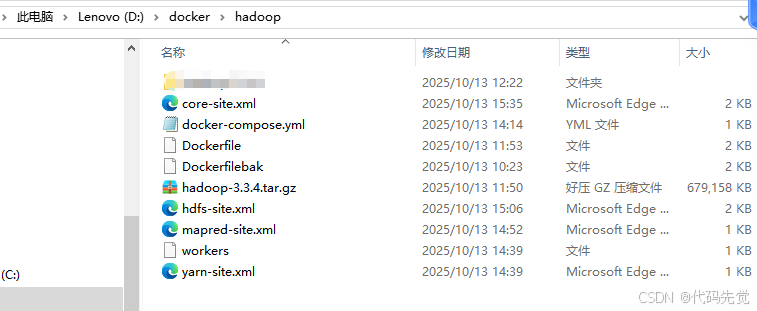
Hadoop安装包:hadoop-3.3.4安装包资源-CSDN下载
docker配置:hadoop-docker配置文件dockerfile资源-CSDN下载
由于镜像有2.7G太大了,这里就不展示了,有需要的可以私信博主获取~
想获得更多 变现门道 / 平台规则 / 避坑指南?需要解决 卡壳、没流量 难题?或者想拓展 人脉、攒资源、碰出机会?
关注「代码先觉」公众号!
聊干货、破难题、攒资源,我们陪你一起成长!
点个关注不迷路,深度干货和优质圈子在这等你!

码道开发者社区,聚焦华为云码道 CodeArts 代码智能体,沉淀 Agent、Skill、鸿蒙开发实战内容,供开发者查阅资料、交流技术、分享工程实践
更多推荐



 22
22 0
0- 0


 已为社区贡献2条内容

所有评论(0)