微服务整合swagger
·
集成Swagger
案例:service-system服务整合swagger
- 增加依赖
- 配置类
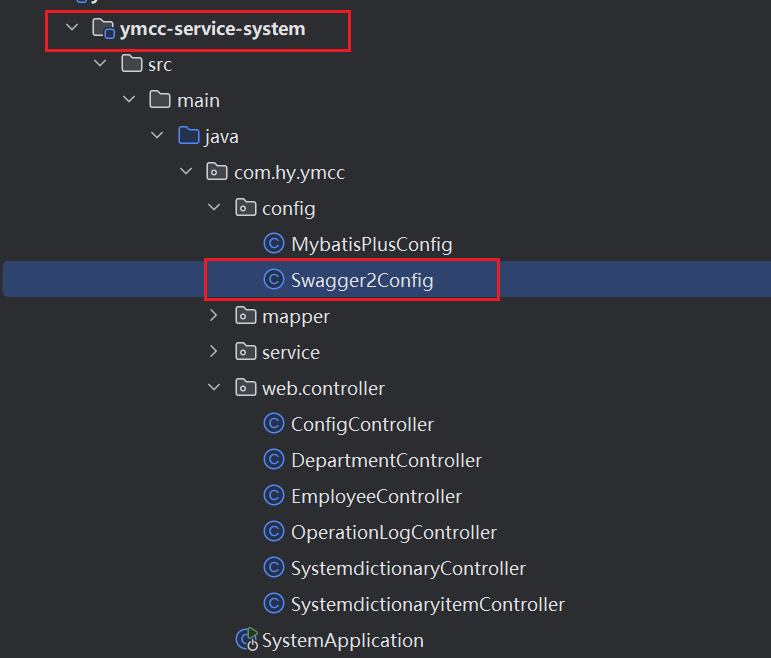
添加依赖
 <!--引入swagger支持-->
 //swagger依赖
<dependency>
    <groupId>io.springfox</groupId>
    <artifactId>springfox-swagger2</artifactId>
    <version>2.9.2</version>
</dependency>

//生成前端页面依赖
<dependency>
    <groupId>io.springfox</groupId>
    <artifactId>springfox-swagger-ui</artifactId>
    <version>2.9.2</version>
</dependency>
配置类
作用就是:主要告诉swagger生成哪个controller下的接口
package com.hy.ymcc.config;

import springfox.documentation.builders.ApiInfoBuilder;
import springfox.documentation.builders.PathSelectors;
import springfox.documentation.builders.RequestHandlerSelectors;
import springfox.documentation.service.ApiInfo;
import springfox.documentation.service.Contact;
import springfox.documentation.spi.DocumentationType;
import springfox.documentation.spring.web.plugins.Docket;
import springfox.documentation.swagger2.annotations.EnableSwagger2;

@Configuration
@EnableSwagger2
public class Swagger2Config {

    @Bean
    public Docket createRestApi() {
        return new Docket(DocumentationType.SWAGGER_2)
                .apiInfo(apiInfo())
                .select()
                //对外暴露服务的包,以controller的方式暴露,所以就是controller的包.
                .apis(RequestHandlerSelectors.basePackage("com.hy.ymcc.web.controller"))
                .paths(PathSelectors.any())
                .build();
    }
    private ApiInfo apiInfo() {
        return new ApiInfoBuilder()
                .title("管理系统")
                .description("管理系统接口文档说明")
                .contact(new Contact("whale", "", "whale.hy.cn"))
                .version("1.0")
                .build();
    }

}
相关注解
-
controller增加 : @Api(value = “接口名”,description = “描述”)
-
方法上增加 :@ApiOperation(value = “方法名”,notes = “备注”,response = JSONResult.class)
-
参数前增加:@ApiParam(name = “参数名”,required = true)
测试
访问: 地址/swagger-ui.html 即可
Gateway聚合Swagger
gateway整合swagger并不意味着,这个项目中的其他服务就不用整合swagger了,其他服务也要像system系统一样整合swagger,而gateway整合swagger是为了方便管理,在网关端口号的swagger中对其他服务进行统一的管理
具体gateway服务集成swagger步骤
- gateway服务的pom 增加依赖
- 写配置类
增加依赖
<dependency>
    <groupId>io.springfox</groupId>
    <artifactId>springfox-swagger2</artifactId>
    <version>2.9.2</version>
</dependency>

<dependency>
    <groupId>io.springfox</groupId>
    <artifactId>springfox-swagger-ui</artifactId>
    <version>2.9.2</version>
</dependency>
配置类
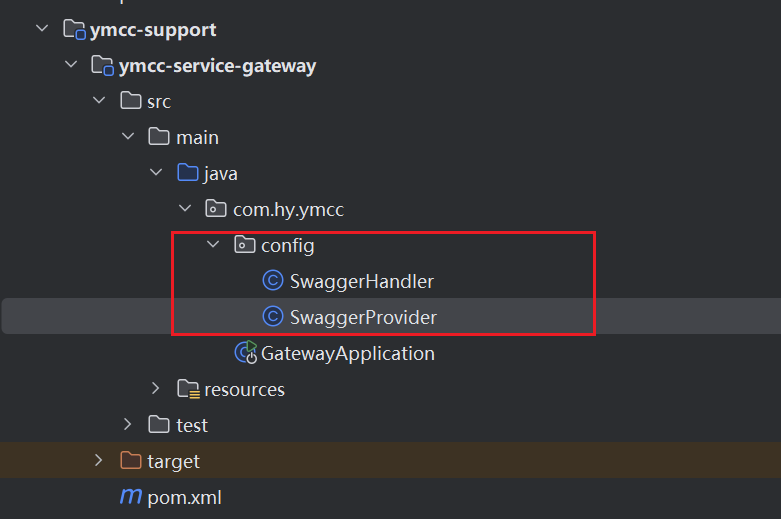
1.配置Swagger资源处理器
package com.hy.ymcc.config;

import org.springframework.beans.factory.annotation.Autowired;
import org.springframework.http.HttpStatus;
import org.springframework.http.ResponseEntity;
import org.springframework.web.bind.annotation.GetMapping;
import org.springframework.web.bind.annotation.RequestMapping;
import org.springframework.web.bind.annotation.RestController;
import reactor.core.publisher.Mono;
import springfox.documentation.swagger.web.*;

import java.util.Optional;

@RestController
@RequestMapping("/swagger-resources")
public class SwaggerHandler {

    @Autowired(required = false)
    private SecurityConfiguration securityConfiguration;

    @Autowired(required = false)
    private UiConfiguration uiConfiguration;

    private final SwaggerResourcesProvider swaggerResources;

    @Autowired
    public SwaggerHandler(SwaggerResourcesProvider swaggerResources) {
        this.swaggerResources = swaggerResources;
    }


    @GetMapping("/configuration/security")
    public Mono<ResponseEntity<SecurityConfiguration>> securityConfiguration() {
        return Mono.just(new ResponseEntity<>(
                Optional.ofNullable(securityConfiguration).orElse(SecurityConfigurationBuilder.builder().build()), HttpStatus.OK));
    }

    @GetMapping("/configuration/ui")
    public Mono<ResponseEntity<UiConfiguration>> uiConfiguration() {
        return Mono.just(new ResponseEntity<>(
                Optional.ofNullable(uiConfiguration).orElse(UiConfigurationBuilder.builder().build()), HttpStatus.OK));
    }

    @GetMapping("")
    public Mono<ResponseEntity> swaggerResources() {
        return Mono.just((new ResponseEntity<>(swaggerResources.get(), HttpStatus.OK)));
    }
}
2.swagger资源配置
package com.hy.ymcc.config;

import lombok.AllArgsConstructor;
import org.springframework.cloud.gateway.config.GatewayProperties;
import org.springframework.cloud.gateway.route.RouteLocator;
import org.springframework.cloud.gateway.support.NameUtils;
import org.springframework.context.annotation.Bean;
import org.springframework.context.annotation.Primary;
import org.springframework.stereotype.Component;
import org.springframework.web.util.UriComponentsBuilder;
import springfox.documentation.PathProvider;
import springfox.documentation.spring.web.paths.Paths;
import springfox.documentation.swagger.web.SwaggerResource;
import springfox.documentation.swagger.web.SwaggerResourcesProvider;

import java.util.ArrayList;
import java.util.List;

@Component
@Primary
@AllArgsConstructor
public class SwaggerProvider implements SwaggerResourcesProvider {
    public static final String API_URI = "/v2/api-docs";
    private final RouteLocator routeLocator;
    private final GatewayProperties gatewayProperties;


    @Override
    public List<SwaggerResource> get() {
        List<SwaggerResource> resources = new ArrayList<>();
        List<String> routes = new ArrayList<>();
        routeLocator.getRoutes().subscribe(route -> routes.add(route.getId()));
        gatewayProperties.getRoutes().stream().filter(routeDefinition -> routes.contains(routeDefinition.getId()))
                .forEach(routeDefinition -> routeDefinition.getPredicates().stream()
                        .filter(predicateDefinition -> ("Path").equalsIgnoreCase(predicateDefinition.getName()))
                        .forEach(predicateDefinition -> resources.add(swaggerResource(routeDefinition.getId(),
                                predicateDefinition.getArgs().get(NameUtils.GENERATED_NAME_PREFIX + "0")
                                        .replace("/**", API_URI)))));
        return resources;
    }

    private SwaggerResource swaggerResource(String name, String location) {
        SwaggerResource swaggerResource = new SwaggerResource();
        swaggerResource.setName(name);
        swaggerResource.setLocation(location);
        swaggerResource.setSwaggerVersion("2.0");
        return swaggerResource;
    }
}
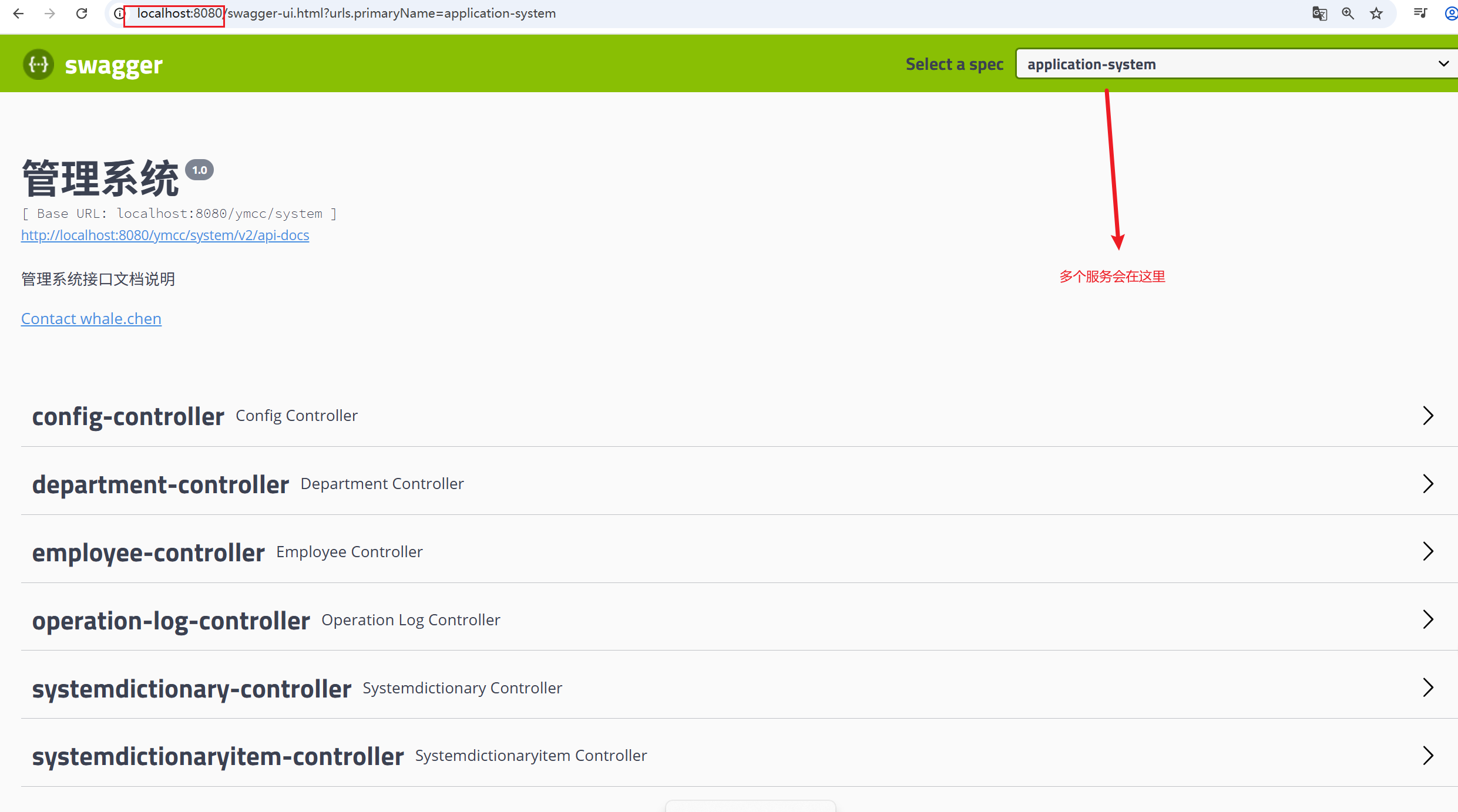
测试
访问gateway: /swagger-ui.html
我这里gateway端口是8080

码道开发者社区,聚焦华为云码道 CodeArts 代码智能体,沉淀 Agent、Skill、鸿蒙开发实战内容,供开发者查阅资料、交流技术、分享工程实践
更多推荐



 4
4 0
0- 0


 已为社区贡献1条内容

所有评论(0)