Spring AI 多模态图片理解与文档识别接入指南
Spring AI 多模态图片理解与文档识别接入指南
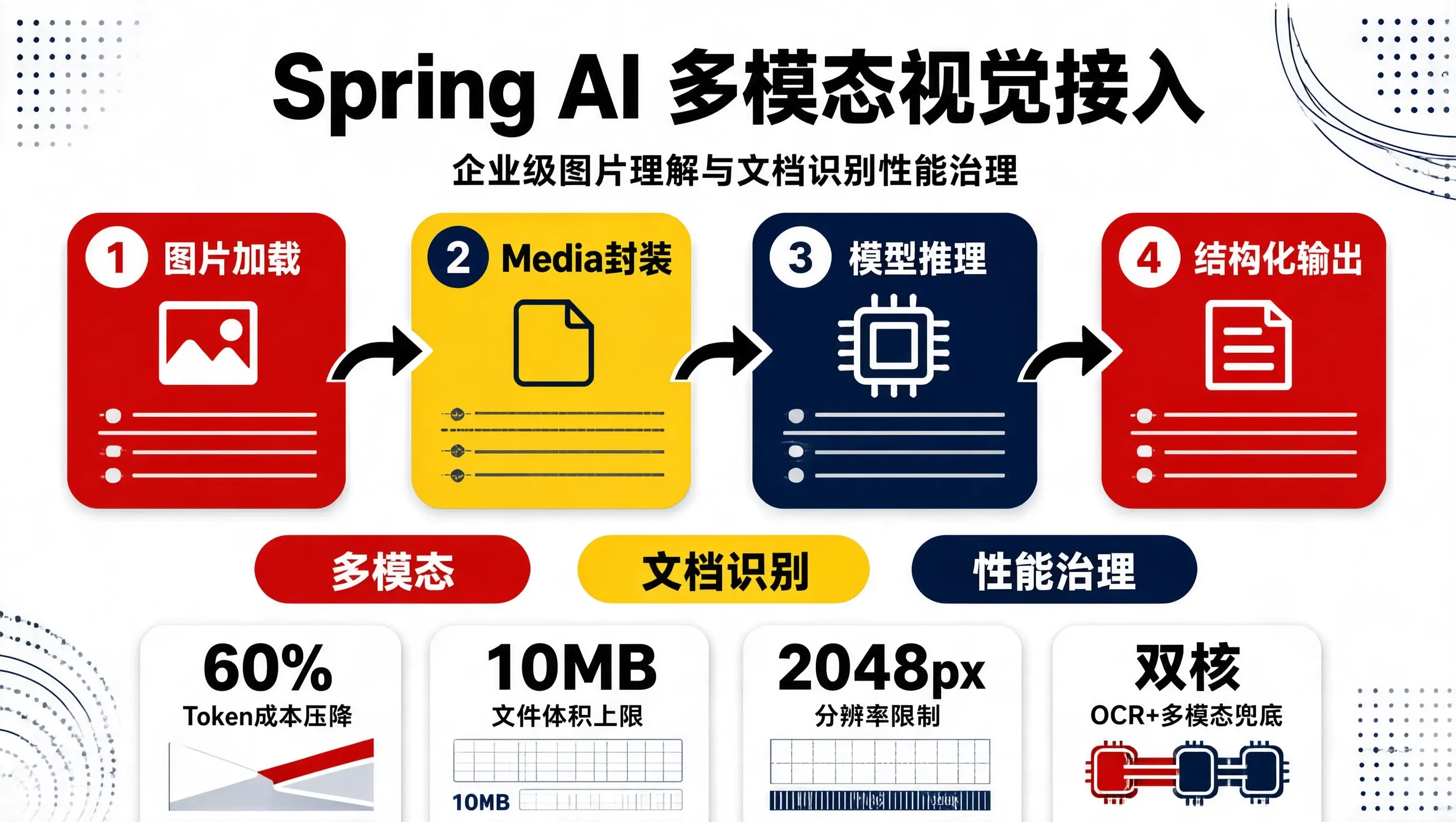
在企业级智能应用开发中,单模态的纯文本交互已经难以满足复杂的业务诉求。发票与单据审核、身份证件 OCR 校对、巡检图片异常定位、以及海量多格式产品手册的结构化解析等业务场景,都需要系统具备对图像与多媒体载荷的实时理解能力。Spring AI 抽象层在演进中全面引入了对多模态(Multimodal)请求的标准支持,使得开发者能够以一致的 Java API 操作多种具备视觉能力的大模型(如 GPT-4o、Claude 3.5 Sonnet、Qwen-VL 等)。
然而,将多模态能力真正落地到高吞吐的企业服务中,面临诸多实际挑战:图片 Base64 编码带来的网络带宽剧增与内存暴涨、不同大模型供应商对媒体格式(MIME Type)与传参结构的方言差异、高分辨率文档图像切割与 Token 计费膨胀、以及异步非阻塞处理机制等。本文基于生产实战,梳理 Spring AI 多模态图片与文档解析的接入规范与性能治理方案。
多模态交互的核心架构与媒体载荷机制
Spring AI 在消息层通过 Media 抽象统一了多模态数据输入。无论是 UserMessage 还是复合提示词,都可以挂载包含特定 MIME 类型的媒体资源。
[客户端上传图像/PDF]
        │
        ▼
[MediaResourceLoader] ──> 本地流式加载 / OSS 直链代理 / 格式预校验
        │
        ▼
[Spring AI UserMessage] ──> 注入 Prompt 文本 + List<Media> 资源
        │
        ▼
[ChatModel Client] ──> 转换为各模型供应商专有 JSON 载荷
        │
        ▼
[大模型服务提供商] ──> 返回结构化分析结果 / 流式解析数据
在构造多模态请求时,Spring AI 支持两种图片传递方式:
- URI 引用模式:直接传入可公网访问的图片对象存储(OSS/S3)URL。这种方式请求体体积小,但下游大模型需要额外发起 HTTP 请求拉取图片,容易受网络抖动与鉴权失效影响。
- 二进制内联模式(Base64 / Resource):将图片二进制流直接封包在 API 请求中。这种方式确定性高、不受外网拉取失败影响,但请求体体积会膨胀约 33%,并对网关和 JVM 内存带来短时压力。
完整代码实现与工程接入
1. Maven 依赖配置
引入 Spring AI 基础起步依赖,建议使用 BOM 管理版本:
<dependencyManagement>
    <dependencies>
        <dependency>
            <groupId>org.springframework.ai</groupId>
            <artifactId>spring-ai-bom</artifactId>
            <version>1.0.0-M1</version>
            <type>pom</type>
            <scope>import</scope>
        </dependency>
    </dependencies>
</dependencyManagement>

<dependencies>
    <dependency>
        <groupId>org.springframework.ai</groupId>
        <artifactId>spring-ai-openai-spring-boot-starter</artifactId>
    </dependency>
    <dependency>
        <groupId>org.springframework.boot</groupId>
        <artifactId>spring-boot-starter-web</artifactId>
    </dependency>
</dependencies>
2. 图像解析服务封装
通过 Media 类将图片封装为统一的多模态输入,并结合 Spring AI 的 ChatModel 发起结构化抽取请求:
package com.example.ai.multimodal.service;

import org.springframework.ai.chat.messages.UserMessage;
import org.springframework.ai.chat.model.ChatModel;
import org.springframework.ai.chat.model.ChatResponse;
import org.springframework.ai.chat.prompt.Prompt;
import org.springframework.ai.model.Media;
import org.springframework.core.io.ByteArrayResource;
import org.springframework.core.io.Resource;
import org.springframework.http.MediaType;
import org.springframework.stereotype.Service;
import org.springframework.util.MimeType;
import org.springframework.util.MimeTypeUtils;

import java.util.Collections;
import java.util.List;

@Service
public class DocumentVisionService {

    private final ChatModel chatModel;

    public DocumentVisionService(ChatModel chatModel) {
        this.chatModel = chatModel;
    }

    /**
     * 单据/发票图像结构化识别
     *
     * @param imageBytes 图片二进制数据
     * @param contentType 图片 MIME 类型,例如 "image/png" 或 "image/jpeg"
     * @param targetFields 需要提取的目标业务字段清单说明
     * @return 结构化解析出的文本结果(通常为 JSON 格式)
     */
    public String extractDocumentInfo(byte[] imageBytes, String contentType, String targetFields) {
        // 1. 构建 MIME 类型与二进制载荷封装
        MimeType mimeType = MimeTypeUtils.parseMimeType(contentType);
        Resource imageResource = new ByteArrayResource(imageBytes);
        Media media = new Media(mimeType, imageResource);

        // 2. 编写精确提示词,限定输出格式
        String instruction = String.format(
                "你是一个专业的高精度单据视觉解析引擎。\n" +
                "请分析所提供的图片内容,提取以下关键业务字段:%s。\n" +
                "输出要求:严格输出合法 JSON 格式,禁止包含 markdown 代码块包裹标记(如 ```json 等),禁止输出任何无关的问候与解释。",
                targetFields
        );

        // 3. 构建多模态 UserMessage 并提交模型
        UserMessage userMessage = new UserMessage(instruction, Collections.singletonList(media));
        Prompt prompt = new Prompt(userMessage);

        ChatResponse response = chatModel.call(prompt);
        if (response == null || response.getResult() == null) {
            throw new IllegalStateException("大模型多模态解析返回空结果");
        }

        return response.getResult().getOutput().getContent();
    }

    /**
     * 基于 OSS/S3 外部 URL 识别图片
     */
    public String analyzeImageByUrl(String imageUrl, String question) {
        Media media = new Media(MimeTypeUtils.IMAGE_JPEG, imageUrl);
        UserMessage userMessage = new UserMessage(question, List.of(media));
        Prompt prompt = new Prompt(userMessage);

        ChatResponse response = chatModel.call(prompt);
        return response.getResult().getOutput().getContent();
    }
}
3. REST 控制层与异常拦截
对外暴露图片识别端点,支持 MultipartFile 上传并进行文件体积与格式前置拦截:
package com.example.ai.multimodal.controller;

import com.example.ai.multimodal.service.DocumentVisionService;
import org.springframework.http.HttpStatus;
import org.springframework.http.ResponseEntity;
import org.springframework.web.bind.annotation.*;
import org.springframework.web.multipart.MultipartFile;

import java.io.IOException;
import java.util.Set;

@RestController
@RequestMapping("/api/v1/vision")
public class VisionInspectionController {

    private final DocumentVisionService visionService;
    private static final Set<String> ALLOWED_TYPES = Set.of("image/jpeg", "image/png", "image/webp");
    private static final long MAX_FILE_SIZE = 10 * 1024 * 1024; // 10MB

    public VisionInspectionController(DocumentVisionService visionService) {
        this.visionService = visionService;
    }

    @PostMapping("/invoice/parse")
    public ResponseEntity<?> parseInvoice(
            @RequestParam("file") MultipartFile file,
            @RequestParam(value = "fields", defaultValue = "发票代码, 发票号码, 开票日期, 合计金额, 销售方纳税人识别号") String fields) {

        if (file.isEmpty()) {
            return ResponseEntity.badRequest().body("上传文件不能为空");
        }

        if (file.getSize() > MAX_FILE_SIZE) {
            return ResponseEntity.status(HttpStatus.PAYLOAD_TOO_LARGE).body("图片体积超过 10MB 限制");
        }

        String contentType = file.getContentType();
        if (contentType == null || !ALLOWED_TYPES.contains(contentType.toLowerCase())) {
            return ResponseEntity.badRequest().body("不支持的文件类型,仅支持 JPEG, PNG, WEBP");
        }

        try {
            byte[] imageBytes = file.getBytes();
            String resultJson = visionService.extractDocumentInfo(imageBytes, contentType, fields);
            return ResponseEntity.ok(resultJson);
        } catch (IOException e) {
            return ResponseEntity.status(HttpStatus.INTERNAL_SERVER_ERROR)
                    .body("读取图片数据失败: " + e.getMessage());
        } catch (Exception e) {
            return ResponseEntity.status(HttpStatus.INTERNAL_SERVER_ERROR)
                    .body("大模型视觉解析服务异常: " + e.getMessage());
        }
    }
}
生产避坑与性能调优考量
在实际多模态落地中,有几个关键设计考量直接决定了系统的可用性与成本收益:
图片分辨率与 Token 消耗控制:
主流多模态模型(如 GPT-4o)将高分辨率图片划分为固定尺寸的小切片(Tile,例如 512x512),每个切片消耗固定的 Token 费用(如 170 tokens)。如果前端直接上传数码相机拍摄的原图(如 4000x3000),单张图片可能直接耗费上千 Token,推理耗时也会拉长至 5 秒以上。生产中建议在服务端使用 Thumbnailator 或 OpenCV 进行自适应等比例缩放(将最长边限制在 1500px~2048px 内),既能保证 OCR 文字边缘清晰度,又能压降 60% 以上的图片 Token 成本。JVM 堆内存与 DirectMemory 压力隔离:
大量的byte[]在进行 Base64 编解码与 JSON 序列化时,会在堆内产生大量的瞬时垃圾对象,容易引发 Young GC 频率剧增甚至触发 Full GC。针对高并发多模态接口,建议对多模态解析线程池设置独立的隔离队列与信号量并发上限,避免大并发图片上传拖垮整个微服务进程。双重校验与兜底降级:
多模态大模型虽然在理解非标准格式单据时泛化能力强,但在极细微数字(如税号末位校验位、金额小数点)上偶发幻觉。针对核心财务单据业务,推荐采用“传统轻量级 OCR(提取纯文本坐标与字符串)+ Spring AI 多模态(负责语义对齐与结构化纠错)”的双核架构,在降低大模型调用频次的同时实现数据精准兜底。

码道开发者社区,聚焦华为云码道 CodeArts 代码智能体,沉淀 Agent、Skill、鸿蒙开发实战内容,供开发者查阅资料、交流技术、分享工程实践
更多推荐



 0
0 0
0- 0


 已为社区贡献1条内容

所有评论(0)