连接Memgraph失败【Docker真是搞死人又费时间!DEB包下载安装快又顺!】
Memgraph 连接失败
本文结论(最简单快速解决方式)
下载DEB包:
wget https://download.memgraph.com/memgraph/v3.5.0/ubuntu-24.04/memgraph_3.5.0-1_amd64.deb
安装包:
sudo dpkg -i memgraph_3.5.0-1_amd64.deb
如果提示依赖缺失,运行
sudo apt-get install -f
启动 Memgraph 服务
sudo systemctl start memgraph
在国内Docker真是搞死人又费时间!DEB包下载安装快又顺!当然,如果科学上网条件下,可能Docker问题也不大。这次所有问题出现的根源应该能归咎于网络不畅。
漫长无语的求索过程
要执行如下连接:
    # 5. 连接Memgraph并创建索引
    print("🔌 步骤5:连接Memgraph并创建索引...")
    conn = mgclient.connect(host="127.0.0.1", port=7687)
报错:
OperationalError("couldn't connect to host: Connection refused")
查了下虚拟环境KG,安装有 memgraph0.0.1,但没有mgclient,这让我有些懵逼,因为我清晰记得昨晚已安装好。等我认怂重新安装 mgclient 时,告诉环境中已安装pymgclient1.5.1,原来是名称不对。
所以,运行 Memgraph 所需环境已安装,可能只是没运行,导致连接失败。
Grok-4给了2种启动方法:
“是的,您在 Anaconda3 的虚拟环境 KG 中安装了 pymgclient==1.5.1,这是 Memgraph 的 Python 客户端库,用于从 Python 代码连接到 Memgraph 数据库。它本身不是数据库服务端,无法“启动”——它只是一个库。您遇到的连接问题是因为 Memgraph 服务端(数据库本身)尚未安装或运行。Memgraph 是独立的 C++ 程序,与 Anaconda/Python 环境无关,因此安装和启动 Memgraph 不需要在您的 KG 环境中进行。
以下是针对 Ubuntu Linux(从您的主机名推断)的 Memgraph 安装和启动指南。我推荐两种方式:DEB 包(本地安装)和 Docker(更简单,适合测试)。选择一种即可。”
当前测试为主,先Docker安装。
更新包列表
sudo apt update
安装 Docker
sudo apt install docker.io
启动 Docker 服务
sudo systemctl start docker
启动 Memgraph 容器
运行
docker run -p 7687:7687 -p 3000:3000 -p 7444:7444 --name memgraph memgraph/memgraph-platform
报错
(KG) hyt@user-H3C-UniServer-R4900-G5:~$ docker run -p 7687:7687 -p 3000:3000 -p 7444:7444 --name memgraph memgraph/memgraph-platform
docker: permission denied while trying to connect to the Docker daemon socket at unix:///var/run/docker.sock: Head "http://%2Fvar%2Frun%2Fdocker.sock/_ping": dial unix /var/run/docker.sock: connect: permission denied.
前面的错误,是在运行 Docker 命令时遇到了权限问题。这是因为当前用户(hyt)没有足够的权限访问 Docker 守护进程套接字(/var/run/docker.sock)。这是一个常见的 Linux Docker 权限问题,通常可以通过使用 sudo 或将用户添加到 docker 组来解决。
(KG) hyt@user-H3C-UniServer-R4900-G5:~$ sudo docker run -p 7687:7687 -p 3000:3000 -p 7444:7444 --name memgraph memgraph/memgraph-platform
Unable to find image 'memgraph/memgraph-platform:latest' locally
docker: Error response from daemon: Get "https://registry-1.docker.io/v2/": context deadline exceeded (Client.Timeout exceeded while awaiting headers).
See 'docker run --help'.
Docker 命令在尝试从 Docker Hub 拉取镜像时遇到了网络超时错误(“context deadline exceeded”),这通常是由互联网连接问题、DNS 解析故障、代理设置或防火墙引起的,而不是镜像名称本身的问题(虽然我注意到推荐的镜像名称应为 memgraph/memgraph-mage,而非 memgraph/memgraph-platform。针对 Ubuntu 系统,逐步排查和修复:
测试连互联网:ping 8.8.8.8 , 没问题
测试连谷歌: curl https://www.google.com , 不行,但连百度: curl https://www.baidu.com 可以。
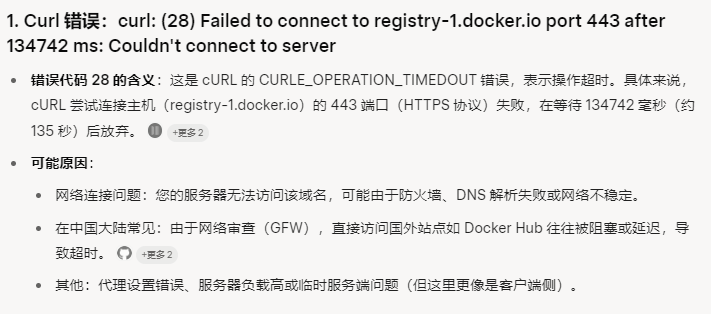
测试docker注册表访问: curl https://registry-1.docker.io/v2/ 失败。
(KG) hyt@user-H3C-UniServer-R4900-G5:~$ curl https://registry-1.docker.io/v2/
curl: (28) Failed to connect to registry-1.docker.io port 443 after 134742 ms: Couldn't connect to server
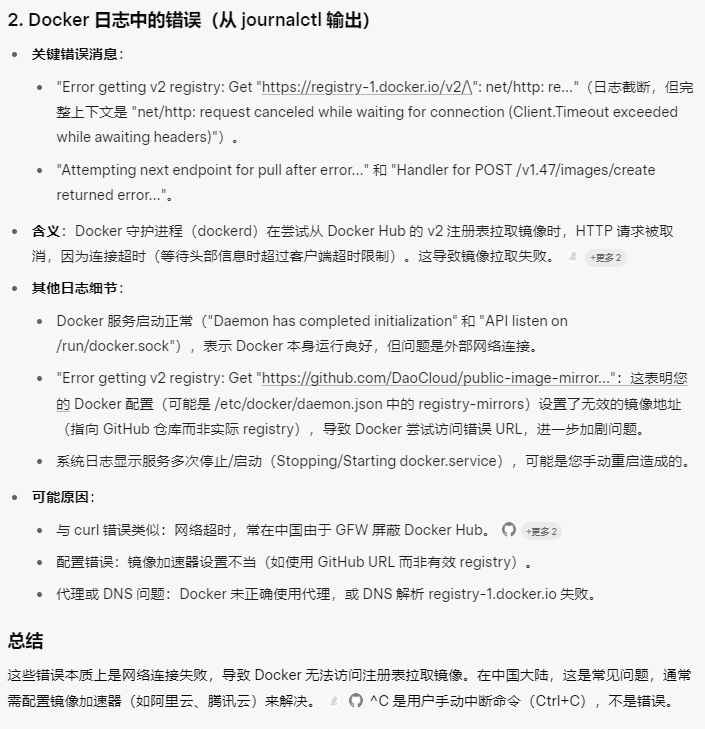
sudo journalctl -u docker -n 50
(KG) hyt@user-H3C-UniServer-R4900-G5:~$ ^C
(KG) hyt@user-H3C-UniServer-R4900-G5:~$ sudo journalctl -u docker -n 50
9月 04 09:22:37 user-H3C-UniServer-R4900-G5 systemd[1]: Starting docker.service - Docker Application Container Engine...
9月 04 09:22:37 user-H3C-UniServer-R4900-G5 dockerd[1165645]: time="2025-09-04T09:22:37.405486080+08:00" level=info msg="Starting up"
9月 04 09:22:37 user-H3C-UniServer-R4900-G5 dockerd[1165645]: time="2025-09-04T09:22:37.405991790+08:00" level=info msg="OTEL tracing is not configured, using no-op tracer provider"
9月 04 09:22:37 user-H3C-UniServer-R4900-G5 dockerd[1165645]: time="2025-09-04T09:22:37.406087543+08:00" level=info msg="detected 127.0.0.53 nameserver, assuming systemd-resolved, so using resolv.conf: /ru>
9月 04 09:22:37 user-H3C-UniServer-R4900-G5 dockerd[1165645]: time="2025-09-04T09:22:37.761847603+08:00" level=info msg="Loading containers: start."
9月 04 09:22:38 user-H3C-UniServer-R4900-G5 dockerd[1165645]: time="2025-09-04T09:22:38.373222324+08:00" level=info msg="Loading containers: done."
9月 04 09:22:38 user-H3C-UniServer-R4900-G5 dockerd[1165645]: time="2025-09-04T09:22:38.406085747+08:00" level=info msg="Docker daemon" commit="27.5.1-0ubuntu3~24.04.2" containerd-snapshotter=false storage>
9月 04 09:22:38 user-H3C-UniServer-R4900-G5 dockerd[1165645]: time="2025-09-04T09:22:38.406254402+08:00" level=info msg="Daemon has completed initialization"
9月 04 09:22:38 user-H3C-UniServer-R4900-G5 dockerd[1165645]: time="2025-09-04T09:22:38.424274943+08:00" level=info msg="API listen on /run/docker.sock"
9月 04 09:22:38 user-H3C-UniServer-R4900-G5 systemd[1]: Started docker.service - Docker Application Container Engine.
9月 04 09:30:37 user-H3C-UniServer-R4900-G5 dockerd[1165645]: time="2025-09-04T09:30:37.237920864+08:00" level=warning msg="Error getting v2 registry: Get \"https://registry-1.docker.io/v2/\": net/http: re>
9月 04 09:30:37 user-H3C-UniServer-R4900-G5 dockerd[1165645]: time="2025-09-04T09:30:37.238001846+08:00" level=info msg="Attempting next endpoint for pull after error: Get \"https://registry-1.docker.io/v2>
9月 04 09:30:37 user-H3C-UniServer-R4900-G5 dockerd[1165645]: time="2025-09-04T09:30:37.244804704+08:00" level=error msg="Handler for POST /v1.47/images/create returned error: Get \"https://registry-1.dock>
9月 04 09:39:45 user-H3C-UniServer-R4900-G5 dockerd[1165645]: time="2025-09-04T09:39:45.635071412+08:00" level=warning msg="Error getting v2 registry: Get \"https://registry-1.docker.io/v2/\": context dead>
9月 04 09:39:45 user-H3C-UniServer-R4900-G5 dockerd[1165645]: time="2025-09-04T09:39:45.635155848+08:00" level=info msg="Attempting next endpoint for pull after error: Get \"https://registry-1.docker.io/v2>
9月 04 09:39:45 user-H3C-UniServer-R4900-G5 dockerd[1165645]: time="2025-09-04T09:39:45.636507292+08:00" level=error msg="Handler for POST /v1.47/images/create returned error: Get \"https://registry-1.dock>
9月 04 10:19:25 user-H3C-UniServer-R4900-G5 systemd[1]: Stopping docker.service - Docker Application Container Engine...
9月 04 10:19:25 user-H3C-UniServer-R4900-G5 dockerd[1165645]: time="2025-09-04T10:19:25.663852184+08:00" level=info msg="Processing signal 'terminated'"
9月 04 10:19:25 user-H3C-UniServer-R4900-G5 dockerd[1165645]: time="2025-09-04T10:19:25.665686760+08:00" level=info msg="stopping event stream following graceful shutdown" error="<nil>" module=libcontainer>
9月 04 10:19:25 user-H3C-UniServer-R4900-G5 dockerd[1165645]: time="2025-09-04T10:19:25.666432045+08:00" level=info msg="Daemon shutdown complete"
9月 04 10:19:25 user-H3C-UniServer-R4900-G5 systemd[1]: docker.service: Deactivated successfully.
9月 04 10:19:25 user-H3C-UniServer-R4900-G5 systemd[1]: Stopped docker.service - Docker Application Container Engine.
9月 04 10:19:25 user-H3C-UniServer-R4900-G5 systemd[1]: docker.service: Consumed 1.116s CPU time, 27.8M memory peak, 0B memory swap peak.
9月 04 10:19:25 user-H3C-UniServer-R4900-G5 systemd[1]: Starting docker.service - Docker Application Container Engine...
9月 04 10:19:25 user-H3C-UniServer-R4900-G5 dockerd[1166423]: time="2025-09-04T10:19:25.746370802+08:00" level=info msg="Starting up"
9月 04 10:19:25 user-H3C-UniServer-R4900-G5 dockerd[1166423]: time="2025-09-04T10:19:25.746806865+08:00" level=info msg="OTEL tracing is not configured, using no-op tracer provider"
9月 04 10:19:25 user-H3C-UniServer-R4900-G5 dockerd[1166423]: time="2025-09-04T10:19:25.746879360+08:00" level=info msg="detected 127.0.0.53 nameserver, assuming systemd-resolved, so using resolv.conf: /ru>
9月 04 10:19:25 user-H3C-UniServer-R4900-G5 dockerd[1166423]: time="2025-09-04T10:19:25.793681173+08:00" level=info msg="[graphdriver] using prior storage driver: overlay2"
9月 04 10:19:25 user-H3C-UniServer-R4900-G5 dockerd[1166423]: time="2025-09-04T10:19:25.794029204+08:00" level=info msg="Loading containers: start."
9月 04 10:19:26 user-H3C-UniServer-R4900-G5 dockerd[1166423]: time="2025-09-04T10:19:26.701759208+08:00" level=info msg="Default bridge (docker0) is assigned with an IP address 172.17.0.0/16. Daemon option>
9月 04 10:19:26 user-H3C-UniServer-R4900-G5 dockerd[1166423]: time="2025-09-04T10:19:26.967167926+08:00" level=info msg="Loading containers: done."
9月 04 10:19:26 user-H3C-UniServer-R4900-G5 dockerd[1166423]: time="2025-09-04T10:19:26.989401652+08:00" level=info msg="Docker daemon" commit="27.5.1-0ubuntu3~24.04.2" containerd-snapshotter=false storage>
9月 04 10:19:26 user-H3C-UniServer-R4900-G5 dockerd[1166423]: time="2025-09-04T10:19:26.989549848+08:00" level=info msg="Daemon has completed initialization"
9月 04 10:19:27 user-H3C-UniServer-R4900-G5 systemd[1]: Started docker.service - Docker Application Container Engine.
9月 04 10:19:27 user-H3C-UniServer-R4900-G5 dockerd[1166423]: time="2025-09-04T10:19:27.010346584+08:00" level=info msg="API listen on /run/docker.sock"
9月 04 10:25:57 user-H3C-UniServer-R4900-G5 dockerd[1166423]: time="2025-09-04T10:25:57.280991110+08:00" level=warning msg="Error getting v2 registry: Get \"https://github.com/DaoCloud/public-image-mirror\>
9月 04 10:25:57 user-H3C-UniServer-R4900-G5 dockerd[1166423]: time="2025-09-04T10:25:57.281074375+08:00" level=info msg="Attempting next endpoint for pull after error: Get \"https://github.com/DaoCloud/pub>
9月 04 10:26:12 user-H3C-UniServer-R4900-G5 dockerd[1166423]: time="2025-09-04T10:26:12.282021787+08:00" level=warning msg="Error getting v2 registry: Get \"https://registry-1.docker.io/v2/\": net/http: re>
9月 04 10:26:12 user-H3C-UniServer-R4900-G5 dockerd[1166423]: time="2025-09-04T10:26:12.282123529+08:00" level=info msg="Attempting next endpoint for pull after error: Get \"https://registry-1.docker.io/v2>
9月 04 10:26:12 user-H3C-UniServer-R4900-G5 dockerd[1166423]: time="2025-09-04T10:26:12.283533137+08:00" level=error msg="Handler for POST /v1.47/images/create returned error: Get \"https://registry-1.dock>
lines 1-40/40 (END)
Grok-4的分析:
所以,登录阿里云账号,整了个镜像加速器: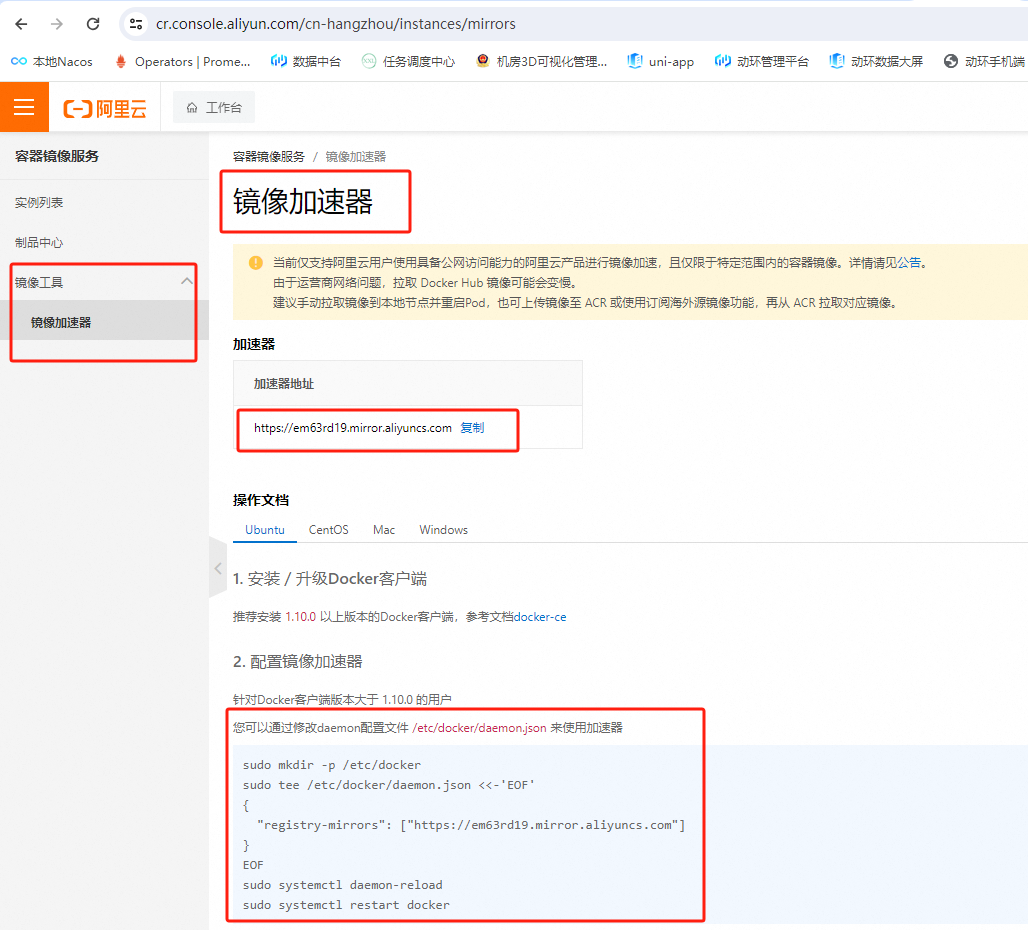
按这个命令行提示输入服务器:
(KG) hyt@user-H3C-UniServer-R4900-G5:~$ sudo mkdir -p /etc/docker
[sudo] hyt 的密码:
(KG) hyt@user-H3C-UniServer-R4900-G5:~$ sudo tee /etc/docker/daemon.json <<-'EOF'
{
  "registry-mirrors": ["https://em63rd19.mirror.aliyuncs.com"]
}
EOF
{
  "registry-mirrors": ["https://em63rd19.mirror.aliyuncs.com"]
}
(KG) hyt@user-H3C-UniServer-R4900-G5:~$ sudo systemctl daemon-reload
sudo systemctl restart docker
(KG) hyt@user-H3C-UniServer-R4900-G5:~$ sudo docker info | grep -A 2 Mirrors
 Registry Mirrors:
  https://em63rd19.mirror.aliyuncs.com/
 Live Restore Enabled: false
创建路径,写入配置文件信息,重新加载文件,重启docker服务。
(KG) hyt@user-H3C-UniServer-R4900-G5:~$ sudo docker info | grep -A 2 Mirrors
 Registry Mirrors:
  https://em63rd19.mirror.aliyuncs.com/
 Live Restore Enabled: false
(KG) hyt@user-H3C-UniServer-R4900-G5:~$ sudo docker info | grep -A 2 Mirrors
 Registry Mirrors:
  https://em63rd19.mirror.aliyuncs.com/
 Live Restore Enabled: false
(KG) hyt@user-H3C-UniServer-R4900-G5:~$ sudo docker pull hello-world
Using default tag: latest
Error response from daemon: Get "https://registry-1.docker.io/v2/": net/http: request canceled while waiting for connection (Client.Timeout exceeded while awaiting headers)
(KG) hyt@user-H3C-UniServer-R4900-G5:~$ sudo docker pull hello-world
Using default tag: latest
Error response from daemon: Get "https://registry-1.docker.io/v2/": net/http: request canceled while waiting for connection (Client.Timeout exceeded while awaiting headers)
是的,尽管阿里云镜像加速器已配置成功(从 docker info 可见),但 sudo docker pull hello-world 仍报“net/http: request canceled while waiting for connection (Client.Timeout exceeded while awaiting headers)”错误。
这表示 Docker 在连接注册表时请求超时,通常是由网络延迟、DNS 问题或镜像源临时不稳定引起,在中国大陆网络环境下特别常见。 Docker Hub 自 2024 年 6 月起在中国被屏蔽,直接访问常导致此类问题,即使使用镜像加速器也可能偶发。
此时,Grok-4说:鉴于 Docker 配置反复出现问题,我推荐放弃 Docker 方式,直接使用 Memgraph 的 Ubuntu DEB 包本地安装。
这不需要拉取镜像,只需下载一个 ~100MB 的包,即可运行 Memgraph。您的系统是 Ubuntu 24.04(从 Docker 版本推断),最新 Memgraph 版本为 v3.5.0(2025 年 8 月发布)。
好吧,我理解,只要让服务器科学上网应该就能解决问题了,但Ubuntu系统的科学上网,我好像还没找到。先按它说的做,先本地安装下:
下载DEB包:
wget https://download.memgraph.com/memgraph/v3.5.0/ubuntu-24.04/memgraph_3.5.0-1_amd64.deb
安装包:
sudo dpkg -i memgraph_3.5.0-1_amd64.deb
如果提示依赖缺失,运行
sudo apt-get install -f
启动 Memgraph 服务
sudo systemctl start memgraph
验证运行
(1)检查状态
sudo systemctl status memgraph
(2)检查端口
netstat -tuln | grep 7687
(3)检查进程
ps aux | grep memgraph
测试连接
import mgclient
conn = mgclient.connect(host="127.0.0.1", port=7687)
print("连接成功!")

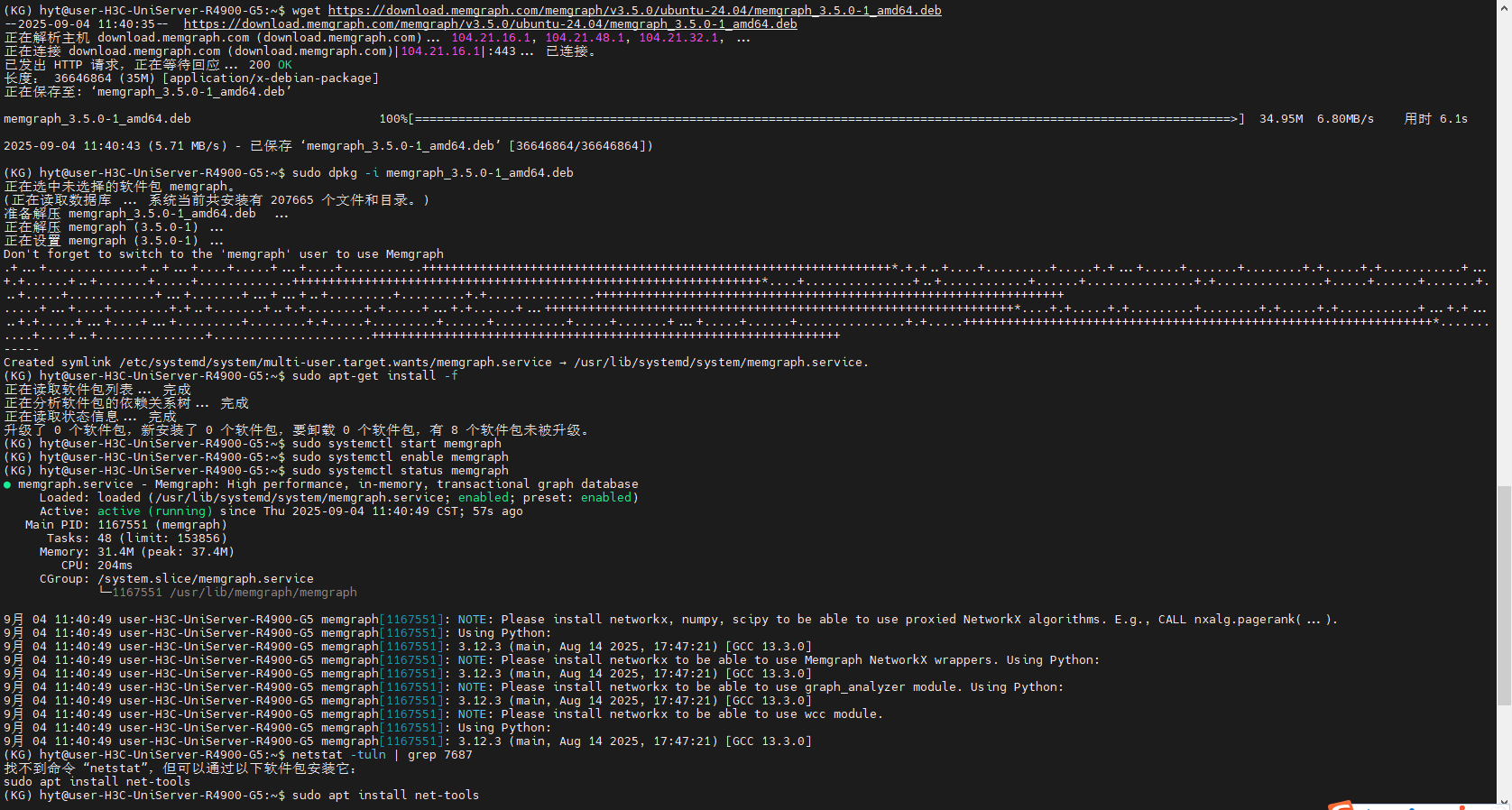
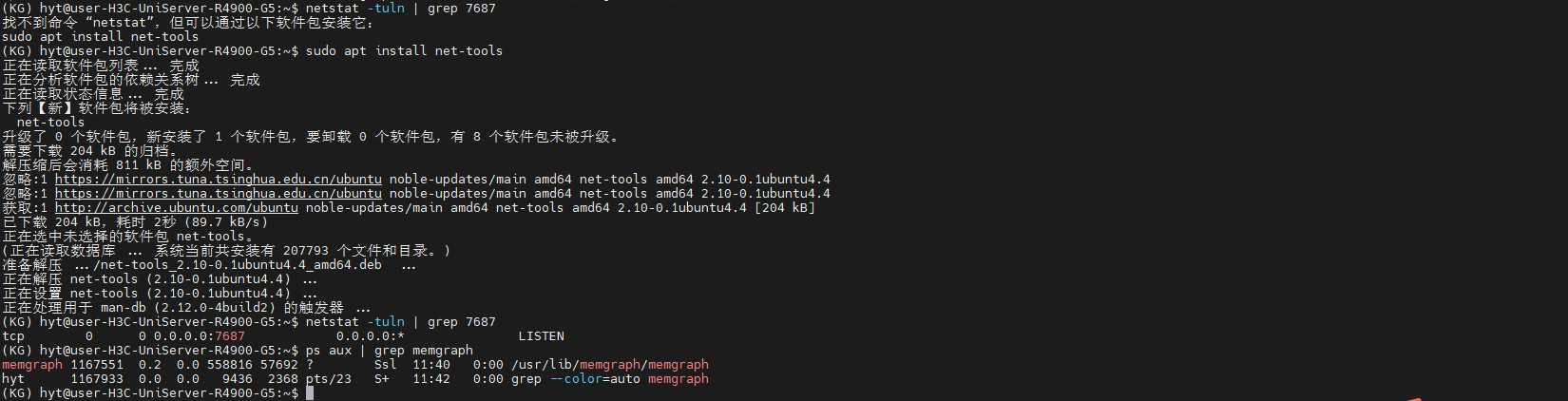
竟然如此简单!Docker真是搞死人又费时间!DEB安装快又顺!

码道开发者社区,聚焦华为云码道 CodeArts 代码智能体,沉淀 Agent、Skill、鸿蒙开发实战内容,供开发者查阅资料、交流技术、分享工程实践
更多推荐



 20
20 0
0- 0


 已为社区贡献2条内容

所有评论(0)