程序员实战:LLaMA2 大模型开源全流程方案(从入门到精通)
作为 Meta 开源的重磅大模型,LLaMA2 凭借 7B/13B/70B 多参数版本、支持商业使用、训练数据量翻倍等优势,成为大模型入门与落地的首选框架。但对程序员而言,从环境搭建、模型加载到功能扩展,全流程实操仍存在诸多技术难点。本文基于 LLaMA2 开源生态,结合完整代码示例,拆解 “环境部署 - 核心功能 - 进阶优化” 全链路方案,助你快速掌握从模型调用到工程化落地的全技能。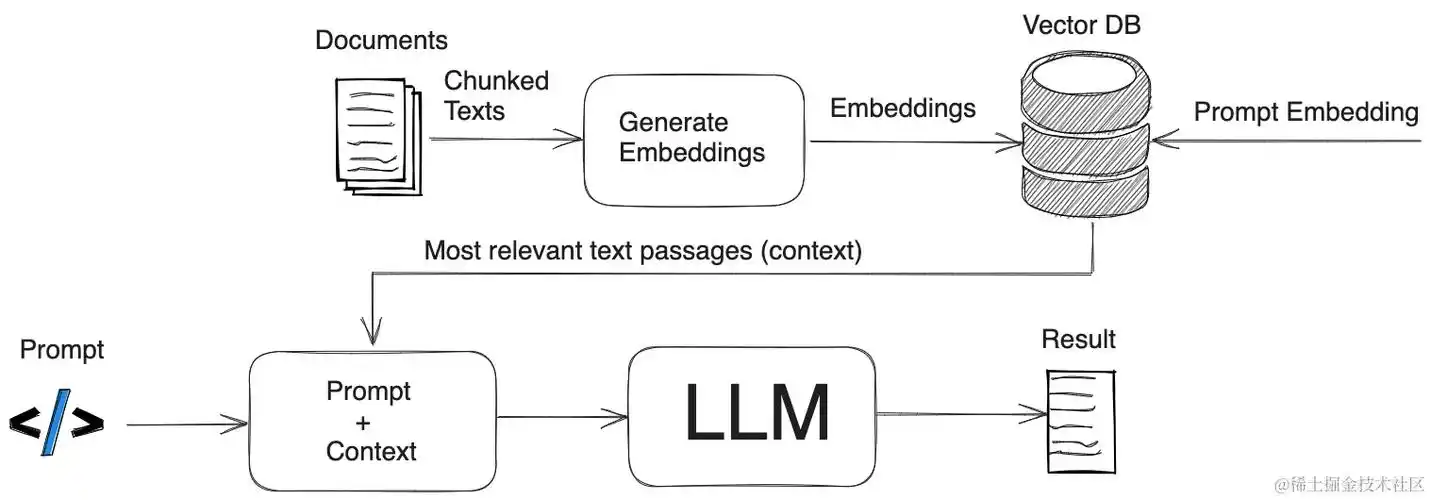
环境搭建与模型部署:零基础快速上手
LLaMA2 的环境搭建需解决 “依赖适配”“权重获取”“高效部署” 三大核心问题。得益于开源社区的支持,目前已形成一套轻量化部署方案,普通程序员通过 Python+PyTorch 即可完成环境配置,无需复杂的底层优化。
1. 基础环境配置
LLaMA2 对运行环境有明确要求:Python 3.8+、PyTorch 2.0+、CUDA 11.7+(GPU 加速),通过 conda 可快速搭建隔离环境:
# 1. 创建并激活conda环境
conda create -n llama2_env python=3.10 -y
conda activate llama2_env
# 2. 安装核心依赖
pip install torch==2.1.0 torchvision==0.16.0 torchaudio==2.1.0 --index-url https://download.pytorch.org/whl/cu118
pip install transformers==4.34.0 sentencepiece==0.1.99 accelerate==0.23.0 datasets==2.14.0
pip install llama-cpp-python==0.2.0 # 轻量化部署依赖(支持CPU/GPU)
2. 模型权重获取与加载
LLaMA2 权重需通过 Meta 官方申请(https://ai.meta.com/resources/models-and-libraries/llama-downloads/),获取授权后可通过 Hugging Face Transformers 库直接加载,或下载权重文件本地部署。
方式 1:Hugging Face 在线加载(推荐入门)
from transformers import AutoTokenizer, AutoModelForCausalLM
def load_llama2_online(model_size="7b"):
"""
在线加载LLaMA2模型(需提前申请Meta授权并登录Hugging Face)
model_size: 模型参数规模(7b/13b/70b,70B需GPU显存≥40GB)
"""
# 模型名称(Hugging Face官方映射)
model_name = f"meta-llama/Llama-2-{model_size}-chat-hf"
# 登录Hugging Face(需输入申请的token)
from huggingface_hub import login
login(token="你的Hugging Face Token")
# 加载Tokenizer与模型
tokenizer = AutoTokenizer.from_pretrained(model_name)
model = AutoModelForCausalLM.from_pretrained(
model_name,
torch_dtype="auto", # 自动匹配数据类型(GPU用float16,CPU用float32)
device_map="auto", # 自动分配设备(优先GPU)
load_in_8bit=True # 8bit量化(减少显存占用,7B模型从13GB降至7GB)
)
# 测试模型生成
prompt = "用Python写一个快速排序函数,并添加详细注释"
inputs = tokenizer(prompt, return_tensors="pt").to(model.device)
outputs = model.generate(
**inputs,
max_new_tokens=300, # 最大生成token数
temperature=0.7, # 随机性(0-1,值越小越确定)
top_p=0.9 # 采样阈值
)
response = tokenizer.decode(outputs[0], skip_special_tokens=True)
print("模型生成结果:\n", response)
return tokenizer, model
# 加载7B聊天模型(适合入门测试)
tokenizer, model = load_llama2_online(model_size="7b")
方式 2:本地权重部署(适合无网络环境)
def load_llama2_local(weight_path, model_size="7b"):
"""
本地加载LLaMA2权重(需提前下载权重文件)
weight_path: 本地权重文件夹路径
"""
from transformers import LlamaTokenizer, LlamaForCausalLM
tokenizer = LlamaTokenizer.from_pretrained(weight_path)
model = LlamaForCausalLM.from_pretrained(
weight_path,
torch_dtype=torch.float16,
device_map="auto",
load_in_4bit=True, # 4bit量化(7B模型显存降至4GB,支持消费级GPU)
bnb_4bit_use_double_quant=True # 双量化优化(精度损失小)
)
# 测试对话功能
chat_prompt = [
{"role": "user", "content": "解释什么是大模型的量化,有哪些常用方法?"}
]
# 格式化对话prompt(LLaMA2有固定格式要求)
formatted_prompt = tokenizer.apply_chat_template(
chat_prompt,
add_generation_prompt=True,
return_tensors="pt"
).to(model.device)
outputs = model.generate(
formatted_prompt,
max_new_tokens=512,
temperature=0.6,
do_sample=True
)
response = tokenizer.decode(outputs[0], skip_special_tokens=True)
print("对话生成结果:\n", response)
return tokenizer, model
# 加载本地7B模型(权重路径需替换为实际路径)
# tokenizer, model = load_llama2_local(weight_path="./llama-2-7b-chat")
3. 轻量化部署(CPU / 边缘设备适配)
若无高性能 GPU,可通过llama-cpp-python实现 CPU 部署,7B 模型在 i7-12700H 处理器上可达到 5-10 tokens / 秒的生成速度:
# 安装支持CPU的llama-cpp-python(需提前安装CMake)
CMAKE_ARGS="-DLLAMA_CPU_ONLY=on" pip install llama-cpp-python
from llama_cpp import Llama
def load_llama2_cpu(weight_path="./llama-2-7b-chat.ggmlv3.q4_0.bin"):
"""
CPU部署LLaMA2(使用ggml量化权重,需提前转换格式)
weight_path: ggml格式权重文件路径(可从社区下载)
"""
# 初始化模型(CPU模式)
llm = Llama(
model_path=weight_path,
n_ctx=2048, # 上下文长度
n_threads=8, # 推理线程数(建议设为CPU核心数)
n_gpu_layers=0 # 0表示纯CPU模式
)
# 生成文本
output = llm(
"写一段关于Python列表推导式的使用教程,包含3个示例",
max_tokens=500,
temperature=0.7,
stop=["\n\n"], # 停止符
echo=False # 不重复输出prompt
)
print("CPU模式生成结果:\n", output["choices"][0]["text"])
return llm
# 加载CPU量化模型(ggml格式,4bit量化)
# llm = load_llama2_cpu()
核心功能实战:从文本生成到工具调用
LLaMA2 的核心价值在于其强大的文本生成与对话能力,通过扩展还可实现 “函数调用”“多轮对话管理” 等实用功能,满足实际开发需求。
1. 多轮对话与上下文管理
LLaMA2-Chat 系列模型原生支持对话格式,需严格按照其模板构建 prompt,确保上下文连贯性:
def llama2_chat_manager(tokenizer, model, max_history=5):
"""
LLaMA2多轮对话管理器(支持上下文记忆)
max_history: 最大记忆轮次(避免上下文过长)
"""
chat_history = [] # 存储对话历史
print("LLaMA2对话开始(输入'退出'结束):")
while True:
user_input = input("用户:")
if user_input == "退出":
print("对话结束")
break
# 添加用户输入到历史
chat_history.append({"role": "user", "content": user_input})
# 截取最近max_history轮对话
chat_history = chat_history[-max_history:]
# 格式化对话prompt
formatted_prompt = tokenizer.apply_chat_template(
chat_history,
add_generation_prompt=True,
return_tensors="pt"
).to(model.device)
# 生成回复
with torch.no_grad(): # 禁用梯度计算,节省内存
outputs = model.generate(
formatted_prompt,
max_new_tokens=512,
temperature=0.6,
top_p=0.9,
repetition_penalty=1.1 # 抑制重复生成
)
# 解析回复(去除prompt部分)
response = tokenizer.decode(
outputs[0][formatted_prompt.shape[-1]:],
skip_special_tokens=True
)
print(f"LLaMA2:{response}")
# 添加模型回复到历史
chat_history.append({"role": "assistant", "content": response})
# 启动多轮对话
# llama2_chat_manager(tokenizer, model)
2. 函数调用与工具集成
通过 Prompt Engineering 与输出解析,可让 LLaMA2 具备调用外部工具的能力(如数据库查询、API 调用),扩展模型应用边界:
def llama2_function_call(tokenizer, model):
"""
LLaMA2函数调用示例(实现天气查询工具调用)
"""
# 定义可调用函数描述
function_desc = """
你可以调用以下工具解决用户问题:
1. 函数名:get_weather
功能:查询指定城市的实时天气
参数:city(字符串,城市名称,如"北京")
返回值:字典,包含temperature(温度)、weather(天气状况)、wind(风力)
当用户问题涉及天气查询时,必须调用该函数,输出格式为:
<function_call>{"name":"get_weather","parameters":{"city":"城市名"}}<function_call>
无需额外说明,直接输出函数调用格式即可。
"""
# 用户问题
user_query = "查询上海今天的天气,告诉我温度和风力"
# 构建带函数描述的prompt
prompt = f"""
{function_desc}
用户问题:{user_query}
你的回答:
"""
# 生成函数调用指令
inputs = tokenizer(prompt, return_tensors="pt").to(model.device)
outputs = model.generate(
**inputs,
max_new_tokens=100,
temperature=0.1, # 降低随机性,确保输出格式正确
do_sample=False
)
function_call = tokenizer.decode(outputs[0], skip_special_tokens=True)
print("模型输出的函数调用指令:\n", function_call)
# 解析函数调用(提取城市参数)
import re
pattern = r'<function_call>(.*?)</function_call>'
match = re.search(pattern, function_call)
if match:
import json
func_json = json.loads(match.group(1))
city = func_json["parameters"]["city"]
print(f"提取到查询城市:{city}")
# 模拟调用天气API
def get_weather(city):
# 实际场景替换为真实API调用
weather_data = {
"北京": {"temperature": "25℃", "weather": "晴", "wind": "3级西北风"},
"上海": {"temperature": "28℃", "weather": "多云", "wind": "2级东南风"}
}
return weather_data.get(city, {"temperature": "未知", "weather": "未知", "wind": "未知"})
# 执行函数并获取结果
weather_result = get_weather(city)
print(f"{city}实时天气:{weather_result}")
# 让模型基于结果生成自然语言回复
final_prompt = f"""
用户问题:{user_query}
天气查询结果:{weather_result}
请基于查询结果,用自然语言回答用户问题,保持简洁明了。
"""
final_inputs = tokenizer(final_prompt, return_tensors="pt").to(model.device)
final_outputs = model.generate(** final_inputs, max_new_tokens=200)
final_response = tokenizer.decode(final_outputs[0], skip_special_tokens=True)
print("最终回复:\n", final_response)
# 测试函数调用功能
# llama2_function_call(tokenizer, model)
3. 文本生成优化(控制输出格式)
在代码生成、报告撰写等场景中,常需控制 LLaMA2 的输出格式(如 JSON、Markdown),通过 Prompt 约束可实现精准格式控制:
def controlled_text_generation(tokenizer, model):
"""
控制LLaMA2输出格式(生成JSON格式的技术文档目录)
"""
prompt = """
请为"Python大模型开发实战"一书生成目录,要求:
1. 包含5-8个章节,每个章节有3-4个小节
2. 输出格式为JSON,结构如下:
{
"book_title": "Python大模型开发实战",
"chapters": [
{
"chapter_title": "章节1标题",
"sections": ["小节1.1标题", "小节1.2标题", ...]
},
...
]
}
3. 目录需覆盖大模型环境搭建、模型加载、功能开发、工程化部署等内容
无需额外说明,直接输出JSON即可,确保JSON格式正确可解析。
"""
inputs = tokenizer(prompt, return_tensors="pt").to(model.device)
outputs = model.generate(
**inputs,
max_new_tokens=1000,
temperature=0.5,
top_p=0.8,
repetition_penalty=1.2
)
json_output = tokenizer.decode(outputs[0], skip_special_tokens=True)
print("格式化目录输出:\n", json_output)
# 验证JSON格式
try:
import json
book_json = json.loads(json_output)
print(f"\n解析成功!共包含{len(book_json['chapters'])}个章节")
for i, chapter in enumerate(book_json['chapters'], 1):
print(f"第{i}章:{chapter['chapter_title']}({len(chapter['sections'])}个小节)")
except json.JSONDecodeError as e:
print(f"JSON格式错误:{e}")
# 测试格式化输出
# controlled_text_generation(tokenizer, model)
进阶应用与性能优化:从实验到生产
LLaMA2 从实验环境走向生产部署,需解决 “性能优化”“微调适配”“服务化部署” 三大核心问题,通过量化、微调、API 封装等手段,实现高效稳定的工程化落地。
1. 模型量化与性能优化
量化是平衡 LLaMA2 性能与资源占用的关键技术,目前主流有 4bit/8bit 量化方案,可在损失少量精度的前提下,大幅降低显存占用与推理延迟:
def llama2_quantization_optimization():
"""
LLaMA2量化优化对比(4bit vs 8bit vs 全精度)
"""
from transformers import AutoTokenizer, AutoModelForCausalLM, BitsAndBytesConfig
import time
model_name = "meta-llama/Llama-2-7b-chat-hf"
tokenizer = AutoTokenizer.from_pretrained(model_name)
prompt = "详细解释Transformer模型的注意力机制,包括自注意力与交叉注意力"
# 1. 全精度(float32)- 基准测试
print("=== 全精度(float32)测试 ===")
start_time = time.time()
model_fp32 = AutoModelForCausalLM.from_pretrained(
model_name,
torch_dtype=torch.float32,
device_map="auto"
)
inputs = tokenizer(prompt, return_tensors="pt").to(model_fp32.device)
outputs_fp32 = model_fp32.generate(** inputs, max_new_tokens=500)
gen_time_fp32 = time.time() - start_time
gen_tokens =</doubaocanvas>

码道开发者社区,聚焦华为云码道 CodeArts 代码智能体,沉淀 Agent、Skill、鸿蒙开发实战内容,供开发者查阅资料、交流技术、分享工程实践
更多推荐



 21
21 0
0- 0


 已为社区贡献9条内容

所有评论(0)