第10节:容器化部署基础
·
📚 课程目标
通过本课程的学习,学员将能够:
- 深入理解Docker容器化技术的原理
- 掌握Docker Compose容器编排技术
- 学会镜像优化策略和最佳实践
- 具备在生产环境中部署容器化应用的能力
🎯 课程大纲
- Docker容器技术原理
- Docker基础操作
- Docker Compose容器编排
- 镜像优化策略
- 容器网络与存储
- 生产环境部署实践
📖 课程内容
1. Docker容器技术原理
1.1 容器化技术概述
容器化技术是一种操作系统级虚拟化技术,通过容器隔离技术实现应用程序的打包、分发和运行。
容器 vs 虚拟机
| 对比维度 | 容器 | 虚拟机 |
|---|---|---|
| 资源占用 | 轻量级 | 重量级 |
| 启动时间 | 秒级 | 分钟级 |
| 隔离级别 | 进程级 | 系统级 |
| 性能开销 | 低 | 高 |
| 资源利用率 | 高 | 低 |
| 移植性 | 好 | 一般 |

1.2 Docker核心实现
Docker容器管理器
import docker
import asyncio
import json
from typing import List, Dict, Any
import logging

class DockerManager:
    """Docker容器管理器"""
    def __init__(self):
        self.client = docker.from_env()
        self.logger = logging.getLogger(__name__)

    async def create_container(self,
                             image: str,
                             name: str,
                             ports: Dict[str, str] = None,
                             environment: Dict[str, str] = None,
                             volumes: Dict[str, str] = None) -> str:
        """创建容器"""
        try:
            container_config = {
                'image': image,
                'name': name,
                'detach': True,
                'restart_policy': {'Name': 'unless-stopped'}
            }

            if ports:
                container_config['ports'] = ports

            if environment:
                container_config['environment'] = environment

            if volumes:
                container_config['volumes'] = volumes

            container = self.client.containers.run(**container_config)
            self.logger.info(f"容器 {name} 创建成功,ID: {container.id}")
            return container.id

        except Exception as e:
            self.logger.error(f"容器创建失败: {e}")
            raise

    async def start_container(self, container_id: str) -> bool:
        """启动容器"""
        try:
            container = self.client.containers.get(container_id)
            container.start()
            self.logger.info(f"容器 {container_id} 启动成功")
            return True
        except Exception as e:
            self.logger.error(f"容器启动失败: {e}")
            return False

    async def stop_container(self, container_id: str) -> bool:
        """停止容器"""
        try:
            container = self.client.containers.get(container_id)
            container.stop()
            self.logger.info(f"容器 {container_id} 停止成功")
            return True
        except Exception as e:
            self.logger.error(f"容器停止失败: {e}")
            return False

    async def get_container_logs(self, container_id: str, tail: int = 100) -> str:
        """获取容器日志"""
        try:
            container = self.client.containers.get(container_id)
            logs = container.logs(tail=tail).decode('utf-8')
            return logs
        except Exception as e:
            self.logger.error(f"获取日志失败: {e}")
            return ""

    async def list_containers(self, all_containers: bool = False) -> List[Dict]:
        """列出容器"""
        try:
            containers = self.client.containers.list(all=all_containers)
            container_list = []

            for container in containers:
                container_info = {
                    'id': container.short_id,
                    'name': container.name,
                    'image': container.image.tags[0] if container.image.tags else 'unknown',
                    'status': container.status,
                    'created': container.attrs['Created'],
                    'ports': container.ports
                }
                container_list.append(container_info)

            return container_list
        except Exception as e:
            self.logger.error(f"列出容器失败: {e}")
            return []

    async def build_image(self,
                         dockerfile_path: str,
                         tag: str,
                         context: str = ".") -> bool:
        """构建镜像"""
        try:
            self.logger.info(f"开始构建镜像: {tag}")

            image, build_log = self.client.images.build(
                path=context,
                tag=tag,
                dockerfile=dockerfile_path,
                rm=True,
                forcerm=True
            )

            self.logger.info(f"镜像构建成功: {image.id}")
            return True

        except Exception as e:
            self.logger.error(f"镜像构建失败: {e}")
            return False

class DockerComposeManager:
    """Docker Compose管理器"""
    def __init__(self, compose_file: str = "docker-compose.yml"):
        self.compose_file = compose_file
        self.client = docker.from_env()
        self.logger = logging.getLogger(__name__)

    async def up_services(self, services: List[str] = None) -> bool:
        """启动服务"""
        try:
            cmd = ["docker-compose", "-f", self.compose_file, "up", "-d"]
            if services:
                cmd.extend(services)

            result = await asyncio.create_subprocess_exec(
                *cmd,
                stdout=asyncio.subprocess.PIPE,
                stderr=asyncio.subprocess.PIPE
            )

            stdout, stderr = await result.communicate()

            if result.returncode == 0:
                self.logger.info("服务启动成功")
                return True
            else:
                self.logger.error(f"服务启动失败: {stderr.decode()}")
                return False

        except Exception as e:
            self.logger.error(f"启动服务异常: {e}")
            return False

    async def down_services(self) -> bool:
        """停止服务"""
        try:
            cmd = ["docker-compose", "-f", self.compose_file, "down"]

            result = await asyncio.create_subprocess_exec(
                *cmd,
                stdout=asyncio.subprocess.PIPE,
                stderr=asyncio.subprocess.PIPE
            )

            stdout, stderr = await result.communicate()

            if result.returncode == 0:
                self.logger.info("服务停止成功")
                return True
            else:
                self.logger.error(f"服务停止失败: {stderr.decode()}")
                return False

        except Exception as e:
            self.logger.error(f"停止服务异常: {e}")
            return False

    async def get_service_status(self) -> Dict[str, Any]:
        """获取服务状态"""
        try:
            cmd = ["docker-compose", "-f", self.compose_file, "ps", "--format", "json"]

            result = await asyncio.create_subprocess_exec(
                *cmd,
                stdout=asyncio.subprocess.PIPE,
                stderr=asyncio.subprocess.PIPE
            )

            stdout, stderr = await result.communicate()

            if result.returncode == 0:
                services = []
                for line in stdout.decode().strip().split('\n'):
                    if line:
                        services.append(json.loads(line))
                return {'services': services}
            else:
                return {'error': stderr.decode()}

        except Exception as e:
            return {'error': str(e)}

# 使用示例
async def main():
    # Docker管理器示例
    docker_manager = DockerManager()

    # 创建容器
    container_id = await docker_manager.create_container(
        image="nginx:latest",
        name="web-server",
        ports={"80/tcp": "8080"},
        environment={"ENV": "production"}
    )

    # 启动容器
    await docker_manager.start_container(container_id)

    # 获取容器列表
    containers = await docker_manager.list_containers()
    for container in containers:
        print(f"容器: {container['name']}, 状态: {container['status']}")

    # Docker Compose示例
    compose_manager = DockerComposeManager("docker-compose.yml")

    # 启动所有服务
    await compose_manager.up_services()

    # 获取服务状态
    status = await compose_manager.get_service_status()
    print(f"服务状态: {status}")

if __name__ == "__main__":
    asyncio.run(main())
容器编排架构

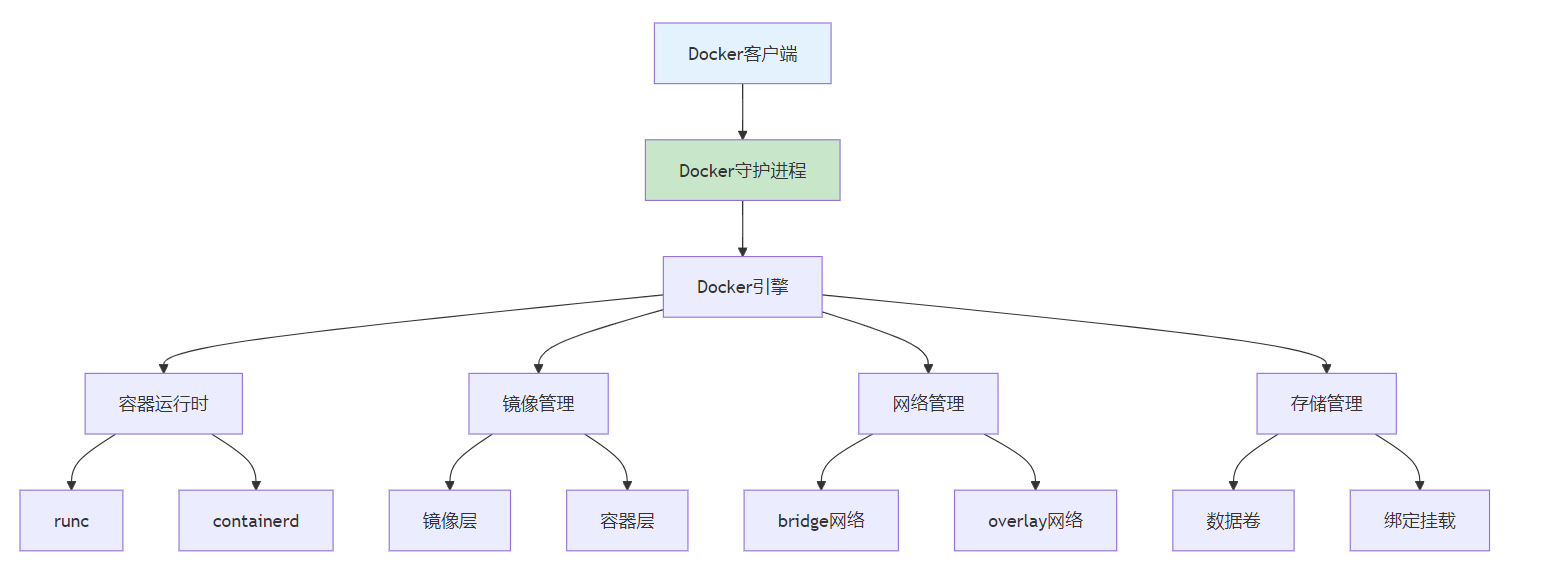
1.2 Docker架构原理
Docker采用客户端-服务器架构,主要组件包括:
1.3 容器核心技术
命名空间(Namespaces)
- PID命名空间:进程隔离
- 网络命名空间:网络隔离
- 挂载命名空间:文件系统隔离
- 用户命名空间:用户权限隔离
控制组(Cgroups)
- CPU控制:CPU使用限制
- 内存控制:内存使用限制
- I/O控制:磁盘I/O限制
- 网络控制:网络带宽限制
联合文件系统(UnionFS)
- 分层存储:镜像分层结构
- 写时复制:高效存储利用
- 增量更新:快速镜像构建
2. Docker基础操作
2.1 镜像操作
镜像拉取
# 拉取官方镜像
docker pull nginx:latest

# 拉取指定版本
docker pull python:3.9-slim

# 查看本地镜像
docker images
核心代码实现
import docker
import os
import json
from typing import List, Dict, Any

class DockerImageManager:
    """Docker镜像管理器"""
    def __init__(self):
        self.client = docker.from_env()

    def pull_image(self, image_name: str, tag: str = "latest") -> bool:
        """拉取镜像"""
        try:
            full_name = f"{image_name}:{tag}"
            print(f"正在拉取镜像: {full_name}")

            image = self.client.images.pull(full_name)
            print(f"镜像拉取成功: {image.id}")
            return True
        except Exception as e:
            print(f"镜像拉取失败: {e}")
            return False

    def list_images(self) -> List[Dict[str, Any]]:
        """列出本地镜像"""
        images = self.client.images.list()
        image_list = []

        for image in images:
            image_info = {
                'id': image.short_id,
                'tags': image.tags,
                'created': image.attrs['Created'],
                'size': image.attrs['Size'],
                'labels': image.labels
            }
            image_list.append(image_info)

        return image_list

    def build_image(self, dockerfile_path: str, tag: str, context: str = ".") -> bool:
        """构建镜像"""
        try:
            print(f"正在构建镜像: {tag}")

            image, build_log = self.client.images.build(
                path=context,
                tag=tag,
                dockerfile=dockerfile_path,
                rm=True
            )

            print(f"镜像构建成功: {image.id}")
            return True
        except Exception as e:
            print(f"镜像构建失败: {e}")
            return False

    def remove_image(self, image_id: str, force: bool = False) -> bool:
        """删除镜像"""
        try:
            self.client.images.remove(image_id, force=force)
            print(f"镜像删除成功: {image_id}")
            return True
        except Exception as e:
            print(f"镜像删除失败: {e}")
            return False

    def inspect_image(self, image_id: str) -> Dict[str, Any]:
        """检查镜像详情"""
        try:
            image = self.client.images.get(image_id)
            return image.attrs
        except Exception as e:
            print(f"镜像检查失败: {e}")
            return {}

class DockerfileGenerator:
    """Dockerfile生成器"""
    def __init__(self):
        self.templates = {
            'python': self._python_template,
            'node': self._node_template,
            'java': self._java_template,
            'nginx': self._nginx_template
        }

    def generate_dockerfile(self, app_type: str, config: Dict[str, Any]) -> str:
        """生成Dockerfile"""
        if app_type not in self.templates:
            raise ValueError(f"不支持的应用类型: {app_type}")

        return self.templates[app_type](config)

    def _python_template(self, config: Dict[str, Any]) -> str:
        """Python应用Dockerfile模板"""
        base_image = config.get('base_image', 'python:3.9-slim')
        workdir = config.get('workdir', '/app')
        requirements_file = config.get('requirements_file', 'requirements.txt')
        app_file = config.get('app_file', 'app.py')
        port = config.get('port', 8000)

        dockerfile = f"""FROM {base_image}

# 设置工作目录
WORKDIR {workdir}

# 安装系统依赖
RUN apt-get update && apt-get install -y \\
    gcc \\
    && rm -rf /var/lib/apt/lists/*

# 复制依赖文件
COPY {requirements_file} .

# 安装Python依赖
RUN pip install --no-cache-dir -r {requirements_file}

# 复制应用代码
COPY . .

# 创建非root用户
RUN useradd --create-home --shell /bin/bash app \\
    && chown -R app:app {workdir}
USER app

# 暴露端口
EXPOSE {port}

# 健康检查
HEALTHCHECK --interval=30s --timeout=3s --start-period=5s --retries=3 \\
    CMD curl -f http://localhost:{port}/health || exit 1

# 启动命令
CMD ["python", "{app_file}"]
"""
        return dockerfile

    def _node_template(self, config: Dict[str, Any]) -> str:
        """Node.js应用Dockerfile模板"""
        base_image = config.get('base_image', 'node:16-alpine')
        workdir = config.get('workdir', '/app')
        package_file = config.get('package_file', 'package.json')
        start_script = config.get('start_script', 'npm start')
        port = config.get('port', 3000)

        dockerfile = f"""FROM {base_image}

# 设置工作目录
WORKDIR {workdir}

# 复制package文件
COPY {package_file} .

# 安装依赖
RUN npm install --only=production

# 复制应用代码
COPY . .

# 创建非root用户
RUN addgroup -g 1001 -S nodejs \\
    && adduser -S nextjs -u 1001
USER nextjs

# 暴露端口
EXPOSE {port}

# 健康检查
HEALTHCHECK --interval=30s --timeout=3s --start-period=5s --retries=3 \\
    CMD curl -f http://localhost:{port}/health || exit 1

# 启动命令
CMD ["{start_script}"]
"""
        return dockerfile

    def _java_template(self, config: Dict[str, Any]) -> str:
        """Java应用Dockerfile模板"""
        base_image = config.get('base_image', 'openjdk:11-jre-slim')
        workdir = config.get('workdir', '/app')
        jar_file = config.get('jar_file', 'app.jar')
        port = config.get('port', 8080)

        dockerfile = f"""FROM {base_image}

# 设置工作目录
WORKDIR {workdir}

# 复制jar文件
COPY {jar_file} .

# 创建非root用户
RUN useradd --create-home --shell /bin/bash app \\
    && chown -R app:app {workdir}
USER app

# 暴露端口
EXPOSE {port}

# 健康检查
HEALTHCHECK --interval=30s --timeout=3s --start-period=5s --retries=3 \\
    CMD curl -f http://localhost:{port}/actuator/health || exit 1

# 启动命令
CMD ["java", "-jar", "{jar_file}"]
"""
        return dockerfile

    def _nginx_template(self, config: Dict[str, Any]) -> str:
        """Nginx Dockerfile模板"""
        base_image = config.get('base_image', 'nginx:alpine')
        config_file = config.get('config_file', 'nginx.conf')
        static_dir = config.get('static_dir', '/usr/share/nginx/html')

        dockerfile = f"""FROM {base_image}

# 复制nginx配置
COPY {config_file} /etc/nginx/nginx.conf

# 复制静态文件
COPY . {static_dir}

# 暴露端口
EXPOSE 80

# 健康检查
HEALTHCHECK --interval=30s --timeout=3s --start-period=5s --retries=3 \\
    CMD curl -f http://localhost/ || exit 1

# 启动命令
CMD ["nginx", "-g", "daemon off;"]
"""
        return dockerfile

class MultiStageBuilder:
    """多阶段构建器"""
    def __init__(self):
        self.generator = DockerfileGenerator()

    def build_multi_stage_dockerfile(self, config: Dict[str, Any]) -> str:
        """构建多阶段Dockerfile"""
        app_type = config.get('app_type', 'python')
        stages = config.get('stages', ['build', 'runtime'])

        if app_type == 'python':
            return self._python_multi_stage(config)
        elif app_type == 'node':
            return self._node_multi_stage(config)
        else:
            return self.generator.generate_dockerfile(app_type, config)

    def _python_multi_stage(self, config: Dict[str, Any]) -> str:
        """Python多阶段构建"""
        build_image = config.get('build_image', 'python:3.9')
        runtime_image = config.get('runtime_image', 'python:3.9-slim')
        workdir = config.get('workdir', '/app')
        requirements_file = config.get('requirements_file', 'requirements.txt')
        app_file = config.get('app_file', 'app.py')
        port = config.get('port', 8000)

        dockerfile = f"""# 构建阶段
FROM {build_image} AS builder

WORKDIR {workdir}

# 复制依赖文件
COPY {requirements_file} .

# 安装依赖到虚拟环境
RUN python -m venv /opt/venv
ENV PATH="/opt/venv/bin:$PATH"
RUN pip install --no-cache-dir -r {requirements_file}

# 运行阶段
FROM {runtime_image}

# 安装运行时依赖
RUN apt-get update && apt-get install -y \\
    curl \\
    && rm -rf /var/lib/apt/lists/*

# 从构建阶段复制虚拟环境
COPY --from=builder /opt/venv /opt/venv
ENV PATH="/opt/venv/bin:$PATH"

# 设置工作目录
WORKDIR {workdir}

# 复制应用代码
COPY . .

# 创建非root用户
RUN useradd --create-home --shell /bin/bash app \\
    && chown -R app:app {workdir}
USER app

# 暴露端口
EXPOSE {port}

# 健康检查
HEALTHCHECK --interval=30s --timeout=3s --start-period=5s --retries=3 \\
    CMD curl -f http://localhost:{port}/health || exit 1

# 启动命令
CMD ["python", "{app_file}"]
"""
        return dockerfile

    def _node_multi_stage(self, config: Dict[str, Any]) -> str:
        """Node.js多阶段构建"""
        build_image = config.get('build_image', 'node:16')
        runtime_image = config.get('runtime_image', 'node:16-alpine')
        workdir = config.get('workdir', '/app')
        package_file = config.get('package_file', 'package.json')
        port = config.get('port', 3000)

        dockerfile = f"""# 构建阶段
FROM {build_image} AS builder

WORKDIR {workdir}

# 复制package文件
COPY {package_file} .

# 安装所有依赖(包括devDependencies)
RUN npm install

# 复制源代码
COPY . .

# 构建应用
RUN npm run build

# 运行阶段
FROM {runtime_image}

# 安装运行时依赖
RUN apk add --no-cache curl

# 设置工作目录
WORKDIR {workdir}

# 复制package文件
COPY {package_file} .

# 只安装生产依赖
RUN npm install --only=production && npm cache clean --force

# 从构建阶段复制构建结果
COPY --from=builder {workdir}/dist ./dist
COPY --from=builder {workdir}/public ./public

# 创建非root用户
RUN addgroup -g 1001 -S nodejs \\
    && adduser -S nextjs -u 1001
USER nextjs

# 暴露端口
EXPOSE {port}

# 健康检查
HEALTHCHECK --interval=30s --timeout=3s --start-period=5s --retries=3 \\
    CMD curl -f http://localhost:{port}/health || exit 1

# 启动命令
CMD ["npm", "start"]
"""
        return dockerfile

# 使用示例
image_manager = DockerImageManager()

# 拉取镜像
image_manager.pull_image('nginx', 'latest')

# 列出镜像
images = image_manager.list_images()
for img in images:
    print(f"镜像ID: {img['id']}, 标签: {img['tags']}")

# 生成Dockerfile
generator = DockerfileGenerator()
python_config = {
    'base_image': 'python:3.9-slim',
    'workdir': '/app',
    'requirements_file': 'requirements.txt',
    'app_file': 'main.py',
    'port': 8000
}

dockerfile_content = generator.generate_dockerfile('python', python_config)
print("生成的Dockerfile:")
print(dockerfile_content)

# 多阶段构建
multi_builder = MultiStageBuilder()
multi_config = {
    'app_type': 'python',
    'build_image': 'python:3.9',
    'runtime_image': 'python:3.9-slim',
    'workdir': '/app',
    'requirements_file': 'requirements.txt',
    'app_file': 'main.py',
    'port': 8000
}

multi_dockerfile = multi_builder.build_multi_stage_dockerfile(multi_config)
print("多阶段Dockerfile:")
print(multi_dockerfile)
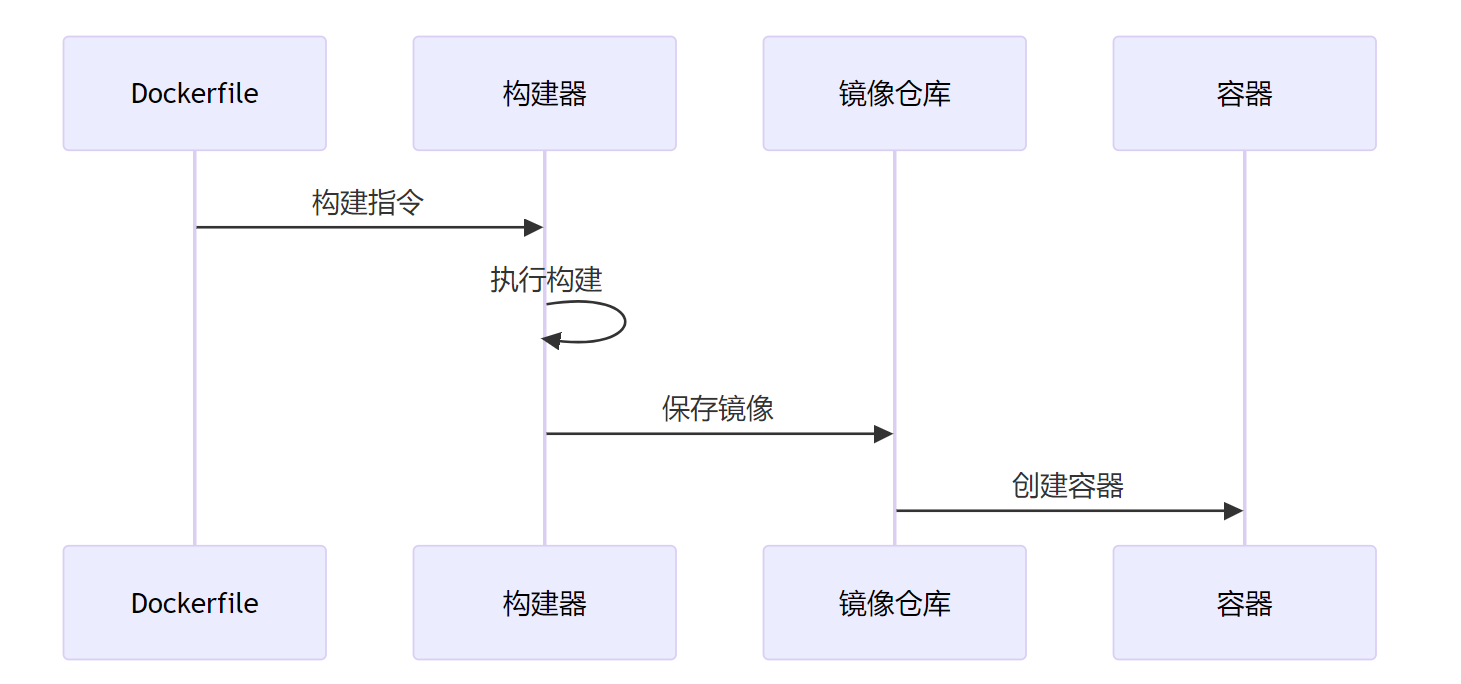
镜像构建
# Dockerfile示例
FROM python:3.9-slim

WORKDIR /app

COPY requirements.txt .
RUN pip install -r requirements.txt

COPY . .

EXPOSE 8000

CMD ["python", "app.py"]
2.2 容器操作
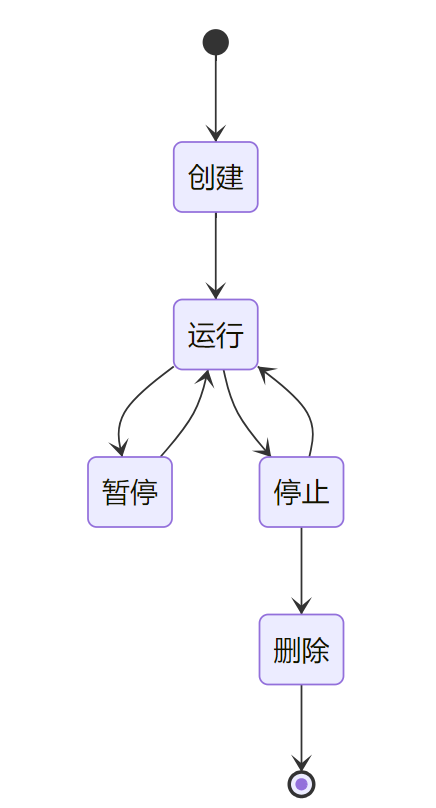
常用命令
# 创建并运行容器
docker run -d --name web nginx:latest

# 查看运行中的容器
docker ps

# 查看容器日志
docker logs web

# 进入容器
docker exec -it web bash

# 停止容器
docker stop web

# 删除容器
docker rm web
2.3 数据管理
数据卷(Volume)
# 创建数据卷
docker volume create myvolume

# 使用数据卷
docker run -v myvolume:/data nginx

# 查看数据卷
docker volume ls
绑定挂载(Bind Mount)
# 绑定挂载
docker run -v /host/path:/container/path nginx

# 只读挂载
docker run -v /host/path:/container/path:ro nginx
3. Docker Compose容器编排
3.1 Compose基础概念
Docker Compose是定义和运行多容器Docker应用程序的工具,通过YAML文件配置服务。
Compose文件结构
version: '3.8'

services:
  web:
    image: nginx
    ports:
      - "80:80"
    depends_on:
      - db

  db:
    image: postgres
    environment:
      POSTGRES_DB: myapp
    volumes:
      - db_data:/var/lib/postgresql/data

volumes:
  db_data:
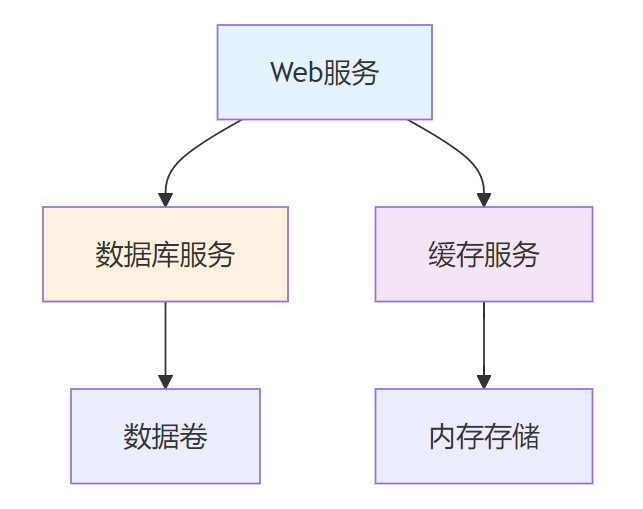
3.2 服务编排
服务依赖关系
网络配置
services:
  web:
    image: nginx
    networks:
      - frontend

  api:
    image: node:14
    networks:
      - frontend
      - backend

  db:
    image: postgres
    networks:
      - backend

networks:
  frontend:
  backend:
3.3 环境管理
多环境配置
# docker-compose.yml
version: '3.8'

services:
  web:
    image: ${IMAGE_NAME}:${IMAGE_TAG}
    environment:
      - NODE_ENV=${NODE_ENV}
    env_file:
      - .env
# .env文件
IMAGE_NAME=myapp
IMAGE_TAG=latest
NODE_ENV=production
4. 镜像优化策略
4.1 镜像构建优化
多阶段构建
# 构建阶段
FROM node:14 AS builder
WORKDIR /app
COPY package*.json ./
RUN npm ci --only=production

# 运行阶段
FROM node:14-alpine
WORKDIR /app
COPY --from=builder /app/node_modules ./node_modules
COPY . .
EXPOSE 3000
CMD ["npm", "start"]
镜像层优化
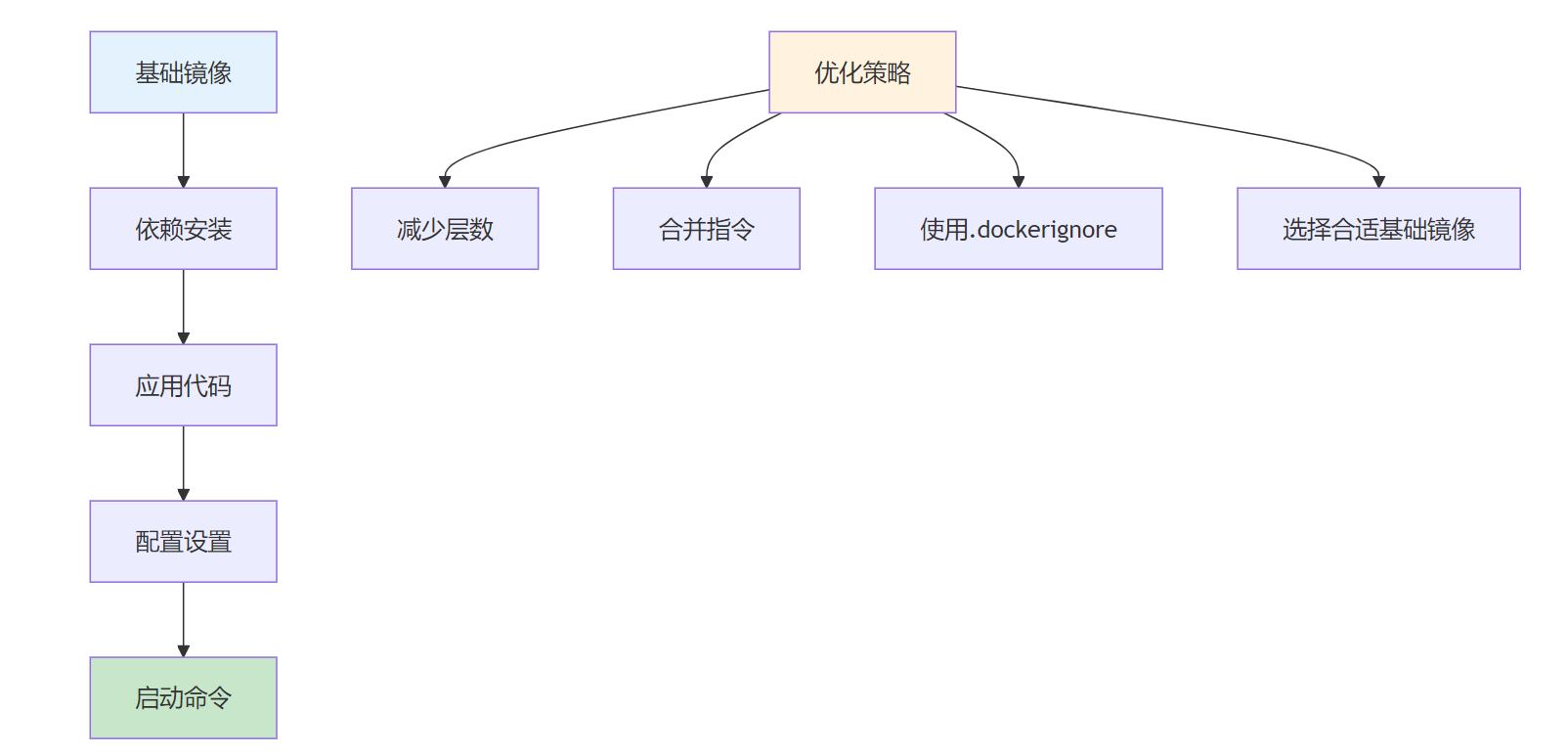
4.2 镜像大小优化
基础镜像选择
- Alpine Linux:最小化镜像
- Distroless:无shell镜像
- Scratch:空镜像
依赖优化
# 优化前
FROM ubuntu:18.04
RUN apt-get update && apt-get install -y \
    python3 \
    python3-pip \
    && rm -rf /var/lib/apt/lists/*

# 优化后
FROM python:3.9-slim
# 使用官方Python镜像,减少依赖
4.3 安全优化
安全最佳实践
- 使用非root用户
- 定期更新基础镜像
- 扫描镜像漏洞
- 最小化攻击面
# 安全配置示例
FROM node:14-alpine

# 创建非root用户
RUN addgroup -g 1001 -S nodejs
RUN adduser -S nextjs -u 1001

# 设置工作目录
WORKDIR /app

# 复制文件并设置权限
COPY --chown=nextjs:nodejs . .

# 切换到非root用户
USER nextjs

EXPOSE 3000
CMD ["npm", "start"]
5. 容器网络与存储
5.1 容器网络
网络模式
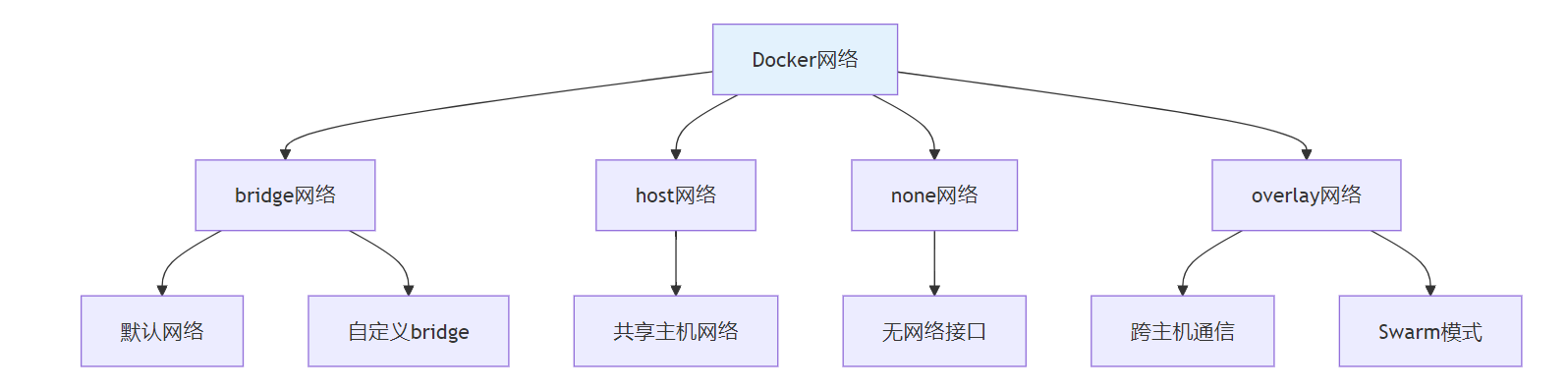
自定义网络
# 创建自定义网络
docker network create mynetwork

# 连接容器到网络
docker run --network mynetwork nginx

# 查看网络信息
docker network ls
docker network inspect mynetwork
5.2 存储管理
存储驱动
- overlay2:推荐驱动
- devicemapper:企业级驱动
- aufs:早期驱动
数据持久化策略
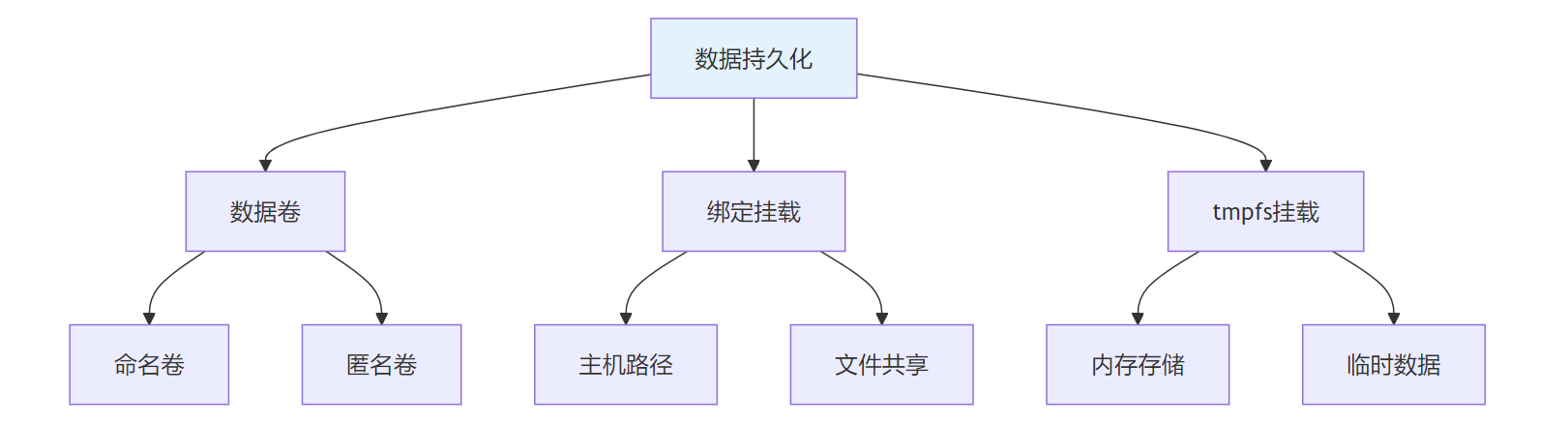
6. 生产环境部署实践
6.1 部署策略
滚动更新
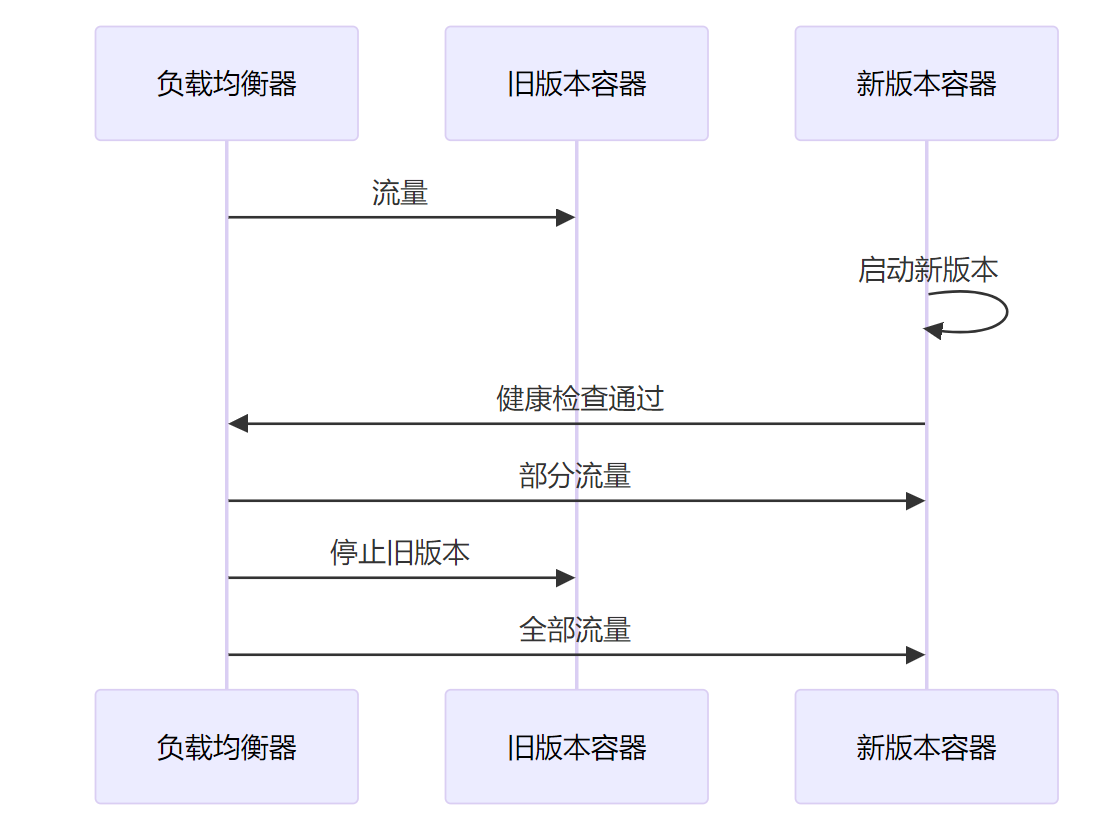
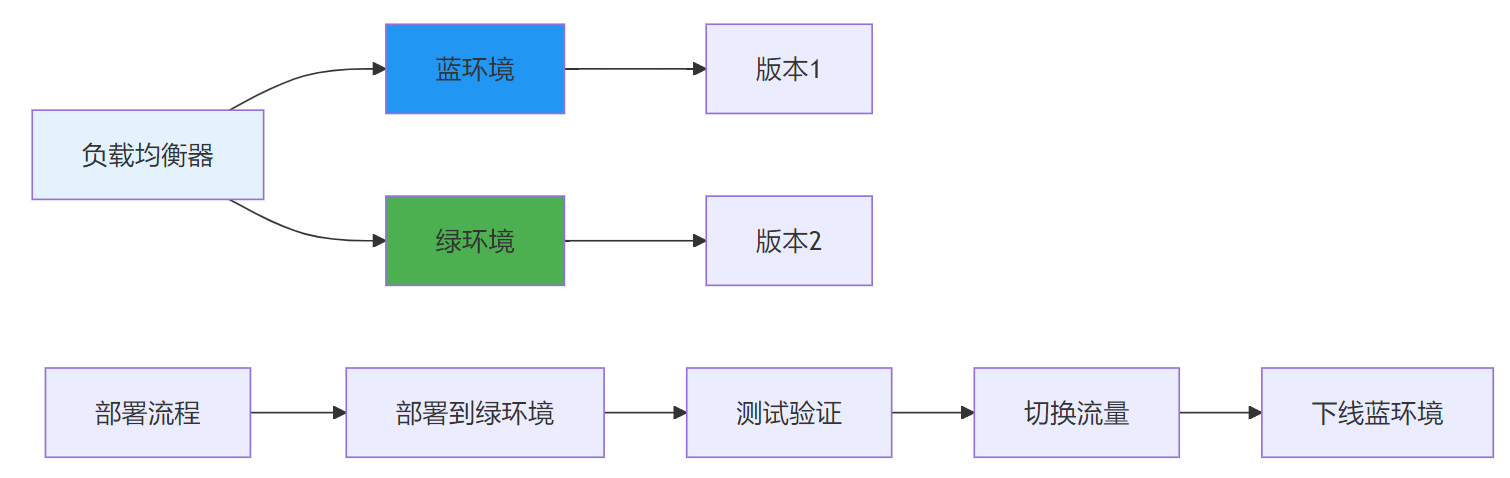
蓝绿部署
6.2 监控与日志
容器监控
# docker-compose.yml
version: '3.8'

services:
  app:
    image: myapp
    deploy:
      resources:
        limits:
          cpus: '0.5'
          memory: 512M
        reservations:
          cpus: '0.25'
          memory: 256M

  monitoring:
    image: prometheus
    ports:
      - "9090:9090"
    volumes:
      - ./prometheus.yml:/etc/prometheus/prometheus.yml

  logging:
    image: fluentd
    volumes:
      - /var/log:/var/log
      - ./fluent.conf:/fluentd/etc/fluent.conf
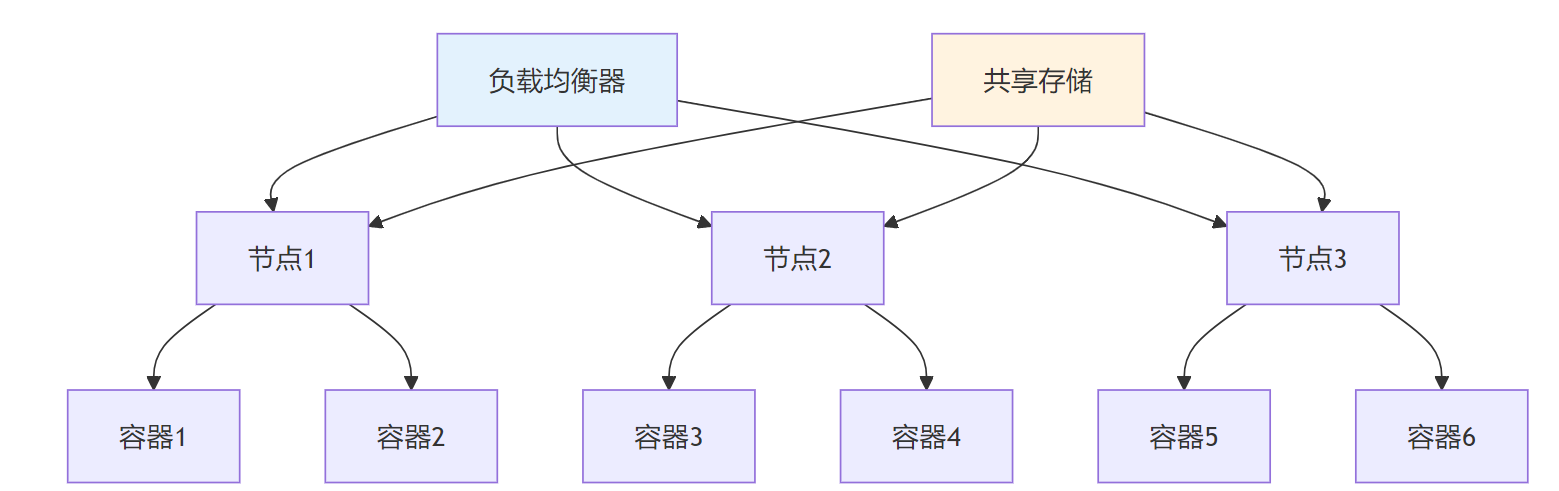
6.3 高可用部署
多节点部署
📝 课程总结
Docker容器化技术为应用部署提供了标准化、轻量级的解决方案。掌握Docker的基础操作、Compose编排和优化策略,是构建现代化应用架构的重要技能。
关键要点回顾:
- 容器化技术通过进程隔离实现轻量级虚拟化
- Docker Compose简化了多容器应用的编排管理
- 镜像优化可以显著减少部署时间和资源消耗
- 生产环境部署需要考虑高可用、监控和安全等因素

码道开发者社区,聚焦华为云码道 CodeArts 代码智能体,沉淀 Agent、Skill、鸿蒙开发实战内容,供开发者查阅资料、交流技术、分享工程实践
更多推荐



 21
21 0
0- 0


 已为社区贡献3条内容

所有评论(0)