esp32s3-idf-dht11
·
使用rmt外设作为接收外设,rmt作为接收器的时候,会将接收到的一个位的电平(0或1)当做一个码元进行保存,一个位对应一个码元(结构体),一条数据帧接收完成后,会将所有接收的信息,通过回调函数发送到队列,主函数可以进行操作。rmt作为可以编辑的信号发生器,就是为了那些时序精准的时序准备,避免了gpio不够精准的局限。
码元格式,采用环形缓冲区,简单来说就是数组,但存储满了之后新的会把旧的覆盖掉,不是读出就会清除。
dht11.c
#include "freertos/FreeRTOS.h"
#include "freertos/task.h"
#include "freertos/queue.h"
#include "driver/gpio.h"
#include "driver/rmt_rx.h"
#include "driver/rmt_tx.h"
#include "esp_log.h"
#define DHT11_PIN   GPIO_NUM_18
//rmt接收通道的句柄
rmt_channel_handle_t rmt_rx_channel_handel=NULL;
//消息队列句柄
QueueHandle_t rx_receive_queue=NULL;
//接收完成回调函数,系统自动传参数
//edata包含完整的接收符号序列
static bool IRAM_ATTR example_rmt_rx_done_callback(rmt_channel_handle_t channel, const rmt_rx_done_event_data_t *edata, void *user_data)
{
    BaseType_t high_task_wakeup = pdFALSE;
    QueueHandle_t rx_receive_queue = (QueueHandle_t)user_data;
    // send the received RMT symbols to the parser task
    xQueueSendFromISR(rx_receive_queue, edata, &high_task_wakeup);
    //根据返回值是否发生任务中断
    return high_task_wakeup == pdTRUE;
}

void DHT11_Init(gpio_num_t dht11_pin){
    rmt_rx_channel_config_t rmt_rx_channel;
    //选择时钟
    rmt_rx_channel.clk_src=RMT_CLK_SRC_APB;
    rmt_rx_channel.resolution_hz=1000 * 1000;	  // 1 MHz 滴答分辨率,即 1 滴答 = 1 µs
    rmt_rx_channel.mem_block_symbols=64;// 内存块大小,即 64 * 4 = 256 字节
    rmt_rx_channel.gpio_num=dht11_pin;// GPIO 编号
    rmt_rx_channel.intr_priority=1;//关闭中断
    //创建rmt接收通道
    rmt_new_rx_channel(&rmt_rx_channel,&rmt_rx_channel_handel);
    ESP_LOGI("dht11_rmt_rx_channel", "rmt_rx_channel create success");
    //新建接收数据队列
    rx_receive_queue=xQueueCreate(20,sizeof(rmt_rx_done_event_data_t));
    // 注册接收完成的回调函数
    rmt_rx_event_callbacks_t cbs = {
        .on_recv_done = example_rmt_rx_done_callback,
    };
    //注册接收完成的回调函数,用户数据是消息队列的句柄
    //这个user_data是在注册回调函数的时候设置一次,然后每次回调函数被调用时都会收到同一个user_data
    rmt_rx_register_event_callbacks(rmt_rx_channel_handel,&cbs,rx_receive_queue);
	ESP_LOGI("dht11_register_callback", "register RX done callback");

    //使能RMT接收通道
    rmt_enable(rmt_rx_channel_handel);
    ESP_LOGI("dht11_init", "dht11_init_success");
}
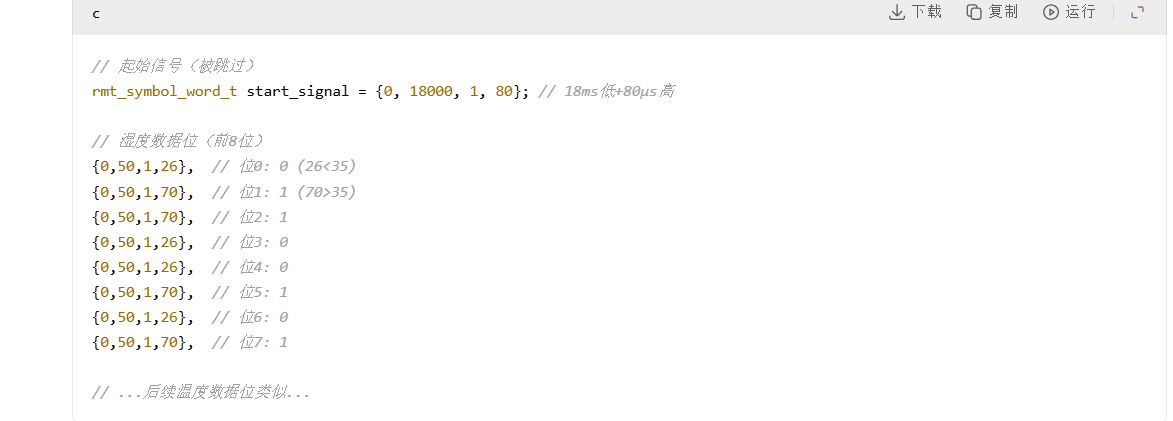
// 将RMT读取到的脉冲数据处理为温度和湿度(rmt_symbol_word_t称为RMT符号)
static int parse_items(rmt_symbol_word_t *item, int item_num, int *humidity, int *temp_x10)
{
	int i = 0;
	unsigned int rh = 0, temp = 0, checksum = 0;
	if (item_num < 41){					// 检查是否有足够的脉冲数
		//ESP_LOGI(TAG, "item_num < 41  %d",item_num);
		return 0;
	}
	if(item_num > 41)
		item++;								// 跳过开始信号脉冲

	for (i = 0; i < 16; i++, item++)	// 提取湿度数据
	{
		uint16_t duration = 0;
		if(item->level0)
			duration = item->duration0;
		else
			duration = item->duration1;
		rh = (rh << 1) + (duration < 35 ? 0 : 1);
	}


	for (i = 0; i < 16; i++, item++)	// 提取温度数据
	{
		uint16_t duration = 0;
		if(item->level0)
			duration = item->duration0;
		else
			duration = item->duration1;
		temp = (temp << 1) + (duration < 35 ? 0 : 1);
	}

	for (i = 0; i < 8; i++, item++){	// 提取校验数据

		uint16_t duration = 0;
		if(item->level0)
			duration = item->duration0;
		else
			duration = item->duration1;
		checksum = (checksum << 1) + (duration < 35 ? 0 : 1);
	}
	// 检查校验
	if ((((temp >> 8) + temp + (rh >> 8) + rh) & 0xFF) != checksum){
		ESP_LOGI("DHT11", "Checksum failure %4X %4X %2X\n", temp, rh, checksum);
		return 0;
	}
	// 返回数据

	rh = rh >> 8;
	temp = (temp >> 8) * 10 + (temp & 0xFF);

	//判断数据合法性
	if(rh <= 100)
		*humidity = rh;
	if(temp <= 600)
		*temp_x10 = temp;
	return 1;
}

/** 获取DHT11数据
 * @param temp_x10 温度值
 * @return 无
*/
int DHT11_StartGet(int *temp_x10, int *humidity){
    //发送20ms开始信号脉冲启动DHT11单总线
	gpio_set_direction(DHT11_PIN, GPIO_MODE_OUTPUT);
	gpio_set_level(DHT11_PIN, 1);
	esp_rom_delay_us(1000);
	gpio_set_level(DHT11_PIN, 0);
	esp_rom_delay_us(20000);
	//拉高20us
	gpio_set_level(DHT11_PIN, 1);
	esp_rom_delay_us(20);
	//信号线设置为输入准备接收数据
	gpio_set_direction(DHT11_PIN, GPIO_MODE_INPUT);
	gpio_set_pull_mode(DHT11_PIN,GPIO_PULLUP_ONLY);
    //配置接受的干扰项,最大和最小
    rmt_receive_config_t receive_config = {
    .signal_range_min_ns = 100,       // 100ns (0.1μs) - 足够小以捕获短脉冲
    .signal_range_max_ns = 1000 * 1000 // 1000μs (1ms) - 足够大以捕获DHT11的长脉冲
};
    static rmt_symbol_word_t raw_symbols[128];	//接收缓存
    static rmt_rx_done_event_data_t rx_data;	//实际接收到的数据
    //rmt开始接受数据
    rmt_receive(rmt_rx_channel_handel, raw_symbols, sizeof(raw_symbols), &receive_config);

    //处理接受的数据
	if (xQueueReceive(rx_receive_queue, &rx_data, pdMS_TO_TICKS(1000)) == pdTRUE) {
		// parse the receive symbols and print the result
		return parse_items(rx_data.received_symbols, rx_data.num_symbols,humidity, temp_x10);
	}
	return 0; // 或返回特定错误码
}
dht11.h
#ifndef __DHT11_H
#define __DHT11_H
#include "driver/gpio.h"
int DHT11_StartGet(int *temp_x10, int *humidity);
void DHT11_Init(gpio_num_t dht11_pin);
#define DHT11_PIN   GPIO_NUM_18
#endif
main.c
#include <stdio.h>
#include "dht11.h"
#include "freertos/FreeRTOS.h"
#include "freertos/task.h"
#include "esp_log.h"
TaskHandle_t dht11_task_handle=NULL;
int temp;
int hum;
void dht11_task(){
    ESP_LOGI("dht11_get","dht11_get start success-----------------");
    while (1)
    {
        DHT11_StartGet(&temp,&hum);
        ESP_LOGI("dht11_demo", "temp->%i.%i C     hum->%i%%", temp / 10, temp % 10, hum);
        vTaskDelay(pdMS_TO_TICKS(1000));
    }

}
void app_main(void)
{
    DHT11_Init(DHT11_PIN);
    xTaskCreatePinnedToCore(dht11_task,"dht11_task",2048,NULL,3,&dht11_task_handle,1);
}

码道开发者社区,聚焦华为云码道 CodeArts 代码智能体,沉淀 Agent、Skill、鸿蒙开发实战内容,供开发者查阅资料、交流技术、分享工程实践
更多推荐



 1
1 0
0- 0


 已为社区贡献9条内容

所有评论(0)