基于Ubuntu20.04镜像创建PCL Dockerfile,并加载指定文件夹,docker内程序自启动
·
准备文件如下图所示:
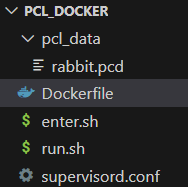
图中的pcl_data/rabbit.pcd可无
rabbit.pcd为斯坦福兔子,感兴趣的可网上下载
先上Dockerfile如下:
# 基础镜像使用Ubuntu 20.04
FROM ubuntu:20.04 AS base

# 避免交互模式下的配置提示
ENV DEBIAN_FRONTEND=noninteractive

# 设置时区
RUN ln -snf /usr/share/zoneinfo/UTC /etc/localtime && echo UTC > /etc/timezone

RUN apt-get update && \
    apt-get install -y --no-install-recommends ca-certificates

#更换为清华大学源
RUN echo '# 清华大学镜像源' > /etc/apt/sources.list && \
    echo 'deb https://mirrors.tuna.tsinghua.edu.cn/ubuntu/ focal main restricted universe multiverse' >> /etc/apt/sources.list && \
    echo 'deb https://mirrors.tuna.tsinghua.edu.cn/ubuntu/ focal-updates main restricted universe multiverse' >> /etc/apt/sources.list && \
    echo 'deb https://mirrors.tuna.tsinghua.edu.cn/ubuntu/ focal-backports main restricted universe multiverse' >> /etc/apt/sources.list && \
    echo 'deb https://mirrors.tuna.tsinghua.edu.cn/ubuntu/ focal-security main restricted universe multiverse' >> /etc/apt/sources.list

RUN cat /etc/apt/sources.list

# 更新系统并安装依赖,增加sudo工具
RUN apt-get update

RUN apt-get install -y  \
    build-essential \
    curl \
    cmake \
    git \
    libpcl-dev \
    pcl-tools \
    sudo \
    supervisor \
    --no-install-recommends

#RUN rm -rf /var/lib/apt/lists/*

# 创建Supervisor配置目录与配置文件
RUN mkdir -p /etc/supervisor/conf.d/
COPY supervisord.conf /etc/supervisor/conf.d/


#创建ubuntu用户并设置密码
ENV USERNAME=ubuntu
RUN useradd -m $USERNAME && \
        echo "$USERNAME:$USERNAME" | chpasswd && \
        usermod --shell /bin/bash $USERNAME && \
        usermod -aG sudo $USERNAME && \
        echo "$USERNAME ALL=(ALL) NOPASSWD:ALL" >> /etc/sudoers.d/$USERNAME && \
        chmod 0440 /etc/sudoers.d/$USERNAME && \
        # Replace 1000 with your user/group id
        usermod  --uid 1000 $USERNAME && \
        groupmod --gid 1000 $USERNAME
WORKDIR /home/$USERNAME


#设置工作目录并修改权限
WORKDIR /home/$USERNAME/workspace
RUN chown -R ubuntu:ubuntu /home/$USERNAME/workspace

#切换到ubuntu用户
USER ubuntu

#暴露一些常用端口(可选)
#EXPOSE 22 8080

# 设置默认启动命令
CMD ["sudo", "/usr/bin/supervisord", "-c", "/etc/supervisor/conf.d/supervisord.conf"]
Dockerfile同目录下创建supervisord.conf,内容如下:
[supervisord]
nodaemon=true
logfile=/var/log/supervisor/supervisord.log
pidfile=/var/run/supervisord.pid

#这里可以配置自启动程序,下面格式可参考
# [program:myapp]
# command=/usr/bin/pcl_viewer /home/ubuntu/workspace/pcl_data/rabbit.pcd
# autostart=true
# autorestart=true
# stdout_logfile=/var/log/myapp.log
# stderr_logfile=/var/log/myapp_error.log
# user=ubuntu
然后编译:
docker build -t pcl-ubuntu2004:x86_64 .
给出创建镜像的run.sh (一般只创建一次, 以后用enter.sh进入)
docker run -it --name pcl-container \
    -v /home/yu/research/pcl_docker/pcl_data:/home/ubuntu/workspace/pcl_data \
    -v /tmp/.X11-unix:/tmp/.X11-unix \
    -e DISPLAY=$DISPLAY \
    pcl-ubuntu2004:x86_64
run.sh中注意-v后面的文件夹,要用绝对路径。
给出镜像创建完成后,每次进入的 enter.sh
docker start pcl-container
docker exec -it pcl-container /bin/bash

码道开发者社区,聚焦华为云码道 CodeArts 代码智能体,沉淀 Agent、Skill、鸿蒙开发实战内容,供开发者查阅资料、交流技术、分享工程实践
更多推荐



 1
1 0
0- 0


 已为社区贡献1条内容

所有评论(0)