Containerd 容器管理 任务管理
容器是基于容器镜像所创建出来的小型操作系统,一个镜像可以创建多个容器,而一个容器,里面只是一个镜像
使用 ctr 查看 帮助
[root@containerd ~]# ctr --help
NAME:
   ctr -
        __
  _____/ /______
 / ___/ __/ ___/
/ /__/ /_/ /
\___/\__/_/

containerd CLI


USAGE:
   ctr [global options] command [command options] [arguments...]

VERSION:
   v1.7.0

DESCRIPTION:

ctr is an unsupported debug and administrative client for interacting
with the containerd daemon. Because it is unsupported, the commands,
options, and operations are not guaranteed to be backward compatible or
stable from release to release of the containerd project.

COMMANDS:
   plugins, plugin            Provides information about containerd plugins
   version                    Print the client and server versions
   containers, c, container   Manage containers
   content                    Manage content
   events, event              Display containerd events
   images, image, i           Manage images
   leases                     Manage leases
   namespaces, namespace, ns  Manage namespaces
   pprof                      Provide golang pprof outputs for containerd
   run                        Run a container
   snapshots, snapshot        Manage snapshots
   tasks, t, task             Manage tasks
   install                    Install a new package
   oci                        OCI tools
   sandboxes, sandbox, sb, s  Manage sandboxes
   info                       Print the server info
   shim                       Interact with a shim directly
   help, h                    Shows a list of commands or help for one command

GLOBAL OPTIONS:
   --debug                      Enable debug output in logs
   --address value, -a value    Address for containerd's GRPC server (default: "/run/containerd/containerd.sock") [$CONTAINERD_ADDRESS]
   --timeout value              Total timeout for ctr commands (default: 0s)
   --connect-timeout value      Timeout for connecting to containerd (default: 0s)
   --namespace value, -n value  Namespace to use with commands (default: "default") [$CONTAINERD_NAMESPACE]
   --help, -h                   show help
   --version, -v                print the version
查看container命令的帮助
[root@containerd ~]# ctr container --help
NAME:
   ctr containers - Manage containers

USAGE:
   ctr containers command [command options] [arguments...]

COMMANDS:
   create                   Create container
   delete, del, remove, rm  Delete one or more existing containers
   info                     Get info about a container
   list, ls                 List containers
   label                    Set and clear labels for a container
   checkpoint               Checkpoint a container
   restore                  Restore a container from checkpoint

OPTIONS:
   --help, -h  show help
这就是我们关于容器管理的命令了,
这里的container可以使用c来简写代替
查看容器
[root@containerd ~]# ctr c ls --help
NAME:
   ctr containers list - List containers

USAGE:
   ctr containers list [command options] [flags] [<filter>, ...]

OPTIONS:
   --quiet, -q  Print only the container id
容器只有一个参数,
-q:不查看全部信息,只查看容器的信息
[root@containerd ~]# ctr c ls
CONTAINER    IMAGE    RUNTIME
[root@containerd ~]#
目前没有创建任何容器,所以这里是空
创建容器
[root@containerd ~]# ctr c create --help
NAME:
   ctr containers create - Create container

USAGE:
   ctr containers create [command options] [flags] Image|RootFS CONTAINER [COMMAND] [ARG...]

OPTIONS:
   --snapshotter value               Snapshotter name. Empty value stands for the default value. [$CONTAINERD_SNAPSHOTTER]
   --snapshotter-label value         Labels added to the new snapshot for this container.
   --config value, -c value          Path to the runtime-specific spec config file
   --cwd value                       Specify the working directory of the process
   --env value                       Specify additional container environment variables (e.g. FOO=bar)
   --env-file value                  Specify additional container environment variables in a file(e.g. FOO=bar, one per line)
   --label value                     Specify additional labels (e.g. foo=bar)
   --annotation value                Specify additional OCI annotations (e.g. foo=bar)
   --mount value                     Specify additional container mount (e.g. type=bind,src=/tmp,dst=/host,options=rbind:ro)
   --net-host                        Enable host networking for the container
   --privileged                      Run privileged container
   --read-only                       Set the containers filesystem as readonly
   --runtime value                   Runtime name or absolute path to runtime binary (default: "io.containerd.runc.v2")
   --runtime-config-path value       Optional runtime config path
   --tty, -t                         Allocate a TTY for the container
   --with-ns value                   Specify existing Linux namespaces to join at container runtime (format '<nstype>:<path>')
   --pid-file value                  File path to write the task's pid
   --gpus value                      Add gpus to the container
   --allow-new-privs                 Turn off OCI spec's NoNewPrivileges feature flag
   --memory-limit value              Memory limit (in bytes) for the container (default: 0)
   --cap-add value                   Add Linux capabilities (Set capabilities with 'CAP_' prefix)
   --cap-drop value                  Drop Linux capabilities (Set capabilities with 'CAP_' prefix)
   --seccomp                         Enable the default seccomp profile
   --seccomp-profile value           File path to custom seccomp profile. seccomp must be set to true, before using seccomp-profile
   --apparmor-default-profile value  Enable AppArmor with the default profile with the specified name, e.g. "cri-containerd.apparmor.d"
   --apparmor-profile value          Enable AppArmor with an existing custom profile
   --blockio-config-file value       File path to blockio class definitions. By default class definitions are not loaded.
   --blockio-class value             Name of the blockio class to associate the container with
   --rdt-class value                 Name of the RDT class to associate the container with. Specifies a Class of Service (CLOS) for cache and memory bandwidth management.
   --hostname value                  Set the container's host name
   --user value, -u value            Username or user id, group optional (format: <name|uid>[:<group|gid>])
   --rootfs                          Use custom rootfs that is not managed by containerd snapshotter
   --no-pivot                        Disable use of pivot-root (linux only)
   --cpu-quota value                 Limit CPU CFS quota (default: -1)
   --cpu-period value                Limit CPU CFS period (default: 0)
   --rootfs-propagation value        Set the propagation of the container rootfs
   --device value                    File path to a device to add to the container; or a path to a directory tree of devices to add to the container
这里可以发现,创建容器的命令参数很多,这里不进行操作,后续使用到的进行说明
注:create创建的是一个静态容器,默认状态是stop的,未启动状态
[root@containerd ~]# ctr c create docker.io/library/busybox:latest busybox
[root@containerd ~]# ctr c ls
CONTAINER    IMAGE                               RUNTIME
busybox      docker.io/library/busybox:latest    io.containerd.runc.v2
这样就创建了一个静态的容器
创建时指定的镜像依然是需要使用全称的形式
此时的容器是无法访问状态
容器任务
如果要使用静态容器,需要将静态的容器转化为动态容器,这时就需要使用到容器任务功能了
查看帮助
[root@containerd ~]# ctr --help
NAME:
   ctr -
        __
  _____/ /______
 / ___/ __/ ___/
/ /__/ /_/ /
\___/\__/_/

containerd CLI


USAGE:
   ctr [global options] command [command options] [arguments...]

VERSION:
   v1.7.0

DESCRIPTION:

ctr is an unsupported debug and administrative client for interacting
with the containerd daemon. Because it is unsupported, the commands,
options, and operations are not guaranteed to be backward compatible or
stable from release to release of the containerd project.

COMMANDS:
   plugins, plugin            Provides information about containerd plugins
   version                    Print the client and server versions
   containers, c, container   Manage containers
   content                    Manage content
   events, event              Display containerd events
   images, image, i           Manage images
   leases                     Manage leases
   namespaces, namespace, ns  Manage namespaces
   pprof                      Provide golang pprof outputs for containerd
   run                        Run a container
   snapshots, snapshot        Manage snapshots
   tasks, t, task             Manage tasks
   install                    Install a new package
   oci                        OCI tools
   sandboxes, sandbox, sb, s  Manage sandboxes
   info                       Print the server info
   shim                       Interact with a shim directly
   help, h                    Shows a list of commands or help for one command

GLOBAL OPTIONS:
   --debug                      Enable debug output in logs
   --address value, -a value    Address for containerd's GRPC server (default: "/run/containerd/containerd.sock") [$CONTAINERD_ADDRESS]
   --timeout value              Total timeout for ctr commands (default: 0s)
   --connect-timeout value      Timeout for connecting to containerd (default: 0s)
   --namespace value, -n value  Namespace to use with commands (default: "default") [$CONTAINERD_NAMESPACE]
   --help, -h                   show help
   --version, -v                print the version
这里tasks命令就是管理containerd的任务命令
可以使用简写的t来进行相关操作
查看tasks帮助
[root@containerd ~]# ctr t --help
NAME:
   ctr tasks - Manage tasks

USAGE:
   ctr tasks command [command options] [arguments...]

COMMANDS:
   attach                   Attach to the IO of a running container
   checkpoint               Checkpoint a container
   delete, del, remove, rm  Delete one or more tasks
   exec                     Execute additional processes in an existing container
   list, ls                 List tasks
   kill                     Signal a container (default: SIGTERM)
   metrics, metric          Get a single data point of metrics for a task with the built-in Linux runtime
   pause                    Pause an existing container
   ps                       List processes for container
   resume                   Resume a paused container
   start                    Start a container that has been created

OPTIONS:
   --help, -h  show help
将静态容器转化为动态容器
[root@containerd ~]# ctr t start busybox
ctr: failed to start shim: failed to resolve runtime path: runtime "io.containerd.runc.v2" binary not installed "containerd-shim-runc-v2": file does not exist: unknown
这里的错误信息是containerd没有正常连接到runc,无法启动容器
将containerd连接runc
[root@containerd ~]# ls
busybox.tar  cri  cri-containerd-cni-1.7.0-linux-amd64.tar.gz
[root@containerd ~]# tree cri
cri
├── cri-containerd.DEPRECATED.txt
├── etc
│   ├── cni
│   │   └── net.d
│   │       └── 10-containerd-net.conflist
│   ├── crictl.yaml
│   └── systemd
│       └── system
├── opt
│   ├── cni
│   │   └── bin
│   │       ├── bandwidth
│   │       ├── bridge
│   │       ├── dhcp
│   │       ├── dummy
│   │       ├── firewall
│   │       ├── host-device
│   │       ├── host-local
│   │       ├── ipvlan
│   │       ├── loopback
│   │       ├── macvlan
│   │       ├── portmap
│   │       ├── ptp
│   │       ├── sbr
│   │       ├── static
│   │       ├── tuning
│   │       ├── vlan
│   │       └── vrf
│   └── containerd
│       └── cluster
│           ├── gce
│           │   ├── cloud-init
│           │   │   ├── master.yaml
│           │   │   └── node.yaml
│           │   ├── cni.template
│           │   ├── configure.sh
│           │   └── env
│           └── version
└── usr
    └── local
        ├── bin
        │   ├── containerd-shim
        │   ├── containerd-shim-runc-v1
        │   ├── containerd-shim-runc-v2
        │   ├── containerd-stress
        │   ├── crictl
        │   ├── critest
        │   └── ctd-decoder
        └── sbin
            └── runc

16 directories, 34 files
将containerd-shim-runc-v2移动至bin目录下
[root@containerd ~]# cd cri/
[root@containerd cri]# cp usr/local/bin/containerd-shim-runc-v2 /usr/bin/
再次转换动态容器
[root@containerd cri]# ctr t start busybox
此时出现了一个问题,为什么一直没有返回信息,终端一直是这样呢?

疑问:使用ctr t start 将静态容器转换为动态容器后,终端卡死在这个界面
这其实不是卡死在了这个界面中,而是直接进入到了busybox容器内部
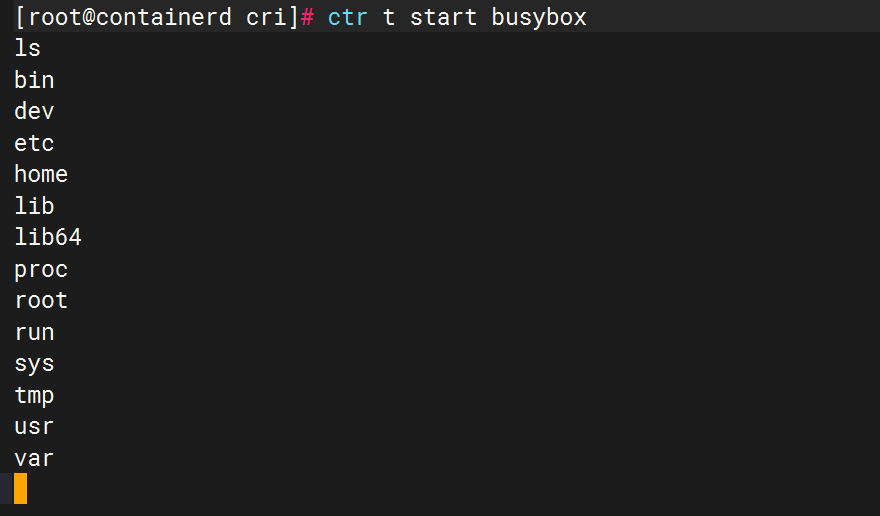
这里,我输入ls,正常的返回了一些目录
解决方法:
解决方法如同docker的创建容器一样,如果只是docker run一个容器,他会直接进如到容器的终端,解决方法也同docker一样,加上-d参数就可解决
-d:daemon
以后台形式运行当前容器
这里将当前终端ctrl+d中断,加上-d参数再次尝试
[root@containerd cri]# ctr t start -d busybox
[root@containerd cri]#
可以发现,很快的就返回到本地的终端中了
查看任务
[root@containerd cri]# ctr t ls --help
NAME:
   ctr tasks list - List tasks

USAGE:
   ctr tasks list [command options] [flags]

OPTIONS:
   --quiet, -q  Print only the task id
直接使用ctr t ls 进行查看
[root@containerd cri]# ctr t ls
TASK       PID     STATUS
busybox    1826    RUNNING
[root@containerd cri]#
这里可以发现是正常运行了一个容器,容器状态是RUNNING,PID是1826
查看容器任务进程
[root@containerd cri]# ctr t ps --help
NAME:
   ctr tasks ps - List processes for container

USAGE:
   ctr tasks ps CONTAINER
[root@containerd cri]# ctr t ps busybox
PID     INFO
1826    -
这里返回了容器正在使用的进程
[root@containerd cri]# ps -ef | grep 1806
root       1806      1  0 14:46 ?        00:00:00 /usr/bin/containerd-shim-runc-v2 -namespace default -id busybox -address /run/containerd/containerd.sock
root       1826   1806  0 14:46 ?        00:00:00 sh
容器内的进程,是在宿主机中的进程是一致的,所以可以在宿主机中看到
进入容器操作
既然使用了-d使得容器在后台运行,那怎么再次的进入到容器终端呢?
[root@containerd cri]# ctr t exec --help
NAME:
   ctr tasks exec - Execute additional processes in an existing container

USAGE:
   ctr tasks exec [command options] [flags] CONTAINER CMD [ARG...]

OPTIONS:
   --cwd value       Working directory of the new process
   --tty, -t         Allocate a TTY for the container
   --detach, -d      Detach from the task after it has started execution
   --exec-id value   Exec specific id for the process
   --fifo-dir value  Directory used for storing IO FIFOs
   --log-uri value   Log uri for custom shim logging
   --user value      User id or name
使用exec命令
进入容器
[root@containerd cri]# ctr t exec --exec-id 1 busybox sh
ls
bin
dev
etc
home
lib
lib64
proc
root
run
sys
tmp
usr
var
pwd
/
ifconfig
lo        Link encap:Local Loopback
          inet addr:127.0.0.1  Mask:255.0.0.0
          inet6 addr: ::1/128 Scope:Host
          UP LOOPBACK RUNNING  MTU:65536  Metric:1
          RX packets:0 errors:0 dropped:0 overruns:0 frame:0
          TX packets:0 errors:0 dropped:0 overruns:0 carrier:0
          collisions:0 txqueuelen:1000
          RX bytes:0 (0.0 B)  TX bytes:0 (0.0 B)
这样即再次进入了容器的终端
exec-id参数:需要指定执行容器的id,要避免与其他id冲突
创建一个动态容器
[root@containerd cri]# ctr run --help
NAME:
   ctr run - Run a container

USAGE:
   ctr run [command options] [flags] Image|RootFS ID [COMMAND] [ARG...]

OPTIONS:
   --rm                                    Remove the container after running, cannot be used with --detach
   --null-io                               Send all IO to /dev/null
   --log-uri value                         Log uri
   --detach, -d                            Detach from the task after it has started execution, cannot be used with --rm
   --fifo-dir value                        Directory used for storing IO FIFOs
   --cgroup value                          Cgroup path (To disable use of cgroup, set to "" explicitly)
   --platform value                        Run image for specific platform
   --cni                                   Enable cni networking for the container
   --runc-binary value                     Specify runc-compatible binary
   --runc-root value                       Specify runc-compatible root
   --runc-systemd-cgroup                   Start runc with systemd cgroup manager
   --uidmap container-uid:host-uid:length  Run inside a user namespace with the specified UID mapping range; specified with the format container-uid:host-uid:length
   --gidmap container-gid:host-gid:length  Run inside a user namespace with the specified GID mapping range; specified with the format container-gid:host-gid:length
   --remap-labels                          Provide the user namespace ID remapping to the snapshotter via label options; requires snapshotter support
   --privileged-without-host-devices       Don't pass all host devices to privileged container
   --cpus value                            Set the CFS cpu quota (default: 0)
   --cpu-shares value                      Set the cpu shares (default: 1024)
   --snapshotter value                     Snapshotter name. Empty value stands for the default value. [$CONTAINERD_SNAPSHOTTER]
   --snapshotter-label value               Labels added to the new snapshot for this container.
   --config value, -c value                Path to the runtime-specific spec config file
   --cwd value                             Specify the working directory of the process
   --env value                             Specify additional container environment variables (e.g. FOO=bar)
   --env-file value                        Specify additional container environment variables in a file(e.g. FOO=bar, one per line)
   --label value                           Specify additional labels (e.g. foo=bar)
   --annotation value                      Specify additional OCI annotations (e.g. foo=bar)
   --mount value                           Specify additional container mount (e.g. type=bind,src=/tmp,dst=/host,options=rbind:ro)
   --net-host                              Enable host networking for the container
   --privileged                            Run privileged container
   --read-only                             Set the containers filesystem as readonly
   --runtime value                         Runtime name or absolute path to runtime binary (default: "io.containerd.runc.v2")
   --runtime-config-path value             Optional runtime config path
   --tty, -t                               Allocate a TTY for the container
   --with-ns value                         Specify existing Linux namespaces to join at container runtime (format '<nstype>:<path>')
   --pid-file value                        File path to write the task's pid
   --gpus value                            Add gpus to the container
   --allow-new-privs                       Turn off OCI spec's NoNewPrivileges feature flag
   --memory-limit value                    Memory limit (in bytes) for the container (default: 0)
   --cap-add value                         Add Linux capabilities (Set capabilities with 'CAP_' prefix)
   --cap-drop value                        Drop Linux capabilities (Set capabilities with 'CAP_' prefix)
   --seccomp                               Enable the default seccomp profile
   --seccomp-profile value                 File path to custom seccomp profile. seccomp must be set to true, before using seccomp-profile
   --apparmor-default-profile value        Enable AppArmor with the default profile with the specified name, e.g. "cri-containerd.apparmor.d"
   --apparmor-profile value                Enable AppArmor with an existing custom profile
   --blockio-config-file value             File path to blockio class definitions. By default class definitions are not loaded.
   --blockio-class value                   Name of the blockio class to associate the container with
   --rdt-class value                       Name of the RDT class to associate the container with. Specifies a Class of Service (CLOS) for cache and memory bandwidth management.
   --hostname value                        Set the container's host name
   --user value, -u value                  Username or user id, group optional (format: <name|uid>[:<group|gid>])
   --rootfs                                Use custom rootfs that is not managed by containerd snapshotter
   --no-pivot                              Disable use of pivot-root (linux only)
   --cpu-quota value                       Limit CPU CFS quota (default: -1)
   --cpu-period value                      Limit CPU CFS period (default: 0)
   --rootfs-propagation value              Set the propagation of the container rootfs
   --device value                          File path to a device to add to the container; or a path to a directory tree of devices to add to the container
直接使用ctr run 就可以创建一个动态容器,不需要使用task start 启动
[root@containerd cri]# ctr run -d --net-host docker.io/library/busybox:latest busybox2
[root@containerd cri]# ctr t ls
TASK        PID     STATUS
busybox     1826    RUNNING
busybox2    2005    RUNNING
[root@containerd cri]# ctr c ls
CONTAINER    IMAGE                               RUNTIME
busybox      docker.io/library/busybox:latest    io.containerd.runc.v2
busybox2     docker.io/library/busybox:latest    io.containerd.runc.v2
可以发现,使用ctr run创建的容器,状态就是RUNNING
--net-host:直接使用主机的网络
进入容器
[root@containerd cri]# ctr t exec --exec-id 1 busybox2 sh
ifconfig
ens33     Link encap:Ethernet  HWaddr 00:0C:29:0B:3F:13
          inet addr:192.168.87.36  Bcast:192.168.87.255  Mask:255.255.255.0
          inet6 addr: fe80::49a5:7cc9:562b:60b4/64 Scope:Link
          UP BROADCAST RUNNING MULTICAST  MTU:1500  Metric:1
          RX packets:1776 errors:0 dropped:0 overruns:0 frame:0
          TX packets:1120 errors:0 dropped:0 overruns:0 carrier:0
          collisions:0 txqueuelen:1000
          RX bytes:138187 (134.9 KiB)  TX bytes:155802 (152.1 KiB)

lo        Link encap:Local Loopback
          inet addr:127.0.0.1  Mask:255.0.0.0
          inet6 addr: ::1/128 Scope:Host
          UP LOOPBACK RUNNING  MTU:65536  Metric:1
          RX packets:32 errors:0 dropped:0 overruns:0 frame:0
          TX packets:32 errors:0 dropped:0 overruns:0 carrier:0
          collisions:0 txqueuelen:1000
          RX bytes:2592 (2.5 KiB)  TX bytes:2592 (2.5 KiB)
可以发现,比之前的网络多了一条ens33的网卡
配置一个httpd查看
[root@containerd cri]# ctr t exec --exec-id 1 busybox2 sh
echo "busybox test" >> /tmp/index.html
httpd -h /tmp
[root@containerd cri]# curl 192.168.87.36
busybox test
成功在宿主机当中访问容器内的页面
删除容器
[root@containerd cri]# ctr c rm --help
NAME:
   ctr containers delete - Delete one or more existing containers

USAGE:
   ctr containers delete [command options] [flags] CONTAINER [CONTAINER, ...]

OPTIONS:
   --keep-snapshot  Do not clean up snapshot with container
使用rm进行删除
[root@containerd cri]# ctr c rm busybox
ERRO[0000] failed to delete container "busybox"          error="cannot delete a non stopped container: {running 0 0001-01-01 00:00:00 +0000 UTC}"
ctr: cannot delete a non stopped container: {running 0 0001-01-01 00:00:00 +0000 UTC}
出现错误,需要先将动态的容器停止为静态容器才可进行删除
停止容器
[root@containerd cri]# ctr t --help
NAME:
   ctr tasks - Manage tasks

USAGE:
   ctr tasks command [command options] [arguments...]

COMMANDS:
   attach                   Attach to the IO of a running container
   checkpoint               Checkpoint a container
   delete, del, remove, rm  Delete one or more tasks
   exec                     Execute additional processes in an existing container
   list, ls                 List tasks
   kill                     Signal a container (default: SIGTERM)
   metrics, metric          Get a single data point of metrics for a task with the built-in Linux runtime
   pause                    Pause an existing container
   ps                       List processes for container
   resume                   Resume a paused container
   start                    Start a container that has been created

OPTIONS:
   --help, -h  show help
这里需要使用的是kill命令
[root@containerd cri]# ctr t kill --help
NAME:
   ctr tasks kill - Signal a container (default: SIGTERM)

USAGE:
   ctr tasks kill [command options] [flags] CONTAINER

OPTIONS:
   --signal value, -s value  Signal to send to the container
   --exec-id value           Process ID to kill
   --all, -a                 Send signal to all processes inside the container
执行停止操作
[root@containerd cri]# ctr t kill -s 9 busybox2
[root@containerd cri]# ctr t kill -s 9 busybox
[root@containerd cri]# ctr t ls
TASK        PID     STATUS
busybox     1826    STOPPED
busybox2    2005    STOPPED
-s 9:强制停止,如果单独使用kill无法停止,可能是容器内正在运行,可以使用-s进行强制的停止
在创建容器时,有一个--rm参数,这个也可以做到对容器的移除,不过这个是用于只需要创建进入里面检测容器内部的参数,与-d冲突
再次进行删除容器操作
[root@containerd cri]# ctr c rm busybox
[root@containerd cri]# ctr c rm busybox2
[root@containerd cri]# ctr c ls
CONTAINER    IMAGE    RUNTIME
[root@containerd cri]#
删除完成
总结
本次学习了对于容器镜像所创建的容器进行管理的操作,学习了容器的创建,删除等
需要注意的是create创建的是静态容器,需要使用task进行启动
run创建的是动态容器,使用task exec即可进入容器内部
删除则是需要先进行对应容器的kill,杀掉容器的进程,然后再执行rm操作,对容器进行删除操作

码道开发者社区,聚焦华为云码道 CodeArts 代码智能体,沉淀 Agent、Skill、鸿蒙开发实战内容,供开发者查阅资料、交流技术、分享工程实践
更多推荐



 19
19 0
0- 0


 已为社区贡献4条内容

所有评论(0)