使用Hystrix实现微服务熔断与降级!
在实际项目中,微服务之间的相互调用可能会遇上网络抖动、延迟、超时等一些列问题,如果不加以处理,可能引发更加严重的问题,如一开始的用户服务不可用导致调用此服务的售票服务受阻,导致占用了很多系统资源,因而导致调用售票服务的支付服务也挂掉,这期间又导致了资源占用无法释放,持续滚雪球导致整个系统都宕掉,也是极有可能的。这个时候需要一种适当的容错机制,从上面来看,这种容错至少需要这个几个功能点:
1、请求超时:为每个请求设置超时时间,避免系统资源的持续性无效占用;
2、断路器模式:当某个服务不可用并达到一定的失败率(默认5秒内20次),快速跳闸,请求快速返回,并且后续进来的调用此服务的请求不再继续调用不可用的服务;
Hystrix实现了超时机制及断电模式,它是Netflix开源的延迟和容错工具类库。它实现的功能点主要如下:
1、包裹请求:请求包裹在HystrixCommand中,并在独立线程中执行;
2、断路器机制:当某个服务不可用率到达阈值就跳闸,一段时间内禁止后续请求该服务(熔断);
3、回退机制:当服务间调用遇上网络延迟、超时、失败或已经跳闸,直接放回自定义方法中缺省值(降级);
4、监控:Hystrix会实时的监控请求的成功、失败、超时等服务运行指标
5、资源隔离:Hystrix为每个依赖维护了一个小型的信号量,如果信号量满了则进来的请求直接拒绝,不需要排队等待;
Hystrix核心点:
1、Hystrix的容错性关键点在于把各个微服务之间的RPC调用包裹在了HystrixCommand中,这样每次调用就是都是单独的线程执行
2、Hystrix分线程隔离和信号量隔离,HystrixCommand就是线程隔离(默认使用),因为线程隔相对信号量而言较耗资源,所以可在高负载时候选用
实现Hystrix HelloWorld
修改之前ticket-consumer-ribbon项目的ArtifactId为ticket-consumer-ribbon-hystrix,pom中添加Hystrix依赖:
<dependency><groupId>org.springframework.cloud</groupId><artifactId>spring-cloud-starter-hystrix</artifactId></dependency>
启动类头部加上@EnableHystrix注解,开启Hystrix;
修改TicketController类方法方法头部加上:
import com.netflix.hystrix.contrib.javanica.annotation.HystrixCommand;import com.netflix.hystrix.contrib.javanica.annotation.HystrixProperty;import com.simons.cn.util.CommonEnum;import com.simons.cn.util.CommonResult;import lombok.extern.slf4j.Slf4j;import org.springframework.beans.factory.annotation.Autowired;import org.springframework.cloud.client.ServiceInstance;import org.springframework.cloud.client.loadbalancer.LoadBalancerClient;import org.springframework.stereotype.Controller;import org.springframework.web.bind.annotation.GetMapping;import org.springframework.web.bind.annotation.RequestMapping;import org.springframework.web.bind.annotation.RequestParam;import org.springframework.web.bind.annotation.ResponseBody;import org.springframework.web.client.RestTemplate;@Slf4j@Controllerpublic class TicketController {@Autowiredprivate RestTemplate restTemplate;@Autowiredprivate LoadBalancerClient loadBalancerClient;@HystrixCommand(fallbackMethod = "purchaseTicketFallBack", commandProperties = {@HystrixProperty(name = "circuitBreaker.requestVolumeThreshold", value = "20"), //滑动窗口大小@HystrixProperty(name = "circuitBreaker.sleepWindowInMilliseconds", value = "5000"), //过多久再次检测是否开启熔断器@HystrixProperty(name ="circuitBreaker.errorThresholdPercentage",value = "50") //错误率})@RequestMapping("/ticketpurchase")@ResponseBodypublic CommonResult purchaseTicket(@RequestParam(required = false, value = "name") String name) {CommonResult result = restTemplate.getForObject("http://user-provider/getuserinfo?name=" + name, CommonResult.class);return result;}/*** 默认回退方法(此处fallback属性实现的功能效果即降级)** @return*/public CommonResult purchaseTicketFallBack(String name) {return CommonResult.success(CommonEnum.FAIL.getCode(), CommonEnum.FAIL.getMessage(), null);}@GetMapping("/loginfo")public void loginfo() {ServiceInstance serviceInstance = loadBalancerClient.choose("user-provider");log.info("host=" + serviceInstance.getHost() + ",port=" + serviceInstance.getPort() + ",serviceid=" + serviceInstance.getServiceId());}}
测试:
启动多个user-provider-eureka项目服务;
启动discovery-eureka项目服务;
启动ticket-consumer-ribbon-hystrix项目服务;
浏览器访问http://localhost:9000/ticketpurchase?name=jack,出现
{ "code": "0", "message": "success", "data":[{ "id": 125, "name": "jack", "role": "system" }]当关闭user-provider-eureka服务后再访问http://localhost:9000/ticketpurchase?name=jack,出现
{ "code": "1", "message": "system error", "data": null
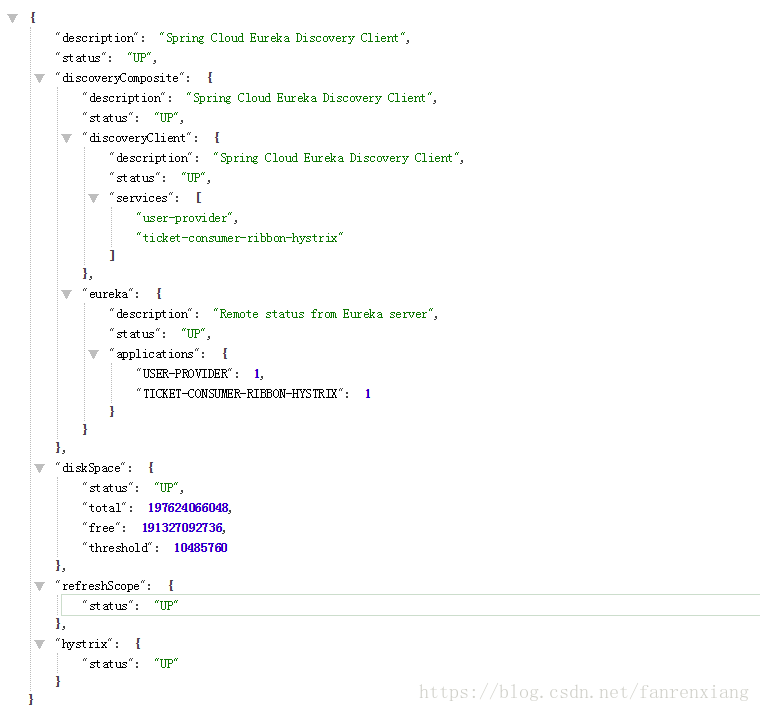
可以看到,默认的回退方法生效了。我们可以利用SpringBoot的Actuator来检查下Hystrix状态,访问:http://localhost:9000/health,效果如下
Hystrix提供了这么几个关键参数:
circuitBreaker.requestVolumeThreshold 滑动窗口大小
circuitBreaker.sleepWindowInMilliseconds 过多久断路器再次检测是否开启circuitBreaker.errorThresholdPercentage 错误率
上面controller中的配置组合起来的意思就是,每20个请求中,有50%的失败就会打开断路器,此时后续的请求将不再调用此服务,5s钟之后重新检测打开还是关闭断路器。更多参数配置请参考:
https://github.com/Netflix/Hystrix/wiki/Configuration
在Feign中使用Hystrix
参考之前的ticket-consumer-feign项目,在Feign接口UserFeignService中添加
import com.simons.cn.util.CommonResult;import com.simons.cn.util.UserFeignFallBackReason;import com.simons.cn.util.UserFeignServiceFallBack;import org.springframework.cloud.netflix.feign.FeignClient;import org.springframework.web.bind.annotation.RequestMapping;import org.springframework.web.bind.annotation.RequestMethod;import org.springframework.web.bind.annotation.RequestParam;@FeignClient(name = "user-provider",fallback = UserFeignServiceFallBack.class,fallbackFactory = UserFeignFallBackReason.class)public interface UserFeignService {@RequestMapping(value = "/getuserinfo",method = RequestMethod.GET)CommonResult getUserByName(@RequestParam(required = false,value = "name") String name);
fallback属性值为UserFeignServiceFallBack类需实现自定义Feign接口(此处fallback属性实现的功能效果即降级)
import com.simons.cn.UserFeignService;/*** 在Feign中使用Hystrix,需要实现自定义Feign接口*/public class UserFeignServiceFallBack implements UserFeignService {@Overridepublic CommonResult getUserByName(String name) {return CommonResult.success(CommonEnum.FAIL.getCode(), CommonEnum.FAIL.getMessage(), null);}}
同时使用fallbackFactory属性定义实现feign接口的UserFeignFallBackReason类来获取回退异常原因
import com.simons.cn.UserFeignService;import feign.hystrix.FallbackFactory;import lombok.extern.slf4j.Slf4j;import org.springframework.stereotype.Component;/*** 通过实现FallBackFactory接口的类来打印服务调用回退的原因*/@Slf4j@Componentpublic class UserFeignFallBackReason implements FallbackFactory {@Overridepublic UserFeignService create(final Throwable throwable) {return new UserFeignService() {@Overridepublic CommonResult getUserByName(String name) {log.error("UserFeignService fallback reason was:"+throwable);return CommonResult.success(CommonEnum.FAIL.getCode(), CommonEnum.FAIL.getMessage(), null);}};}}
在Feign中禁用Hystrix
因为SpringCloud默认为Feign整合了Hystrix,也就是说,Feign也默认会使用HystrixCommand包裹所有请求,但生产环境中不一定就需要Hystrix,这个时候就需要去掉这个限制(包裹请求)
application.yml文件中添加如下配置:
feign:hystrix:enabled: false

码道开发者社区,聚焦华为云码道 CodeArts 代码智能体,沉淀 Agent、Skill、鸿蒙开发实战内容,供开发者查阅资料、交流技术、分享工程实践
更多推荐

 8
8 0
0- 0


 已为社区贡献22条内容

所有评论(0)