PHP项目Kubernetes部署与Jenkins CI/CD流水线全栈实践指南
·
第一步:Jenkins 配置
一、Jenkins Master 基础镜像制作
1. 目录结构
root@bocheng-System-Product-Name:/mnt/2025-10-10-v3/jenkins-setup/master# tree -a -L 1
.
├── Dockerfile.master
├── entrypoint.sh
├── jdk-17.0.12
└── jenkins.war
2 directories, 5 files
2. Dockerfile.master内容
# Dockerfile.master
FROM ubuntu:22.04
LABEL maintainer="devops@example.com"
# 设置变量
ENV JAVA_HOME=/data/jdk-17.0.12 \
    JENKINS_HOME=/var/jenkins_home \
    JENKINS_VERSION=2.516.2

# 换国内源加速
RUN sed -i 's/archive.ubuntu.com/mirrors.aliyun.com/g' /etc/apt/sources.list && \
    sed -i 's/security.ubuntu.com/mirrors.aliyun.com/g' /etc/apt/sources.list

# 安装基础工具
RUN apt-get update && \
    apt-get install -y wget net-tools curl libfreetype6 fonts-dejavu-core fontconfig && \
    rm -rf /var/lib/apt/lists/*

# 创建 jenkins 用户(UID=1000)
RUN groupadd --gid 1000 jenkins && \
    useradd -m -u 1000 -g jenkins -d /home/jenkins jenkins && \
    mkdir -p /var/jenkins_home && \
    chown -R jenkins:jenkins /var/jenkins_home

# 添加 Java 到 PATH
ENV PATH="${JAVA_HOME}/bin:${PATH}"
WORKDIR /home/jenkins

#COPY jenkins.war /home/jenkins/jenkins.war
RUN chown jenkins:jenkins jenkins.war

# 使用 root 用户运行(按你的需求)
USER root

# 复制启动脚本
COPY entrypoint.sh /entrypoint.sh
RUN chmod +x /entrypoint.sh

EXPOSE 8080
ENTRYPOINT ["/entrypoint.sh"]
3. entrypoint.sh内容
#!/bin/bash
set -e
# ✅ 指向正确的 WAR 路径(当前用户目录下)
JAR="/home/jenkins/jenkins.war"

# 确保 Jenkins home 目录权限正确
chown -R jenkins:jenkins $JENKINS_HOME

exec java \
    -Djenkins.install.runSetupWizard=false \
    -Djenkins.CLI.disabled=true \
    -Djenkins.model.Jenkins.pluginsUrl=https://mirrors.huaweicloud.com/jenkins/latest/plugins/%s.hpi \
    -Djenkins.model.Jenkins.updateCenterUrl=https://mirrors.huaweicloud.com/jenkins/updates/update-center.json \
    -Dhudson.model.DownloadService.noSignatureCheck=true \
    -jar ${JAR} \
    --httpPort=8080 \
    --webroot=$JENKINS_HOME/war \
    --argumentsRealm.passwd.jenkins=jenkins \
    --argumentsRealm.roles.jenkins=admin
4. 镜像创建命令
docker build -f Dockerfile.master -t swr.cn-east-3.myhuaweicloud.com/bocheng-test/jenkins-master:v5 .
二、Jenkins Agent 基础镜像制作
1. 目录结构
root@bocheng-System-Product-Name:/mnt/2025-10-10-v3/jenkins-setup/agent# tree -a -L 2
.
├── agent.jar //此处不需要,Dockerfile里会自动下载
├── apache-maven-3.8.8 //mvn配置(此处不需要,java项目是需要的)
│   ├── bin
│   ├── boot
│   ├── conf
│   ├── lib
│   ├── LICENSE
│   ├── NOTICE
│   └── README.txt
├── Dockerfile.agent
├── jdk-17.0.12 //jdk的bin包
│   ├── bin
│   ├── conf
│   ├── include
│   ├── jmods
│   ├── legal
│   ├── lib
│   ├── LICENSE
│   ├── man
│   ├── README
│   └── release
├── jenkins-agent.sh
├── .kube //连接k8s集群配置文件
│   ├── cache
│   └── config
├── kubectl //工具类
└── .ssh //连接gitlab配置文件
    ├── authorized_keys
    ├── config
    ├── id_rsa_gitlab
    ├── id_rsa_gitlab.pub
    └── known_hosts
2. Dockerfile.agent内容
# Dockerfile.agent - 完整可运行版本
FROM ubuntu:22.04
LABEL maintainer="devops@example.com"

# 设置环境变量
ENV AGENT_WORKDIR=/home/jenkins/agent \
    JAVA_HOME=/data/jdk-17.0.12 \
    MAVEN_HOME=/opt/apache-maven-3.8.8 \
    NVM_DIR=/home/jenkins/.nvm \
    USER=jenkins

# 添加 Java 和 Maven 到 PATH
ENV PATH="${JAVA_HOME}/bin:${MAVEN_HOME}/bin:${PATH}"

# 换源为阿里云加速 apt
RUN sed -i 's/archive.ubuntu.com/mirrors.aliyun.com/g' /etc/apt/sources.list && \
    sed -i 's/security.ubuntu.com/mirrors.aliyun.com/g' /etc/apt/sources.list

# 安装基础工具
RUN apt-get update && \
    apt-get install -y curl git vim sshpass rsync unzip python3-pip && \
    rm -rf /var/lib/apt/lists/*

# 创建 jenkins 用户
RUN groupadd --gid 1000 jenkins && \
    useradd -m -u 1000 -g jenkins -d /home/jenkins jenkins

# 创建 agent 工作目录
RUN mkdir -p $AGENT_WORKDIR && \
    chown -R jenkins:jenkins $AGENT_WORKDIR

# 拷贝本地 .SSH
COPY .ssh /root/.ssh
RUN chmod 600 /root/.ssh/id_rsa_gitlab

# 拷贝本地 .kube
COPY .kube /root/.kube
COPY kubectl /usr/bin/kubectl
RUN chmod 755 /usr/bin/kubectl

# 拷贝本地 JDK
COPY jdk-17.0.12 /data/jdk-17.0.12

# 拷贝本地 Maven
COPY apache-maven-3.8.8 /opt/apache-maven-3.8.8

# 设置 Maven 权限
RUN chmod +x /opt/apache-maven-3.8.8/bin/mvn && \
    chown -R jenkins:jenkins /opt/apache-maven-3.8.8

# 🔧 拷贝启动脚本
COPY jenkins-agent.sh /usr/local/bin/jenkins-agent.sh
RUN chmod +x /usr/local/bin/jenkins-agent.sh && \
    chown jenkins:jenkins /usr/local/bin/jenkins-agent.sh

# 确保所有文件归属 jenkins 用户
RUN chown -R jenkins:jenkins /home/jenkins

# 🔥 关键设置:切换用户并定义入口点
USER jenkins
WORKDIR $AGENT_WORKDIR
ENTRYPOINT ["/usr/local/bin/jenkins-agent.sh"]
3. jenkins-agent.sh内容
#!/bin/bash
# jenkins-agent.sh
set -e

if [ -z "$1" ] || [ -z "$2" ]; then
    echo "❌ 错误:缺少 JNLP secret 或 agent name"
    echo "💡 用法: $0 <secret> <agent-name>"
    exit 1
fi

export AGENT_WORKDIR="/home/jenkins/agent"
export JAVA_HOME="/data/jdk-17.0.12"
export PATH="$JAVA_HOME/bin:$PATH"

cd "$AGENT_WORKDIR"
curl -fsSL -o agent.jar http://jenkins-master.jenkins.svc.cluster.local:8080/jnlpJars/agent.jar

exec java \
    -Duser.home=/home/jenkins \
    -Djava.awt.headless=true \
    -jar ./agent.jar \
    -url http://jenkins-master.jenkins.svc.cluster.local:8080 \
    -webSocket \
    -workDir "$AGENT_WORKDIR" \
    -headless \
    "$1" "$2"
4. 镜像创建命令
docker build -f Dockerfile.agent -t swr.cn-east-3.myhuaweicloud.com/bocheng-test/jenkins-agent:v9 .
三、Jenkins 相关的配置
1. Jenkins Ingress 配置 (jenkins-ingress.yaml)
# ~/jenkins-setup/jenkins-ingress.yaml
apiVersion: networking.k8s.io/v1
kind: Ingress
metadata:
  name: jenkins-ingress
  namespace: jenkins
  annotations:
    # 移除 configuration-snippet!这是被禁用的
    nginx.ingress.kubernetes.io/ssl-redirect: "false"
    nginx.ingress.kubernetes.io/proxy-body-size: "0"
    nginx.ingress.kubernetes.io/proxy-connect-timeout: "3600"
    nginx.ingress.kubernetes.io/proxy-send-timeout: "3600"
    nginx.ingress.kubernetes.io/proxy-read-timeout: "3600"
    nginx.ingress.kubernetes.io/proxy-request-buffering: "off"
    # 可选:启用 WebSocket 支持(默认已开启)
    nginx.ingress.kubernetes.io/websocket-services: jenkins-master
spec:
  # ✅ 显式指定 ingressClass
  ingressClassName: nginx
  rules:
  - host: jenkins.local
    http:
      paths:
      - path: /
        pathType: Prefix
        backend:
          service:
            name: jenkins-master
            port:
              number: 8080
2. Jenkins 连接 Kubernetes 集群的权限配置 (rbac.yaml)
# rbac.yaml
apiVersion: v1
kind: ServiceAccount
metadata:
  name: jenkins
  namespace: jenkins
---
apiVersion: rbac.authorization.k8s.io/v1
kind: ClusterRole
metadata:
  name: jenkins
rules:
- apiGroups: [""]
  resources: ["pods", "services", "secrets", "configmaps", "events"]
  verbs: ["get", "list", "watch", "create", "delete", "update"]
- apiGroups: ["batch"]
  resources: ["jobs"]
  verbs: ["get", "list", "watch", "create", "delete"]
- apiGroups: ["apps"]
  resources: ["deployments", "statefulsets"]
  verbs: ["get", "list", "watch"]
---
apiVersion: rbac.authorization.k8s.io/v1
kind: ClusterRoleBinding
metadata:
  name: jenkins
roleRef:
  apiGroup: rbac.authorization.k8s.io
  kind: ClusterRole
  name: jenkins
subjects:
- kind: ServiceAccount
  name: jenkins
  namespace: jenkins
3. Jenkins 的落盘存储配置
4.1 Jenkins Master 的落盘存储
apiVersion: v1
kind: PersistentVolume
metadata:
  name: jenkins-pv
spec:
  capacity:
    storage: 10Gi
  volumeMode: Filesystem
  accessModes:
  - ReadWriteOnce
  persistentVolumeReclaimPolicy: Retain
  storageClassName: local-storage
  local:
    path: /data/jenkins-pv
  nodeAffinity:
    required:
      nodeSelectorTerms:
      - matchExpressions:
        - key: kubernetes.io/hostname
          operator: In
          values:
          - k8s-node1
---
apiVersion: v1
kind: PersistentVolumeClaim
metadata:
  name: jenkins-pvc
  namespace: jenkins
spec:
  accessModes:
  - ReadWriteOnce
  resources:
    requests:
      storage: 10Gi
  storageClassName: local-storage
  volumeName: jenkins-pv
4.2 NFS 存储配置 (用于应用数据)
apiVersion: v1
kind: PersistentVolume
metadata:
  name: nfs-pv-dbb-live-api-test-jenkins # 新名字,避免冲突
spec:
  capacity:
    storage: 10Gi
  accessModes:
  - ReadWriteMany
  persistentVolumeReclaimPolicy: Retain
  nfs:
    server: 192.168.122.189
    path: /opt/nfs/dbb-live-api-test # 同一 NFS 路径,允许多个 PV 指向它
  mountOptions:
  - nfsvers=4.1
  - hard
  - intr
---
apiVersion: v1
kind: PersistentVolumeClaim
metadata:
  name: nfs-pvc-dbb-live-api-test # 保持与 pipeline 中引用的名称一致
  namespace: jenkins # 必须是 Jenkins Pod 所在命名空间
spec:
  accessModes:
  - ReadWriteMany
  resources:
    requests:
      storage: 10Gi
  volumeName: nfs-pv-dbb-live-api-test-jenkins # 绑定新创建的 PV
5. Jenkins 的主YAML文件 (jenkins-main.yaml)
apiVersion: apps/v1
kind: StatefulSet
metadata:
  name: jenkins
  namespace: jenkins
spec:
  serviceName: jenkins-headless
  replicas: 1
  selector:
    matchLabels:
      app: jenkins-master
  template:
    metadata:
      labels:
        app: jenkins-master
    spec:
      serviceAccountName: jenkins
      # 固定调度到 k8s-node1
      nodeSelector:
        kubernetes.io/hostname: k8s-node1
      # 容忍 control-plane/master 节点污点
      tolerations:
      - key: node-role.kubernetes.io/control-plane
        operator: Exists
        effect: NoSchedule
      - key: node-role.kubernetes.io/master
        operator: Exists
        effect: NoSchedule
      # 挂载已有的 PVC
      volumes:
      - name: jenkins-home
        persistentVolumeClaim:
          claimName: jenkins-pvc
      containers:
      - name: jenkins-master
        image: swr.cn-east-3.myhuaweicloud.com/bocheng-test/jenkins-master:v5
        ports:
        - containerPort: 8080
          name: http
        - containerPort: 50000
          name: jnlp
        volumeMounts:
        - name: jenkins-home
          mountPath: /var/jenkins_home
        resources:
          requests:
            memory: "2Gi"
            cpu: "500m"
          limits:
            memory: "4Gi"
            cpu: "1000m"
---
# Headless Service(用于 StatefulSet 稳定网络标识)
apiVersion: v1
kind: Service
metadata:
  name: jenkins-headless
  namespace: jenkins
spec:
  clusterIP: None # Headless
  selector:
    app: jenkins-master
  ports:
  - port: 8080
    targetPort: 8080
    name: http
  - port: 5000
    targetPort: 50000
    name: jnlp
---
# 外部访问 Service(LoadBalancer 或 NodePort)
apiVersion: v1
kind: Service
metadata:
  name: jenkins-master
  namespace: jenkins
spec:
  type: LoadBalancer # 如果没有 LB,可改为 NodePort
  selector:
    app: jenkins-master
  ports:
  - name: http
    port: 8080
    targetPort: 8080
  - name: jnlp
    port: 50000
    targetPort: 50000
6. Jenkins 主界面配置
1. Cloud Kubernetes Configuration
- 在Jenkins管理界面 -> 系统配置 -> 云中,添加Kubernetes云。
- 配置Kubernetes服务器地址、凭证(使用
jenkinsServiceAccount的token)。 - 设置Jenkins URL为
http://jenkins-master.jenkins.svc.cluster.local:8080。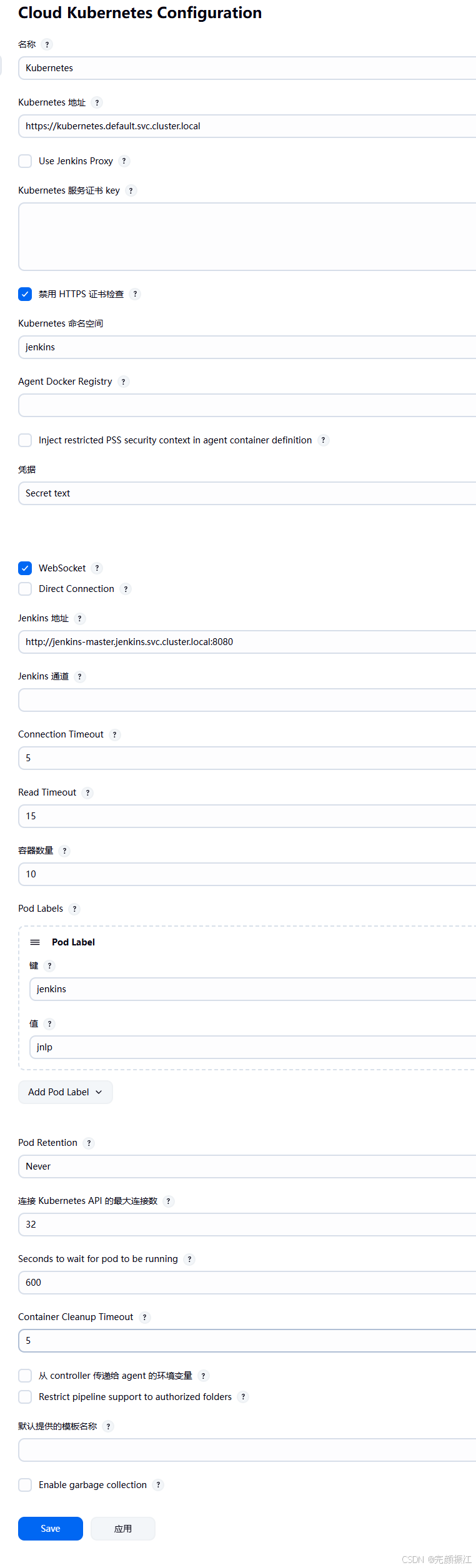
2. Pod Template Settings
- 定义Pod模板,使用我们构建的
swr.cn-east-3.myhuaweicloud.com/bocheng-test/jenkins-agent:v9镜像。 - 配置容器模板,设置工作目录
/home/jenkins/agent。 - 将
.ssh和.kube目录挂载为卷,以便Agent可以访问GitLab和Kubernetes集群。
spec:
  containers:
    - name: jnlp
      securityContext:
        privileged: true
        capabilities:
          add:
            - SYS_ADMIN
            - SETFCAP
        allowPrivilegeEscalation: true
      volumeMounts:
        - name: containers-storage
          mountPath: /var/lib/containers
        - name: dev-mapper
          mountPath: /dev/mapper
        - name: containerd-socket
          mountPath: /run/containerd/containerd.sock
        - name: local-time
          mountPath: /etc/localtime
        - name: maven-cache
          mountPath: /root/.m2/repository
  volumes:
    - name: containers-storage
      emptyDir: {}
    - name: dev-mapper
      hostPath:
        path: /dev/mapper
    - name: containerd-socket
      hostPath:
        path: /run/containerd/containerd.sock
    - name: local-time
      hostPath:
        path: /etc/localtime
    - name: maven-cache
      persistentVolumeClaim:
        claimName: maven-cache-pvc
  tolerations:
    - key: "node-role.kubernetes.io/master"
      operator: "Exists"
      effect: "NoSchedule"
7. Jenkins 的插件
- 确保安装了以下核心插件:
Kubernetes Plugin: 用于动态创建Jenkins Agent Pod。Git Plugin: 用于拉取代码。Pipeline: 提供流水线支持。Credentials Binding Plugin: 用于绑定凭据。Blue Ocean: 提供现代化的UI。
4. k8s环境对华为云镜像仓库的配置
root@k8s-master:~# kubectl  get secret
NAME                  TYPE                             DATA   AGE
swr-registry-secret   kubernetes.io/dockerconfigjson   1      4d22h
swr-secret            kubernetes.io/dockerconfigjson   1      4d22h
root@k8s-master:~# kubectl  get secret -n test
NAME                TYPE     DATA   AGE
nginx-ssl-liveapi   Opaque   2      4d16h
root@k8s-master:~# kubectl  get secret -n jenkins
NAME                  TYPE                             DATA   AGE
swr-registry-secret   kubernetes.io/dockerconfigjson   1      4d22h
swr-secret            kubernetes.io/dockerconfigjson   1      4d22h
第二步:Ingress 配置
1. Ingress Nginx控制器配置 (ingress-nginx-controller.yaml)
apiVersion: v1
kind: Namespace
metadata:
  labels:
    app.kubernetes.io/instance: ingress-nginx
    app.kubernetes.io/name: ingress-nginx
  name: ingress-nginx
---
apiVersion: v1
automountServiceAccountToken: true
kind: ServiceAccount
metadata:
  labels:
    app.kubernetes.io/component: controller
    app.kubernetes.io/instance: ingress-nginx
    app.kubernetes.io/name: ingress-nginx
    app.kubernetes.io/part-of: ingress-nginx
    app.kubernetes.io/version: 1.13.2
  name: ingress-nginx
  namespace: ingress-nginx
---
apiVersion: v1
automountServiceAccountToken: true
kind: ServiceAccount
metadata:
  labels:
    app.kubernetes.io/component: admission-webhook
    app.kubernetes.io/instance: ingress-nginx
    app.kubernetes.io/name: ingress-nginx
    app.kubernetes.io/part-of: ingress-nginx
    app.kubernetes.io/version: 1.13.2
  name: ingress-nginx-admission
  namespace: ingress-nginx
---
apiVersion: rbac.authorization.k8s.io/v1
kind: Role
metadata:
  labels:
    app.kubernetes.io/component: controller
    app.kubernetes.io/instance: ingress-nginx
    app.kubernetes.io/name: ingress-nginx
    app.kubernetes.io/part-of: ingress-nginx
    app.kubernetes.io/version: 1.13.2
  name: ingress-nginx
  namespace: ingress-nginx
rules:
- apiGroups:
  - ""
  resources:
  - namespaces
  verbs:
  - get
---
apiVersion: rbac.authorization.k8s.io/v1
kind: Role
metadata:
  labels:
    app.kubernetes.io/component: controller
    app.kubernetes.io/instance: ingress-nginx
    app.kubernetes.io/name: ingress-nginx
    app.kubernetes.io/part-of: ingress-nginx
    app.kubernetes.io/version: 1.13.2
  name: ingress-nginx
  namespace: ingress-nginx
rules:
- apiGroups:
  - ""
  resources:
  - namespaces
  - configmaps
  - pods
  - secrets
  - endpoints
  verbs:
  - get
  - list
  - watch
- apiGroups:
  - ""
  resources:
  - services
  verbs:
  - get
  - list
  - watch
- apiGroups:
  - networking.k8s.io
  resources:
  - ingresses
  verbs:
  - get
  - list
  - watch
- apiGroups:
  - networking.k8s.io
  resources:
  - ingresses/status
  verbs:
  - update
- apiGroups:
  - networking.k8s.io
  resources:
  - ingressclasses
  verbs:
  - get
  - list
  - watch
- apiGroups:
  - coordination.k8s.io
  resourceNames:
  - ingress-nginx-leader
  resources:
  - leases
  verbs:
  - get
  - update
- apiGroups:
  - coordination.k8s.io
  resources:
  - leases
  verbs:
  - create
- apiGroups:
  - ""
  resources:
  - events
  verbs:
  - create
  - patch
- apiGroups:
  - discovery.k8s.io
  resources:
  - endpointslices
  verbs:
  - list
  - watch
  - get
---
apiVersion: rbac.authorization.k8s.io/v1
kind: Role
metadata:
  labels:
    app.kubernetes.io/component: admission-webhook
    app.kubernetes.io/instance: ingress-nginx
    app.kubernetes.io/name: ingress-nginx
    app.kubernetes.io/part-of: ingress-nginx
    app.kubernetes.io/version: 1.13.2
  name: ingress-nginx-admission
  namespace: ingress-nginx
rules:
- apiGroups:
  - ""
  resources:
  - secrets
  verbs:
  - get
  - create
---
apiVersion: rbac.authorization.k8s.io/v1
kind: RoleBinding
metadata:
  labels:
    app.kubernetes.io/component: controller
    app.kubernetes.io/instance: ingress-nginx
    app.kubernetes.io/name: ingress-nginx
    app.kubernetes.io/part-of: ingress-nginx
    app.kubernetes.io/version: 1.13.2
  name: ingress-nginx
  namespace: ingress-nginx
roleRef:
  apiGroup: rbac.authorization.k8s.io
  kind: Role
  name: ingress-nginx
subjects:
- kind: ServiceAccount
  name: ingress-nginx
  namespace: ingress-nginx
---
apiVersion: rbac.authorization.k8s.io/v1
kind: RoleBinding
metadata:
  labels:
    app.kubernetes.io/component: admission-webhook
    app.kubernetes.io/instance: ingress-nginx
    app.kubernetes.io/name: ingress-nginx
    app.kubernetes.io/part-of: ingress-nginx
    app.kubernetes.io/version: 1.13.2
  name: ingress-nginx-admission
  namespace: ingress-nginx
roleRef:
  apiGroup: rbac.authorization.k8s.io
  kind: Role
  name: ingress-nginx-admission
subjects:
- kind: ServiceAccount
  name: ingress-nginx-admission
  namespace: ingress-nginx
---
apiVersion: rbac.authorization.k8s.io/v1
kind: ClusterRole
metadata:
  labels:
    app.kubernetes.io/instance: ingress-nginx
    app.kubernetes.io/name: ingress-nginx
    app.kubernetes.io/part-of: ingress-nginx
    app.kubernetes.io/version: 1.13.2
  name: ingress-nginx
rules:
- apiGroups:
  - ""
  resources:
  - configmaps
  - endpoints
  - nodes
  - pods
  - secrets
  - namespaces
  verbs:
  - list
  - watch
- apiGroups:
  - coordination.k8s.io
  resources:
  - leases
  verbs:
  - list
  - watch
- apiGroups:
  - ""
  resources:
  - nodes
  verbs:
  - get
- apiGroups:
  - ""
  resources:
  - services
  verbs:
  - get
  - list
  - watch
- apiGroups:
  - networking.k8s.io
  resources:
  - ingresses
  verbs:
  - get
  - list
  - watch
- apiGroups:
  - ""
  resources:
  - events
  verbs:
  - create
  - patch
- apiGroups:
  - networking.k8s.io
  resources:
  - ingresses/status
  verbs:
  - update
- apiGroups:
  - networking.k8s.io
  resources:
  - ingressclasses
  verbs:
  - get
  - list
  - watch
- apiGroups:
  - discovery.k8s.io
  resources:
  - endpointslices
  verbs:
  - list
  - watch
  - get
---
apiVersion: rbac.authorization.k8s.io/v1
kind: ClusterRole
metadata:
  labels:
    app.kubernetes.io/component: admission-webhook
    app.kubernetes.io/instance: ingress-nginx
    app.kubernetes.io/name: ingress-nginx
    app.kubernetes.io/part-of: ingress-nginx
    app.kubernetes.io/version: 1.13.2
  name: ingress-nginx-admission
rules:
- apiGroups:
  - admissionregistration.k8s.io
  resources:
  - validatingwebhookconfigurations
  verbs:
  - get
  - update
---
apiVersion: rbac.authorization.k8s.io/v1
kind: ClusterRoleBinding
metadata:
  labels:
    app.kubernetes.io/instance: ingress-nginx
    app.kubernetes.io/name: ingress-nginx
    app.kubernetes.io/part-of: ingress-nginx
    app.kubernetes.io/version: 1.13.2
  name: ingress-nginx
roleRef:
  apiGroup: rbac.authorization.k8s.io
  kind: ClusterRole
  name: ingress-nginx
subjects:
- kind: ServiceAccount
  name: ingress-nginx
  namespace: ingress-nginx
---
apiVersion: rbac.authorization.k8s.io/v1
kind: ClusterRoleBinding
metadata:
  labels:
    app.kubernetes.io/component: admission-webhook
    app.kubernetes.io/instance: ingress-nginx
    app.kubernetes.io/name: ingress-nginx
    app.kubernetes.io/part-of: ingress-nginx
    app.kubernetes.io/version: 1.13.2
  name: ingress-nginx-admission
roleRef:
  apiGroup: rbac.authorization.k8s.io
  kind: ClusterRole
  name: ingress-nginx-admission
subjects:
- kind: ServiceAccount
  name: ingress-nginx-admission
  namespace: ingress-nginx
---
apiVersion: apps/v1
kind: Deployment
metadata:
  labels:
    app.kubernetes.io/component: controller
    app.kubernetes.io/instance: ingress-nginx
    app.kubernetes.io/name: ingress-nginx
    app.kubernetes.io/part-of: ingress-nginx
    app.kubernetes.io/version: 1.13.2
  name: ingress-nginx-controller
  namespace: ingress-nginx
spec:
  minReadySeconds: 0
  revisionHistoryLimit: 10
  selector:
    matchLabels:
      app.kubernetes.io/component: controller
      app.kubernetes.io/instance: ingress-nginx
      app.kubernetes.io/name: ingress-nginx
  strategy:
    rollingUpdate:
      maxUnavailable: 1
    type: RollingUpdate
  template:
    metadata:
      labels:
        app.kubernetes.io/component: controller
        app.kubernetes.io/instance: ingress-nginx
        app.kubernetes.io/name: ingress-nginx
        app.kubernetes.io/part-of: ingress-nginx
        app.kubernetes.io/version: 1.13.2
    spec:
      containers:
      - args:
        - /nginx-ingress-controller
        - --election-id=ingress-nginx-leader
        - --controller-class=k8s.io/ingress-nginx
        - --configmap=$(POD_NAMESPACE)/ingress-nginx-controller
        - --validating-webhook=:8443
        - --validating-webhook-certificate=/usr/local/certificates/cert
        - --validating-webhook-key=/usr/local/certificates/key
        env:
        - name: POD_NAME
          valueFrom:
            fieldRef:
              fieldPath: metadata.name
        - name: POD_NAMESPACE
          valueFrom:
            fieldRef:
              fieldPath: metadata.namespace
        - name: LD_PRELOAD
          value: /usr/local/lib/libmimalloc.so
        image: registry.cn-hangzhou.aliyuncs.com/google_containers/nginx-ingress-controller:v1.13.2
        lifecycle:
          preStop:
            exec:
              command:
              - /wait-shutdown
        livenessProbe:
          failureThreshold: 5
          httpGet:
            path: /healthz
            port: 10254
            scheme: HTTP
          initialDelaySeconds: 10
          periodSeconds: 10
          successThreshold: 1
          timeoutSeconds: 1
        name: controller
        ports:
        - containerPort: 80
          hostPort: 80
          name: http
          protocol: TCP
        - containerPort: 443
          hostPort: 443
          name: https
          protocol: TCP
        - containerPort: 8443
          name: webhook
          protocol: TCP
        readinessProbe:
          failureThreshold: 3
          httpGet:
            path: /healthz
            port: 10254
            scheme: HTTP
          initialDelaySeconds: 10
          periodSeconds: 10
          successThreshold: 1
          timeoutSeconds: 1
        resources:
          requests:
            cpu: 100m
            memory: 90Mi
        securityContext:
          allowPrivilegeEscalation: true
          capabilities:
            add:
            - NET_BIND_SERVICE
            drop:
            - ALL
          runAsUser: 101
          seccompProfile:
            type: RuntimeDefault
        volumeMounts:
        - mountPath: /usr/local/certificates/
          name: webhook-cert
          readOnly: true
      dnsPolicy: ClusterFirst
      nodeSelector:
        kubernetes.io/os: linux
      serviceAccountName: ingress-nginx
      terminationGracePeriodSeconds: 300
      volumes:
      - name: webhook-cert
        secret:
          secretName: ingress-nginx-admission
---
apiVersion: batch/v1
kind: Job
metadata:
  labels:
    app.kubernetes.io/component: admission-webhook
    app.kubernetes.io/instance: ingress-nginx
    app.kubernetes.io/name: ingress-nginx
    app.kubernetes.io/part-of: ingress-nginx
    app.kubernetes.io/version: 1.13.2
  name: ingress-nginx-admission-create
  namespace: ingress-nginx
spec:
  template:
    metadata:
      labels:
        app.kubernetes.io/component: admission-webhook
        app.kubernetes.io/instance: ingress-nginx
        app.kubernetes.io/name: ingress-nginx
        app.kubernetes.io/part-of: ingress-nginx
        app.kubernetes.io/version: 1.13.2
    spec:
      containers:
      - args:
        - create
        - --host=ingress-nginx-controller-admission,ingress-nginx-controller-admission.$(POD_NAMESPACE).svc
        - --namespace=$(POD_NAMESPACE)
        - --secret-name=ingress-nginx-admission
        env:
        - name: POD_NAMESPACE
          valueFrom:
            fieldRef:
              fieldPath: metadata.namespace
        image: registry.cn-hangzhou.aliyuncs.com/google_containers/kube-webhook-certgen:v1.3.0
        name: create
        securityContext:
          allowPrivilegeEscalation: false
      nodeSelector:
        kubernetes.io/os: linux
      restartPolicy: OnFailure
      securityContext:
        fsGroup: 2000
        runAsNonRoot: true
        runAsUser: 2000
      serviceAccountName: ingress-nginx-admission
---
apiVersion: batch/v1
kind: Job
metadata:
  labels:
    app.kubernetes.io/component: admission-webhook
    app.kubernetes.io/instance: ingress-nginx
    app.kubernetes.io/name: ingress-nginx
    app.kubernetes.io/part-of: ingress-nginx
    app.kubernetes.io/version: 1.13.2
  name: ingress-nginx-admission-patch
  namespace: ingress-nginx
spec:
  template:
    metadata:
      labels:
        app.kubernetes.io/component: admission-webhook
        app.kubernetes.io/instance: ingress-nginx
        app.kubernetes.io/name: ingress-nginx
        app.kubernetes.io/part-of: ingress-nginx
        app.kubernetes.io/version: 1.13.2
    spec:
      containers:
      - args:
        - patch
        - --webhook-name=ingress-nginx-admission
        - --namespace=$(POD_NAMESPACE)
        - --patch-mutating=false
        - --secret-name=ingress-nginx-admission
        - --patch-failure-policy=Fail
        env:
        - name: POD_NAMESPACE
          valueFrom:
            fieldRef:
              fieldPath: metadata.namespace
        image: registry.cn-hangzhou.aliyuncs.com/google_containers/kube-webhook-certgen:v1.3.0
        name: patch
        securityContext:
          allowPrivilegeEscalation: false
      nodeSelector:
        kubernetes.io/os: linux
      restartPolicy: OnFailure
      securityContext:
        fsGroup: 2000
        runAsNonRoot: true
        runAsUser: 2000
      serviceAccountName: ingress-nginx-admission
---
apiVersion: networking.k8s.io/v1
kind: IngressClass
metadata:
  labels:
    app.kubernetes.io/component: controller
    app.kubernetes.io/instance: ingress-nginx
    app.kubernetes.io/name: ingress-nginx
    app.kubernetes.io/part-of: ingress-nginx
    app.kubernetes.io/version: 1.13.2
  name: nginx
spec:
  controller: k8s.io/ingress-nginx
---
apiVersion: admissionregistration.k8s.io/v1
kind: ValidatingWebhookConfiguration
metadata:
  labels:
    app.kubernetes.io/component: admission-webhook
    app.kubernetes.io/instance: ingress-nginx
    app.kubernetes.io/name: ingress-nginx
    app.kubernetes.io/part-of: ingress-nginx
    app.kubernetes.io/version: 1.13.2
  name: ingress-nginx-admission
webhooks:
- admissionReviewVersions:
  - v1
  clientConfig:
    service:
      name: ingress-nginx-controller-admission
      namespace: ingress-nginx
      path: /networking/v1/ingresses
      port: 443
  failurePolicy: Fail
  matchPolicy: Equivalent
  name: validate.nginx.ingress.kubernetes.io
  rules:
  - apiGroups:
    - networking.k8s.io
    apiVersions:
    - v1
    operations:
    - CREATE
    - UPDATE
    resources:
    - ingresses
    sideEffects: None
2. Nginx服务的Ingress示例
apiVersion: networking.k8s.io/v1
kind: Ingress
metadata:
  name: {APP_NAME}-ingress
  namespace: test
  annotations:
    nginx.ingress.kubernetes.io/ssl-redirect: "false"
    nginx.ingress.kubernetes.io/proxy-body-size: "0"
    nginx.ingress.kubernetes.io/proxy-connect-timeout: "3600"
    nginx.ingress.kubernetes.io/proxy-send-timeout: "3600"
    nginx.ingress.kubernetes.io/proxy-read-timeout: "3600"
    nginx.ingress.kubernetes.io/proxy-request-buffering: "off"
    nginx.ingress.kubernetes.io/websocket-services: {APP_NAME}
spec:
  ingressClassName: nginx
  rules:
  - host: {APP_DOMAIN}
    http:
      paths:
      - path: /
        pathType: Prefix
        backend:
          service:
            name: {APP_NAME}-service
            port:
              number: 80
3. 证书的配置
service-nodeport配置
# service-nodeport.yaml
apiVersion: v1
kind: Service
metadata:
  name: custom-nginx-service
  namespace: test
spec:
  type: NodePort
  selector:
    app: custom-nginx
  ports:
  - name: http
    port: 80
    targetPort: 80
    nodePort: 30082
  - name: https
    port: 443
    targetPort: 443
    nodePort: 30444
NFS的信息(nginx配置在NFS上)
# /etc/exports: the access control list for filesystems which may be exported
# to NFS clients. See exports(5).
#
# Example for NFSv2 and NFSv3:
# /srv/homes hostname1(rw,sync,no_subtree_check) hostname2(ro,sync,no_subtree_check)
#
# Example for NFSv4:
# /srv/nfs4 gss/krb5i(rw,sync,fsid=0,crossmnt,no_subtree_check)
# /srv/nfs4/homes gss/krb5i(rw,sync,no_subtree_check)
#
# 共享目录 允许的客户端(IP或网段) (选项)
/opt/nfs/dbb-live-api-test/ *(rw,sync,no_root_squash,no_subtree_check)
/opt/nfs/nginx *(rw,sync,no_root_squash,no_subtree_check)
/opt/nfs/dbb-live-api/ *(rw,sync,no_root_squash,no_subtree_check)
root@vm01:~# cd /opt/nfs/nginx
root@vm01:/opt/nfs/nginx# tree -L 2
.
├── conf.d
│   ├── liveapi.doubbjt.com.conf
│   └── shopapi.doubbjt.com.conf
├── mime.types
├── nginx.conf
└── ssl
    ├── doubbjt.com.key
    └── doubbjt.com.pem

2 directories, 6 files
root@vm01:/opt/nfs/nginx# cat conf.d/liveapi.doubbjt.com.conf
server {
listen 80;
listen 443 ssl http2;
server_name testliveapi.doubbjt.com;
index index.php index.html index.htm;
# ✅ SSL 配置(保持不变)
ssl_certificate /etc/nginx/ssl/doubbjt.com.pem;
ssl_certificate_key /etc/nginx/ssl/doubbjt.com.key;
ssl_protocols TLSv1.1 TLSv1.2 TLSv1.3;
ssl_ciphers ECDHE-RSA-AES128-GCM-SHA256:ECDHE:ECDH:AES:HIGH:!NULL:!aNULL:!MD5:!ADH:!RC4:!DH:!DHE;
ssl_prefer_server_ciphers on;
ssl_session_cache shared:SSL:10m;
ssl_session_timeout 10m;
location ~ .*.(php|php5)?$
{
fastcgi_pass 127.0.0.1:9000;
fastcgi_index index.php;
include fastcgi.conf;
}
location ~ .*\.(gif|jpg|jpeg|png|bmp|swf)$
{
expires 30d;
error_log off;
access_log /var/log/nginx/testliveapi.doubbjt.com.log;
}
location ~ .*\.(js|css)?$
{
expires 12h;
error_log off;
access_log /var/log/nginx/testliveapi.doubbjt.com.log;
}
location ^~ /.well-known/acme-challenge/ {
root /www/wwwroot/testliveapi1.doubbjt.com;
allow all;
default_type "text/plain";
try_files $uri =404;
}
access_log /var/log/nginx/liveapi.doubbjt.com.log main;
error_log /var/log/nginx/liveapi.doubbjt.com.error.log;
}
root@vm01:/opt/nfs/nginx# cat mime.types
types {
text/html html htm shtml;
text/css css;
text/xml xml;
image/gif gif;
image/jpeg jpeg jpg;
application/javascript js;
application/atom+xml atom;
application/rss+xml rss;
text/mathml mml;
text/plain txt;
text/vnd.sun.j2me.app-descriptor jad;
text/vnd.wap.wml wml;
text/x-component htc;
image/png png;
image/svg+xml svg svgz;
image/tiff tif tiff;
image/vnd.wap.wbmp wbmp;
image/webp webp;
image/x-icon ico;
image/x-jng jng;
image/x-ms-bmp bmp;
image/x-png png;
image/x-portable-anymap pnm;
image/x-portable-bitmap pbm;
image/x-portable-graymap pgm;
image/x-portable-pixmap ppm;
image/x-rgb rgb;
image/x-xbitmap xbmp;
image/x-xpixmap xpm;
image/x-xwindowdump xwd;
application/java-archive jar war ear;
application/mac-binhex40 hqx;
application/msword doc;
application/pdf pdf;
application/postscript ps eps ai;
application/rtf rtf;
application/vnd.apple.mpegurl m3u8;
application/vnd.ms-excel xls;
application/vnd.ms-powerpoint ppt;
application/vnd.wap.wmlc wmlc;
application/vnd.google-earth.kml+xml kml;
application/vnd.google-earth.kmz kmz;
application/x-7z-compressed 7z;
application/x-cocoa cco;
application/x-java-archive-delta jardiff;
application/x-java-jnlp-file jnlp;
application/x-makeself run;
application/x-perl pl pm;
application/x-pilot prc pdb;
application/x-rar-compressed rar;
application/x-redhat-package-manager rpm;
application/x-sea sea;
application/x-shockwave-flash swf;
application/x-stuffit sit;
application/x-tcl tcl tk;
application/x-x509-ca-cert der pem crt;
application/x-xpinstall xpi;
application/xhtml+xml xhtml;
application/xspf+xml xspf;
application/zip zip;
application/octet-stream bin exe dll;
application/octet-stream deb;
application/octet-stream dmg;
application/octet-stream eot;
application/octet-stream iso img;
application/octet-stream msi msp msm;
audio/midi mid midi kar;
audio/mpeg mp3;
audio/x-realaudio ra;
video/3gpp 3gpp 3gp;
video/mp2t ts;
video/mp4 mp4;
video/mpeg mpeg mpg;
video/quicktime mov;
video/webm webm;
video/x-flv flv;
video/x-mng mng;
video/x-ms-asf asx asf;
video/x-ms-wmv wmv;
video/x-msvideo avi;
}
root@vm01:/opt/nfs/nginx# cat nginx.conf
user root;
worker_processes auto;
error_log /var/log/nginx/nginx_error.log crit;
pid /var/log/nginx/nginx.pid;
worker_rlimit_nofile 51200;
events
{
use epoll;
worker_connections 51200;
multi_accept on;
}
http
{
log_format main
'$remote_addr - $remote_user [$time_local] '
'"$request" $status $body_bytes_sent '
'"$http_referer" "$http_user_agent" '
'rt=$request_time '
'upstream_addr="$upstream_addr" '
'upstream_status=$upstream_status '
'upstream_response_time=$upstream_response_time '
'upstream_cache_status="$upstream_cache_status"';
include mime.types;
default_type application/octet-stream;
server_names_hash_bucket_size 512;
client_header_buffer_size 32k;
large_client_header_buffers 4 32k;
client_max_body_size 50m;
sendfile on;
tcp_nopush on;
keepalive_timeout 60;
tcp_nodelay on;
fastcgi_connect_timeout 300;
fastcgi_send_timeout 300;
fastcgi_read_timeout 300;
fastcgi_buffer_size 64k;
fastcgi_buffers 4 64k;
fastcgi_busy_buffers_size 128k;
fastcgi_temp_file_write_size 256k;
fastcgi_intercept_errors on;
gzip on;
gzip_min_length 1k;
gzip_buffers 4 16k;
gzip_http_version 1.1;
gzip_comp_level 2;
gzip_types text/plain application/javascript application/x-javascript text/css application/xml;
gzip_vary on;
gzip_proxied expired no-cache no-store private auth;
gzip_disable "MSIE [1-6]\.";
limit_conn_zone $binary_remote_addr zone=perip:10m;
limit_conn_zone $server_name zone=perserver:10m;
server_tokens off;
access_log off;
include /etc/nginx/conf.d/*.conf;
}
deployment-nginx-nfs.yaml
# deployment-nginx-nfs.yaml
apiVersion: apps/v1
kind: Deployment
metadata:
  name: custom-nginx
  namespace: test
  labels:
    app: custom-nginx
spec:
  replicas: 1
  selector:
    matchLabels:
      app: custom-nginx
  template:
    metadata:
      labels:
        app: custom-nginx
    spec:
      containers:
      - name: nginx
        image: swr.cn-east-3.myhuaweicloud.com/bocheng-test/ubuntu:22.04_v1
        imagePullPolicy: IfNotPresent
        command: ["/bin/bash", "-c"]
        args:
        -|
          set -ex
          # 检查 NFS 挂载中是否有配置文件
          if [ ! -f "/etc/nginx/nginx.conf" ]; then
            echo "📄 NFS 目录为空,首次初始化:从模板复制配置..."
            mkdir -p /etc/nginx/conf.d
            cp /tmp/config/nginx.conf /etc/nginx/nginx.conf
            cp /tmp/config/liveapi.doubbjt.com.conf /etc/nginx/conf.d/
          else
            echo "🔁 使用 NFS 中已有配置。"
          fi
          # 创建必要运行目录(使用 tmpfs)
          mkdir -p /run/nginx /var/log/nginx /www/server/nginx/logs
          # 启动 Nginx
          echo "🚀 启动 Nginx 服务..."
          exec /usr/sbin/nginx -g "daemon off;"
        ports:
        - containerPort: 80
        - containerPort: 443
        volumeMounts:
        - name: nginx-config-nfs
          mountPath: /etc/nginx
        - name: config-volume
          mountPath: /tmp/config
          readOnly: true
        - name: ssl-certs
          mountPath: /etc/nginx/ssl
        securityContext:
          runAsUser: 0
          allowPrivilegeEscalation: true
          capabilities:
            add:
            - NET_BIND_SERVICE
      volumes:
      - name: config-volume
        configMap:
          name: custom-nginx-config
      - name: nginx-config-nfs
        nfs:
          server: 192.168.122.189
          path: /opt/nfs/nginx
      - name: ssl-certs
        secret:
          secretName: nginx-ssl-liveapi
依赖配置文件
# configmap
apiVersion: v1
kind: ConfigMap
metadata:
  name: custom-nginx-config
  namespace: test
data:
  nginx.conf: |
    user root;
    worker_processes auto;
    error_log /var/log/nginx/nginx_error.log crit;
    pid /var/log/nginx/nginx.pid;
    worker_rlimit_nofile 51200;
    events
    {
      use epoll;
      worker_connections 51200;
      multi_accept on;
    }
    http
    {
      log_format main
      '$remote_addr - $remote_user [$time_local] '
      '"$request" $status $body_bytes_sent '
      '"$http_referer" "$http_user_agent" '
      'rt=$request_time '
      'upstream_addr="$upstream_addr" '
      'upstream_status=$upstream_status '
      'upstream_response_time=$upstream_response_time '
      'upstream_cache_status="$upstream_cache_status"';
      include mime.types;
      default_type application/octet-stream;
      server_names_hash_bucket_size 512;
      client_header_buffer_size 32k;
      large_client_header_buffers 4 32k;
      client_max_body_size 50m;
      sendfile on;
      tcp_nopush on;
      keepalive_timeout 60;
      tcp_nodelay on;
      fastcgi_connect_timeout 300;
      fastcgi_send_timeout 300;
      fastcgi_read_timeout 300;
      fastcgi_buffer_size 64k;
      fastcgi_buffers 4 64k;
      fastcgi_busy_buffers_size 128k;
      fastcgi_temp_file_write_size 256k;
      fastcgi_intercept_errors on;
      gzip on;
      gzip_min_length 1k;
      gzip_buffers 4 16k;
      gzip_http_version 1.1;
      gzip_comp_level 2;
      gzip_types text/plain application/javascript application/x-javascript text/css application/xml;
      gzip_vary on;
      gzip_proxied expired no-cache no-store private auth;
      gzip_disable "MSIE [1-6]\.";
      limit_conn_zone $binary_remote_addr zone=perip:10m;
      limit_conn_zone $server_name zone=perserver:10m;
      server_tokens off;
      access_log off;
      include /etc/nginx/conf.d/*.conf;
    }
  liveapi.doubbjt.com.conf: |
    server {
    listen 80;
    listen 443 ssl http2;
    server_name testliveapi.doubbjt.com;
    index index.php index.html index.htm;
    # ✅ SSL 配置(保持不变)
    ssl_certificate /etc/nginx/ssl/doubbjt.com.pem;
    ssl_certificate_key /etc/nginx/ssl/doubbjt.com.key;
    ssl_protocols TLSv1.1 TLSv1.2 TLSv1.3;
    ssl_ciphers ECDHE-RSA-AES128-GCM-SHA256:ECDHE:ECDH:AES:HIGH:!NULL:!aNULL:!MD5:!ADH:!RC4:!DH:!DHE;
    ssl_prefer_server_ciphers on;
    ssl_session_cache shared:SSL:10m;
    ssl_session_timeout 10m;
    location ~ .*.(php|php5)?$
    {
    fastcgi_pass 127.0.0.1:9000;
    fastcgi_index index.php;
    include fastcgi.conf;
    }
    location ~ .*\.(gif|jpg|jpeg|png|bmp|swf)$
    {
    expires 30d;
    error_log off;
    access_log /var/log/nginx/testliveapi.doubbjt.com.log;
    }
    location ~ .*\.(js|css)?$
    {
    expires 12h;
    error_log off;
    access_log /var/log/nginx/testliveapi.doubbjt.com.log;
    }
    location ^~ /.well-known/acme-challenge/ {
    root /www/wwwroot/testliveapi1.doubbjt.com;
    allow all;
    default_type "text/plain";
    try_files $uri =404;
    }
    # ✅ 日志(使用你的 main 格式)
    access_log /var/log/nginx/liveapi.doubbjt.com.log main;
    error_log /var/log/nginx/liveapi.doubbjt.com.error.log;
    }
第三步:Jenkins Pipeline
1. GitLab 配置部分
地址: https://gitlab.dbblive.com/kubernetes/yyh-devops/-/blob/master/dbbjt/php/dbb-live-api/k8s-deployment.yaml
该仓库 yyh-devops 存放了所有应用的Kubernetes部署清单模板。
k8s-deployment.yaml 模板内容
apiVersion: apps/v1
kind: Deployment
metadata:
  name: {APP_NAME}
  namespace: test
  labels:
    app: {APP_NAME}
spec:
  replicas: 2
  selector:
    matchLabels:
      app: {APP_NAME}
  template:
    metadata:
      labels:
        app: {APP_NAME}
    spec:
      initContainers:
      - name: build-artisan-cache
        image: swr.cn-east-3.myhuaweicloud.com/bocheng-test/php-fpm-prod:base_v4
        env:
        - name: APP_ENV
          value: "production"
        - name: CACHE_DRIVER
          value: "file"
        - name: SESSION_DRIVER
          value: "file"
        command: ["sh", "-c"]
        args:
        -|
          set -ex
          cd /var/www/html
          rm -f bootstrap/cache/*.php
          rm -rf storage/framework/cache/*
          rm -rf storage/framework/views/*
          rm -rf storage/framework/sessions/*
          php artisan config:cache
          php artisan route:cache
          php artisan view:cache
          php artisan event:cache
        volumeMounts:
        - name: nfs-storage
          subPath: "{NFS_SUBPATH}"
          mountPath: /var/www/html
      containers:
      - name: php-fpm
        image: swr.cn-east-3.myhuaweicloud.com/bocheng-test/php-fpm-prod:base_v4
        ports:
        - containerPort: 9000
        volumeMounts:
        - name: nfs-storage
          subPath: "{NFS_SUBPATH}"
          mountPath: /var/www/html
        resources:
          limits:
            memory: "512Mi"
            cpu: "500m"
          requests:
            memory: "512Mi"
            cpu: "500m"
          securityContext:
            runAsUser: 0
            runAsGroup: 0
      - name: nginx
        image: swr.cn-east-3.myhuaweicloud.com/bocheng-test/nginx-laravel:base_v1
        ports:
        - containerPort: 80
        volumeMounts:
        - name: nfs-storage
          subPath: "{NFS_SUBPATH}"
          mountPath: /var/www/html
        resources:
          limits:
            memory: "128Mi"
            cpu: "200m"
          requests:
            memory: "128Mi"
            cpu: "200m"
          securityContext:
            runAsUser: 0
            runAsGroup: 0
      volumes:
      - name: nfs-storage
        persistentVolumeClaim:
          claimName: nfs-pvc-{APP_NAME}-test
---
apiVersion: v1
kind: Service
metadata:
  name: {APP_NAME}-service
  namespace: test
spec:
  selector:
    app: {APP_NAME}
  ports:
  - protocol: TCP
    port: 80
    targetPort: 80
  type: ClusterIP
2. Jenkins Pipeline 流水线部分
1. 通过PV/PVC挂载NFS的方式
pipeline {
    agent { label 'jnlp-slave' }
    parameters {
        choice(
            name: 'DEPLOY_ACTION',
            choices: ['Deploy', 'Rollback'],
            description: 'Choose action type: Deploy or Rollback'
        )
        string(
            name: 'ROLLBACK_TO_BUILD',
            defaultValue: '',
            description: 'Enter build number to rollback (e.g. 15), leave empty to rollback to last successful version'
        )
    }
    environment {
        DEPLOY_REPO_SSH = 'git@gitlab.dbblive.com:kubernetes/yyh-devops.git'
    }
    stages {
        stage('Initialize Variables') {
            steps {
                script {
                    env.APP_NAME = env.JOB_BASE_NAME
                    echo "Detected APP_NAME from Job Name: ${APP_NAME}"
                    env.NFS_ROOT = "/opt/nfs/${APP_NAME}-test"
                    env.CURRENT_BUILD_DIR = "${NFS_ROOT}/${BUILD_NUMBER}"
                    env.LAST_SUCCESS_FILE = "${NFS_ROOT}/LAST_SUCCESS"
                    env.BASE_DIR = "${NFS_ROOT}/base"
                }
            }
        }
        stage('Prepare Code for Deployment') {
            when {
                expression { params.DEPLOY_ACTION == 'Deploy' }
            }
            steps {
                script {
                    def sourceDir = "${WORKSPACE}"
                    sh """
                        mkdir -p ${CURRENT_BUILD_DIR}
                        rsync -arvP ${sourceDir}/ ${CURRENT_BUILD_DIR}/|| true
                        chmod -R u+rw ${CURRENT_BUILD_DIR}
                    """
                    dir("${CURRENT_BUILD_DIR}") {
                        sh '''
                            cd "${CURRENT_BUILD_DIR}"
                            git config --global core.sshCommand "ssh -o StrictHostKeyChecking=no -o UserKnownHostsFile=/dev/null"
                            git pull|| echo "Git pull skipped (maybe not a repo)"
                        '''
                    }
                }
            }
        }
        stage('Handle Rollback') {
            when { expression { params.DEPLOY_ACTION == 'Rollback' } }
            steps {
                script {
                    def targetBuild = params.ROLLBACK_TO_BUILD?.trim()
                    if (!targetBuild) {
                        def lastSuccessFile = "${NFS_ROOT}/LAST_SUCCESS"
                        if (fileExists(lastSuccessFile)) {
                            targetBuild = readFile(lastSuccessFile).trim()
                            echo "No build number provided. Reading last successful build from ${lastSuccessFile}: ${targetBuild}"
                        } else {
                            error("ROLLBACK_TO_BUILD is empty and LAST_SUCCESS file not found at ${lastSuccessFile}. Cannot determine rollback target.")
                        }
                    }
                    echo "Rolling back to build: ${targetBuild}"
                    env.TARGET_BUILD = targetBuild
                }
            }
        }
        stage('Checkout Deployment Templates') {
            steps {
                script {
                    echo "Cleaning workspace and cloning deployment repo via SSH"
                    deleteDir()
                }
                sh '''
                    git config --global core.sshCommand "ssh -o StrictHostKeyChecking=no -o UserKnownHostsFile=/dev/null"
                    REPO_DIR="yyh-devops-repo"
                    REPO_URL="${DEPLOY_REPO_SSH}"
                    echo "Cloning from ${REPO_URL} into ${REPO_DIR}"
                    git clone "${REPO_URL}" "${REPO_DIR}"
                    INPUT_PATH="${REPO_DIR}/dbbjt/php/${APP_NAME}/k8s-deployment.yaml"
                    if [ ! -f "$INPUT_PATH" ]; then
                        echo "❌ Error: k8s-deployment.yaml not found at $INPUT_PATH"
                        find "${REPO_DIR}" -type f
                        exit 1
                    fi
                    echo "✅ Template repository cloned successfully"
                '''
            }
        }
        stage('Render and Apply Kubernetes Manifest') {
            steps {
                script {
                    env.NFS_SUBPATH = (params.DEPLOY_ACTION == 'Deploy') ? env.BUILD_NUMBER : env.TARGET_BUILD
                    echo "🎯 Final Variables:"
                    echo " APP_NAME = ${APP_NAME}"
                    echo " BUILD_NUMBER = ${BUILD_NUMBER}"
                    echo " NFS_SUBPATH = ${NFS_SUBPATH}"
                    echo " Action = ${params.DEPLOY_ACTION}"
                }
                sh '''
                    set -e
                    set -u
                    INPUT="yyh-devops-repo/dbbjt/php/${APP_NAME}/k8s-deployment.yaml"
                    OUTPUT="${WORKSPACE}/rendered.yaml"
                    if [ ! -f "$INPUT" ]; then
                        echo "❌ Template not found at $INPUT"
                        exit 1
                    fi
                    cp "$INPUT" "$OUTPUT"
                    sed -i "s|{APP_NAME}|${APP_NAME}|g" "$OUTPUT"
                    sed -i "s|{NFS_SUBPATH}|${NFS_SUBPATH}|g" "$OUTPUT"
                    echo "=== 🔍 Rendered Manifest ==="
                    cat "$OUTPUT"
                    echo "=== 🚀 Applying to Kubernetes ==="
                    kubectl apply -f "$OUTPUT"
                '''
            }
        }
        stage('Update Success Marker') {
            when {
                expression { currentBuild.result == null || currentBuild.result == 'SUCCESS' }
            }
            steps {
                script {
                    def finalVersion = (params.DEPLOY_ACTION == 'Deploy') ? env.BUILD_NUMBER : (params.ROLLBACK_TO_BUILD ?: env.TARGET_BUILD)
                    sh "echo ${finalVersion} > ${LAST_SUCCESS_FILE}"
                    echo "Action succeeded. Updated LAST_SUCCESS=${finalVersion}"
                }
            }
            failure {
                echo "Action failed. LAST_SUCCESS was not updated."
            }
            always {
                deleteDir()
            }
        }
    }
}
2. 登录NFS服务器去拷贝的方式
agent { label 'jnlp-slave' }
parameters {
    choice(
        name: 'DEPLOY_ACTION',
        choices: ['Deploy', 'Rollback'],
        description: 'Choose action type: Deploy or Rollback'
    )
    string(
        name: 'ROLLBACK_TO_BUILD',
        defaultValue: '',
        description: 'Enter build number to rollback (e.g. 15), leave empty to rollback to last successful version'
    )
}
environment {
    DEPLOY_REPO_SSH = 'git@gitlab.dbblive.com:kubernetes/yyh-devops.git'
}
stages {
    stage('Initialize Variables') {
        steps {
            script {
                env.APP_NAME = env.JOB_BASE_NAME
                echo "Detected APP_NAME from Job Name: ${APP_NAME}"
                env.NFS_ROOT = "/opt/nfs/${APP_NAME}-test"
                env.CURRENT_BUILD_DIR = "${NFS_ROOT}/${BUILD_NUMBER}"
                env.LAST_SUCCESS_FILE = "${NFS_ROOT}/LAST_SUCCESS"
                env.BASE_DIR = "${NFS_ROOT}/base"
            }
        }
    }
    stage('Prepare Code for Deployment') {
        when {
            expression { params.DEPLOY_ACTION == 'Deploy' }
        }
        steps {
            script {
                def sourceDir = "${WORKSPACE}"
                sh """
                    mkdir -p ${CURRENT_BUILD_DIR}
                    rsync -arvP ${sourceDir}/ ${CURRENT_BUILD_DIR}/|| true
                    chmod -R u+rw ${CURRENT_BUILD_DIR}
                """
                dir("${CURRENT_BUILD_DIR}") {
                    sh '''
                        cd "${CURRENT_BUILD_DIR}"
                        git config --global core.sshCommand "ssh -o StrictHostKeyChecking=no -o UserKnownHostsFile=/dev/null"
                        git pull|| echo "Git pull skipped (maybe not a repo)"
                    '''
                }
            }
        }
    }
    stage('Handle Rollback') {
        when { expression { params.DEPLOY_ACTION == 'Rollback' } }
        steps {
            script {
                def targetBuild = params.ROLLBACK_TO_BUILD?.trim()
                if (!targetBuild) {
                    def lastSuccessFile = "${NFS_ROOT}/LAST_SUCCESS"
                    if (fileExists(lastSuccessFile)) {
                        targetBuild = readFile(lastSuccessFile).trim()
                        echo "No build number provided. Reading last successful build from ${lastSuccessFile}: ${targetBuild}"
                    } else {
                        error("ROLLBACK_TO_BUILD is empty and LAST_SUCCESS file not found at ${lastSuccessFile}. Cannot determine rollback target.")
                    }
                }
                echo "Rolling back to build: ${targetBuild}"
                env.TARGET_BUILD = targetBuild
            }
        }
    }
    stage('Checkout Deployment Templates') {
        steps {
            script {
                echo "Cleaning workspace and cloning deployment repo via SSH"
                deleteDir()
            }
            sh '''
                git config --global core.sshCommand "ssh -o StrictHostKeyChecking=no -o UserKnownHostsFile=/dev/null"
                REPO_DIR="yyh-devops-repo"
                REPO_URL="${DEPLOY_REPO_SSH}"
                echo "Cloning from ${REPO_URL} into ${REPO_DIR}"
                git clone "${REPO_URL}" "${REPO_DIR}"
                INPUT_PATH="${REPO_DIR}/dbbjt/php/${APP_NAME}/k8s-deployment.yaml"
                if [ ! -f "$INPUT_PATH" ]; then
                    echo "Template not found at $INPUT_PATH"
                    exit 1
                fi
                cp "$INPUT_PATH" "$OUTPUT"
                sed -i "s|{APP_NAME}|${APP_NAME}|g" "$OUTPUT"
                sed -i "s|{NFS_SUBPATH}|${NFS_SUBPATH}|g" "$OUTPUT"
                echo "Rendered Manifest"
                cat "$OUTPUT"
                echo "Applying to Kubernetes"
                kubectl apply -f "$OUTPUT"
            '''
        }
    }
    post {
        success {
            script {
                def finalVersion = (params.DEPLOY_ACTION == 'Deploy') ? env.BUILD_NUMBER : (params.ROLLBACK_TO_BUILD ?: env.TARGET_BUILD)
                sh "echo ${finalVersion} > ${LAST_SUCCESS_FILE}"
                echo "Action succeeded. Updated LAST_SUCCESS=${finalVersion}"
            }
        }
        failure {
            echo "Action failed. LAST_SUCCESS was not updated."
        }
        always {
            deleteDir()
        }
    }
}
第四步:最基础镜像制作
Bash
拉取基础镜像
root@bocheng-System-Product-Name:~# docker pull ubuntu:22.04
创建docker容器进入制作基础镜像
root@bocheng-System-Product-Name:~# docker run -itd --name base ubuntu:22.04 bash
root@bocheng-System-Product-Name:~# docker exec -it base bash
容器内操作
root@d3788c4ad31e:~# php -v
PHP 8.0.x (fpm-fcgi) (built: ...)
Copyright (c) The PHP Group
Zend Engine v4.0.0, Copyright (c) Zend Technologies
    with Zend OPcache v8.0.0, Copyright (c), by Zend Technologies

root@d3788c4ad31e:~# composer -V
Composer version 2.0.14 2021-01-06 11:12:37

root@d3788c4ad31e:~# echo "设置时区与PHP默认内存限制"
DEBIAN_FRONTEND=noninteractive TZ=Asia/Shanghai PHP_MEMORY_LIMIT=256M UPLOAD_MAX_FILESIZE=50M POST_MAX_SIZE=100M

root@d3788c4ad31e:~# sed -i 's|http://archive.ubuntu.com/ubuntu/|http://mirrors.aliyun.com/ubuntu/|g' /etc/apt/sources.list && \
   sed -i 's|http://security.ubuntu.com/ubuntu/|http://mirrors.aliyun.com/ubuntu/|g' /etc/apt/sources.list

root@d3788c4ad31e:~# apt-get update && \
   apt-get install -y software-properties-common && \
   add-apt-repository ppa:ondrej/php -y && \
   apt-get update

root@d3788c4ad31e:~# apt-get install -y \
   php8.0-fpm \
   php8.0-cli \
   php8.0-common \
   php8.0-curl \
   php8.0-mbstring \
   php8.0-xml \
   php8.0-dom \
   php8.0-zip \
   php8.0-pdo \
   php8.0-mysql \
   php8.0-redis \
   php8.0-bcmath \
   php8.0-gd \
   php8.0-opcache \
   php8.0-intl \
   php8.0-tokenizer \
   php8.0-json \
   php8.0-fileinfo

root@d3788c4ad31e:~# sed -i 's/memory_limit = .*/memory_limit = 256M/' /etc/php/8.0/fpm/php.ini && \
   sed -i 's/upload_max_filesize = .*/upload_max_filesize = 50M/' /etc/php/8.0/fpm/php.ini && \
   sed -i 's/post_max_size = .*/post_max_size = 100M/' /etc/php/8.0/fpm/php.ini && \
   sed -i 's/;date.timezone.*/date.timezone = Asia\/Shanghai/' /etc/php/8.0/fpm/php.ini

root@d3788c4ad31e:~# echo "启用OPcache优化"
echo "opcache.enable=1" >> /etc/php/8.0/fpm/conf.d/10-opcache.ini && \
echo "opcache.enable_cli=1" >> /etc/php/8.0/fpm/conf.d/10-opcache.ini && \
echo "opcache.memory_consumption=256" >> /etc/php/8.0/fpm/conf.d/10-opcache.ini && \
echo "opcache.max_accelerated_files=20000" >> /etc/php/8.0/fpm/conf.d/10-opcache.ini && \
echo "opcache.validate_timestamps=0" >> /etc/php/8.0/fpm/conf.d/10-opcache.ini

root@d3788c4ad31e:~# sed -i 's/listen = .*/listen = 127.0.0.1:9000/' /etc/php/8.0/fpm/pool.d/www.conf && \
   sed -i 's/;listen.owner/listen.owner/' /etc/php/8.0/fpm/pool.d/www.conf && \
   sed -i 's/;listen.group/listen.group/' /etc/php/8.0/fpm/pool.d/www.conf && \
   sed -i 's/;listen.mode/listen.mode/' /etc/php/8.0/fpm/pool.d/www.conf

root@d3788c4ad31e:~# curl -sS https://getcomposer.org/installer | php8.0 -- --version=2.0.14 --install-dir=/usr/local/bin --filename=composer

root@d3788c4ad31e:~# composer config -g repo.packagist composer https://mirrors.aliyun.com/composer/

root@d3788c4ad31e:~# composer -V
Composer version 2.0.14 2021-01-06 11:12:37

root@d3788c4ad31e:~# php -m | grep -i json
json

root@d3788c4ad31e:~# php -m | grep -i redis
redis

root@d3788c4ad31e:~# nginx -v
nginx version: nginx/1.18.0 (Ubuntu)

root@d3788c4ad31e:~# apt-get install -y nginx supervisor vim git unzip

root@d3788c4ad31e:~# apt-get clean && rm -rf /var/lib/apt/lists/* /tmp/* /var/tmp/*
提交为自定义镜像
root@bocheng-System-Product-Name:~# docker commit base swr.cn-east-3.myhuaweicloud.com/bocheng-test/ubuntu22.04:v1
第五步:服务基础镜像制作
nginx镜像制作
Plain Text
root@bocheng-System-Product-Name:/mnt/2025-10-10-v3/dockerfiles/nginx# tree -L 1
.
├── action.sh
├── Dockerfile
├── laravel.conf
└── nginx.conf

0 directories, 4 files
Bash
root@bocheng-System-Product-Name:/mnt/2025-10-10-v3/dockerfiles/nginx# cat nginx.conf
user root;
worker_processes auto;
error_log /var/log/nginx/error.log warn;
worker_rlimit_nofile 51200;

events {
    use epoll;
    worker_connections 51200;
    multi_accept on;
}

http {
    include /etc/nginx/mime.types;
    default_type application/octet-stream;

    log_format main '$remote_addr - $remote_user [$time_local] "$request" '
                    '$status $body_bytes_sent "$http_referer" '
                    '"$http_user_agent" "$http_x_forwarded_for" '
                    'rt=$request_time uct="$upstream_connect_time" uht="$upstream_header_time" urt="$upstream_response_time"';

    access_log off;
    log_not_found off;
    log_subrequest off;

    client_body_temp_path /tmp/client_body;
    proxy_temp_path /tmp/proxy_temp;
    fastcgi_temp_path /tmp/fastcgi_temp;
    uwsgi_temp_path /tmp/uwsgi_temp;
    scgi_temp_path /tmp/scgi_temp;

    sendfile on;
    tcp_nopush on;
    tcp_nodelay on;
    keepalive_timeout 65;
    keepalive_requests 100;
    types_hash_max_size 2048;

    client_max_body_size 50m;
    client_header_buffer_size 16k;
    large_client_header_buffers 4 32k;

    gzip on;
    gzip_min_length 1k;
    gzip_buffers 4 16k;
    gzip_http_version 1.1;
    gzip_comp_level 2;
    gzip_types
        text/plain
        text/css
        text/xml
        text/javascript
        application/javascript
        application/x-javascript
        application/xml
        application/json
        image/svg+xml;
    gzip_vary on;
    gzip_proxied expired no-cache no-store private auth;
    gzip_disable "MSIE [1-6]\.";

    fastcgi_connect_timeout 300;
    fastcgi_send_timeout 300;
    fastcgi_read_timeout 300;
    fastcgi_buffer_size 64k;
    fastcgi_buffers 4 64k;
    fastcgi_busy_buffers_size 128k;
    fastcgi_temp_file_write_size 256k;
    fastcgi_intercept_errors on;

    limit_conn_zone $binary_remote_addr zone=perip:10m;
    limit_conn_zone $server_name zone=perserver:10m;

    server_tokens off;

    include /etc/nginx/conf.d/*.conf;
    include /etc/nginx/sites-enabled/*;
}
Bash
root@bocheng-System-Product-Name:/mnt/2025-10-10-v3/dockerfiles/nginx# cat laravel.conf
# /etc/nginx/conf.d/default.conf

server {
    listen 80;
    root /var/www/html/public;
    index index.php index.html;

    # 错误日志写入文件(便于排查)
    error_log /var/log/nginx/laravel_error.log warn;
    access_log off;

    location / {
        try_files $uri $uri/ /index.php?$query_string;
    }

    location ~ \.php$ {
        fastcgi_pass 127.0.0.1:9000;
        fastcgi_index index.php;
        fastcgi_param SCRIPT_FILENAME $document_root$fastcgi_script_name;
        include fastcgi_params;

        # 安全头
        fastcgi_param HTTPS off;
    }

    # 安全头
    add_header X-Frame-Options "SAMEORIGIN" always;
    add_header X-Content-Type-Options "nosniff" always;
    add_header X-Permitted-Cross-Domain-Policies "none" always;
    add_header Referrer-Policy "no-referrer" always;
    add_header Content-Security-Policy "default-src 'self'; frame-ancestors 'self';" always;

    # 禁止访问 .htaccess
    location ~ /\.ht {
        deny all;
    }
    location = /health {
        try_files /health.php =200;
    }
    #禁止访问的文件或目录
    location ~ ^/(\.user.ini|\.htaccess|\.git|\.env|\.svn|\.project|LICENSE|README.md)
    {
        return 404;
    }

    #一键申请SSL证书验证目录相关设置
    location ~ \.well-known{
        allow all;
    }

    #禁止在证书验证目录放入敏感文件
    if ( $uri ~ "^/\.well-known/.*\.(php|jsp|py|js|css|lua|ts|go|zip|tar\.gz|rar|7z|sql|bak)$" ) {
        return 403;
    }

    location ~ .*\.(gif|jpg|jpeg|png|bmp|swf)$
    {
        expires      30d;
        error_log /dev/null;
        access_log /dev/null;
    }

    location ~ .*\.(js|css)?$
    {
        expires      12h;
        error_log /dev/null;
        access_log /dev/null;
    }

    # 如果你不用 Let's Encrypt,可删除
    # location ~ /\.well-known/acme-challenge {
    #    allow all;
    # }
}
Bash
root@bocheng-System-Product-Name:/mnt/2025-10-10-v3/dockerfiles/nginx# cat Dockerfile
FROM swr.cn-east-3.myhuaweicloud.com/bocheng-test/ubuntu22.04:v1 AS nginx

ENV DEBIAN_FRONTEND=noninteractive

RUN apt-get update && \
    apt-get install -y nginx && \
    rm -rf /var/lib/apt/lists/* && \
    mkdir -p /var/log/nginx && \
    touch /var/log/nginx/access.log /var/log/nginx/error.log
    # 删除默认站点
RUN rm -f /etc/nginx/sites-enabled/default

# 复制配置
COPY nginx.conf /etc/nginx/nginx.conf
COPY laravel.conf /etc/nginx/conf.d/laravel.conf

WORKDIR /var/www/html
EXPOSE 80

# 使用全路径更安全
CMD ["/usr/sbin/nginx", "-g", "daemon off;"]
Plain Text
root@bocheng-System-Product-Name:/mnt/2025-10-10-v3/dockerfiles/nginx# cat action.sh
#!/bin/bash
docker build -f Dockerfile -t swr.cn-east-3.myhuaweicloud.com/bocheng-test/nginx-laravel:base_v2 .
docker push swr.cn-east-3.myhuaweicloud.com/bocheng-test/nginx-laravel:base_v2
php-fpm镜像制作
Plain Text
root@bocheng-System-Product-Name:/mnt/2025-10-10-v3/dockerfiles/php-fpm# tree -L 3
.
├── action.sh
├── Dockerfile
├── php-fpm
│   ├── php-fpm.conf
│   └── pool.d
│       └── www.conf
├── php-fpm.conf
├── php.ini
└── pool.d
    └── www.conf
Bash
root@bocheng-System-Product-Name:/mnt/2025-10-10-v3/dockerfiles/php-fpm# cat php-fpm/php-fpm.conf
include=/etc/php/8.0/fpm/pool.d/*.conf

[global]
pid = /run/php/php8.0-fpm.pid
error_log = /var/log/php-fpm/php8.0-fpm.log
log_level = notice
TypeScript
root@bocheng-System-Product-Name:/mnt/2025-10-10-v3/dockerfiles/php-fpm# cat php-fpm/pool.d/www.conf
[www]
listen = 0.0.0.0:9000
listen.backlog = 8192

user = www-data
group = www-data

pm = static
pm.max_children = 200
pm.start_servers = 15
pm.min_spare_servers = 15
pm.max_spare_servers = 50

pm.status_path = /phpfpm_80_status

request_terminate_timeout = 30
request_slowlog_timeout = 30
slowlog = /var/log/php-fpm/slow.log
php_admin_value[open_basedir] = /var/www/html:/tmp:/run


Java
root@bocheng-System-Product-Name:/mnt/2025-10-10-v3/dockerfiles/php-fpm# cat php.ini
[PHP]
engine = On
short_open_tag = Off
precision = 14
output_buffering = 4096
zlib.output_compression = Off
implicit_flush = Off
unserialize_callback_func =
serialize_precision = -1
disable_functions = passthru,exec,system,chroot,chgrp,chown,shell_exec,popen,pcntl_exec,ini_alter,ini_restore,dl,openlog,syslog,readlink,symlink,popepassthru,pcntl_fork,pcntl_waitpid,pcntl_wait,pcntl_wifexited,pcntl_wifstopped,pcntl_wifsignaled,pcntl_wifcontinued,pcntl_wexitstatus,pcntl_wtermsig,pcntl_wstopsig,pcntl_signal_dispatch,pcntl_get_last_error,pcntl_strerror,pcntl_sigprocmask,pcntl_sigwaitinfo,pcntl_sigtimedwait,pcntl_exec,pcntl_getpriority,pcntl_setpriority,imap_open,apache_setenv
disable_classes =
zend.enable_gc = On
zend.exception_ignore_args = On
zend.exception_string_param_max_len = 0
expose_php = Off
max_execution_time = 15
max_input_time = 30
memory_limit = 512M
error_reporting = E_ALL & ~E_DEPRECATED & ~E_STRICT & ~E_WARNING & ~E_NOTICE
display_errors = Off
display_startup_errors = Off
log_errors = On
log_errors_max_len = 1024
ignore_repeated_errors = On
ignore_repeated_source = On
report_memleaks = On
variables_order = GPCS
request_order = GP
register_argc_argv = Off
auto_globals_jit = On
post_max_size = 50M
auto_prepend_file =
auto_append_file =
default_mimetype = text/html
default_charset = UTF-8
doc_root =
user_dir =
enable_dl = Off
cgi.fix_pathinfo = 0
file_uploads = On
upload_max_filesize = 50M
max_file_uploads = 20
allow_url_fopen = On
allow_url_include = Off
default_socket_timeout = 5

[Date]
date.timezone = Asia/Shanghai

[Session]
session.save_handler = redis
session.save_path = tcp://127.0.0.1:6379?persistent=1&timeout=2
session.use_strict_mode = 1
session.use_cookies = 1
session.use_only_cookies = 1
session.name = PHPSESSID
session.auto_start = 0
session.cookie_lifetime = 0
session.cookie_path = /
session.cookie_domain =
session.cookie_httponly = 1
session.cookie_samesite = Lax
session.serialize_handler = php
session.gc_probability = 0
session.gc_divisor = 1000
session.gc_maxlifetime = 1440
session.cache_limiter = nocache
session.cache_expire = 180
session.use_trans_sid = 0
session.sid_length = 48
session.trans_sid_tags = a=href,area=href,frame=src,form=
session.sid_bits_per_character = 6

[Assertion]
zend.assertions = -1

[opcache]
opcache.enable = 1
opcache.enable_cli = 0
opcache.memory_consumption = 512
opcache.interned_strings_buffer = 64
opcache.max_accelerated_files = 80000
opcache.validate_timestamps = 0
opcache.revalidate_freq = 0
opcache.fast_shutdown = 1
opcache.save_comments = 0
opcache.load_comments = 0
opcache.jit_buffer_size = 256M
opcache.jit = 1255

[curl]
curl.cainfo = /etc/pki/tls/certs/ca-bundle.crt

[openssl]
openssl.cafile = /etc/pki/tls/certs/ca-bundle.crt

[mysqlnd]
mysqlnd.collect_statistics = Off
mysqlnd.collect_memory_statistics = Off

[PostgreSQL]
pgsql.allow_persistent = On
pgsql.auto_reset_persistent = Off
pgsql.max_persistent = -1
pgsql.max_links = -1
pgsql.ignore_notice = 0
pgsql.log_notice = 0

[bcmath]
bcmath.scale = 0

[Tidy]
tidy.clean_output = Off

[CLI Server]
cli_server.color = On

[Pdo_mysql]
pdo_mysql.default_socket =

[ffi]
ffi.enable = false

[Extension]
extension = zip.so
extension = fileinfo.so
extension = redis.so
zend_extension = /usr/lib/php/20200930/opcache.so
Bash
root@bocheng-System-Product-Name:/mnt/2025-10-10-v3/dockerfiles/php-fpm# cat  Dockerfile
FROM swr.cn-east-3.myhuaweicloud.com/bocheng-test/ubuntu22.04:v1 AS php-fpm

RUN groupadd -g 82 www-data || true && \
    useradd -r -u 82 -g www-data www-data || true

ENV DEBIAN_FRONTEND=noninteractive

COPY php-fpm.conf /etc/php/8.0/fpm/php-fpm.conf
COPY pool.d/www.conf /etc/php/8.0/fpm/pool.d/www.conf
COPY php.ini /etc/php/8.0/fpm/php.ini

RUN mkdir -p /run/php /var/log && \
    chmod -R 755 /var/log && \
    mkdir -p /var/log/php-fpm/
# 创建软链接解决命令找不到
RUN ln -sf /usr/sbin/php-fpm8.0 /usr/local/bin/php-fpm && \
    ln -sf /usr/sbin/php-fpm8.0 /usr/sbin/php-fpm

WORKDIR /var/www/html
EXPOSE 9000

CMD ["php-fpm", "--nodaemonize"]
Plain Text
root@bocheng-System-Product-Name:/mnt/2025-10-10-v3/dockerfiles/php-fpm# cat action.sh
#!/bin/bash
docker build -f Dockerfile -t swr.cn-east-3.myhuaweicloud.com/bocheng-test/php-fpm-prod:base_v4 .
docker push swr.cn-east-3.myhuaweicloud.com/bocheng-test/php-fpm-prod:base_v4

码道开发者社区,聚焦华为云码道 CodeArts 代码智能体,沉淀 Agent、Skill、鸿蒙开发实战内容,供开发者查阅资料、交流技术、分享工程实践
更多推荐


 3
3 0
0- 0


 已为社区贡献17条内容

所有评论(0)