369.大学生HTML期末大作业 —【通用的后台管理系统ui框架模板(12页)】 Web前端网页制作 html5+css3+js
目录
欢迎来到我的CSDN主页!您的支持是我创作的动力!Web前端网页制作、网页完整代码、大学生期末大作业案例模板完整代码、技术交流等,有兴趣的联系我交流学习!更多优质博客文章、网页模板点击以下链接查阅:全网最全的的网页案例集合,5000+套网页完整代码,主题涵盖40+种类型,网页案例持续更新中,需要的文章末尾添加我微信...
【建议收藏】40种主题网页案例大集合 Web前端 大学生期末大作业 HTML+CSS+JS-CSDN博客

一、网页简介
本实例应用html5+css3+js,通用的后台管理系统ui框架模板,适用于大学生网页课程作业设计、公司网页制作等。本网页支持如Dreamweaver、HBuilder、Text 、Vscode 等任意html编辑软件进行编辑修改;支持包括IE、Firefox、Chrome、Safari主流浏览器浏览。
二、网页文件
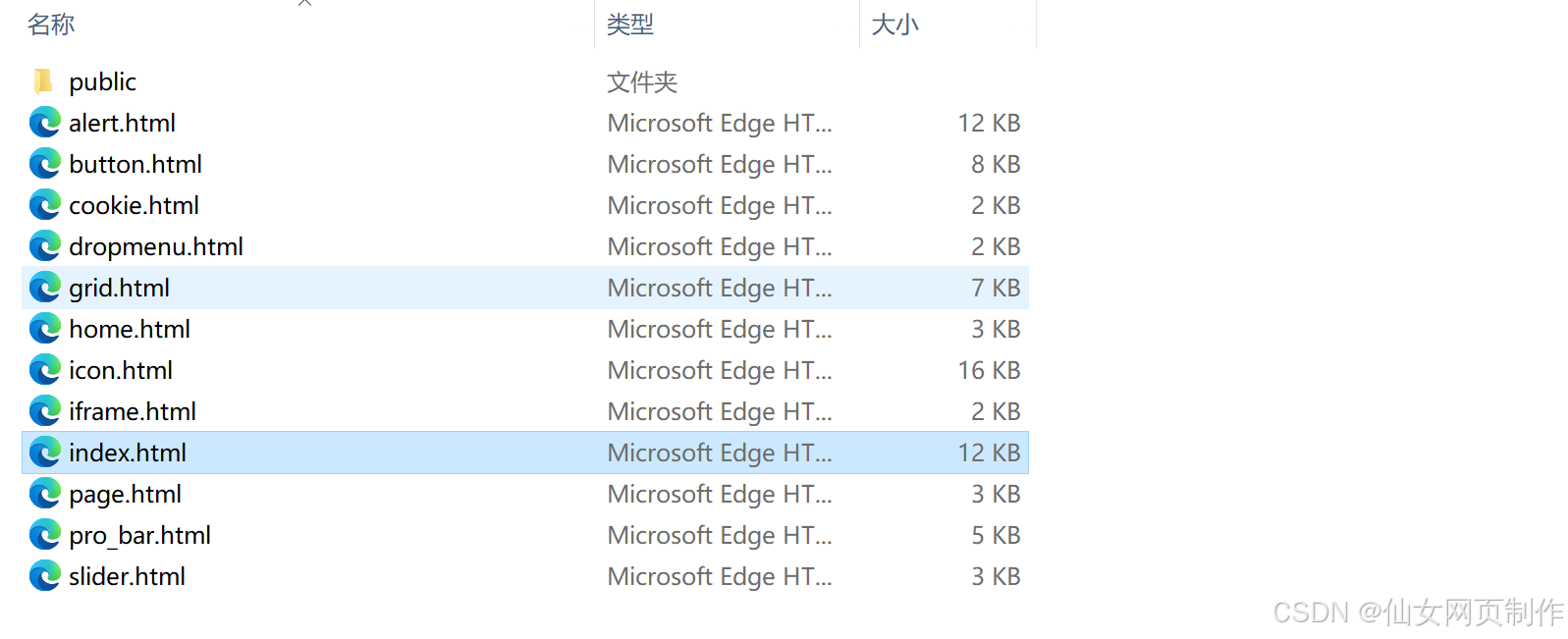
本网页实例共包含12个页面:
三、网页效果
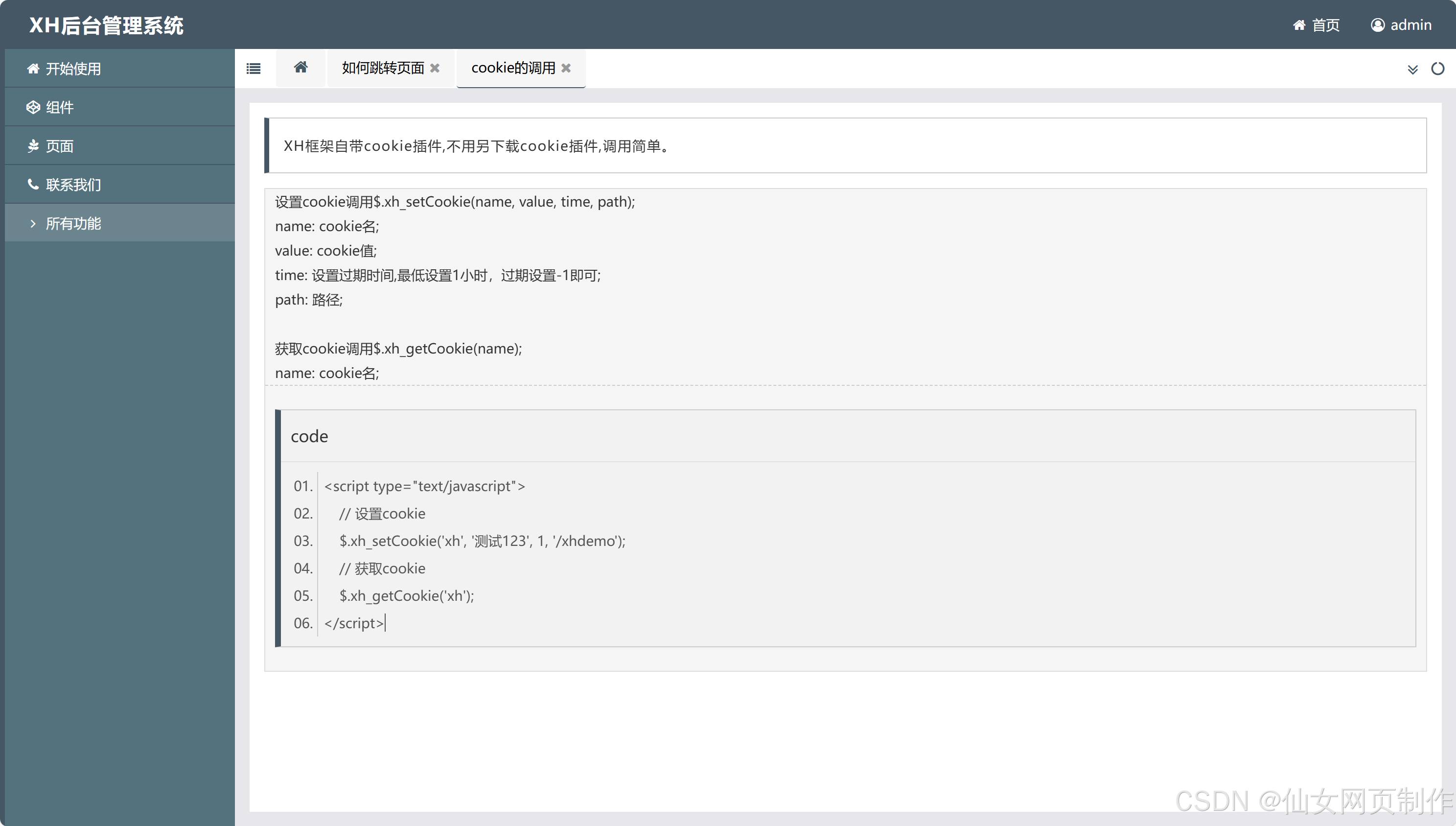
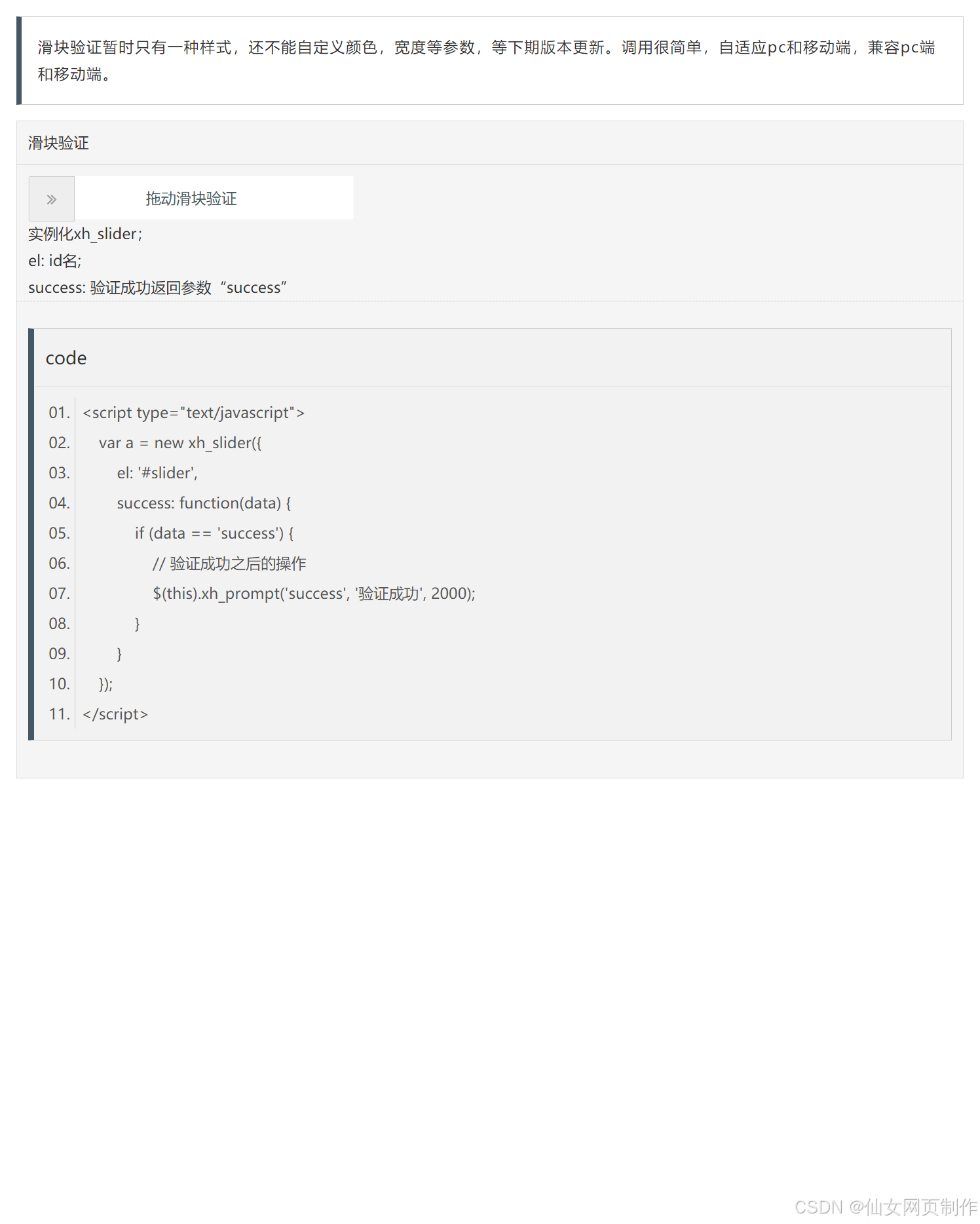
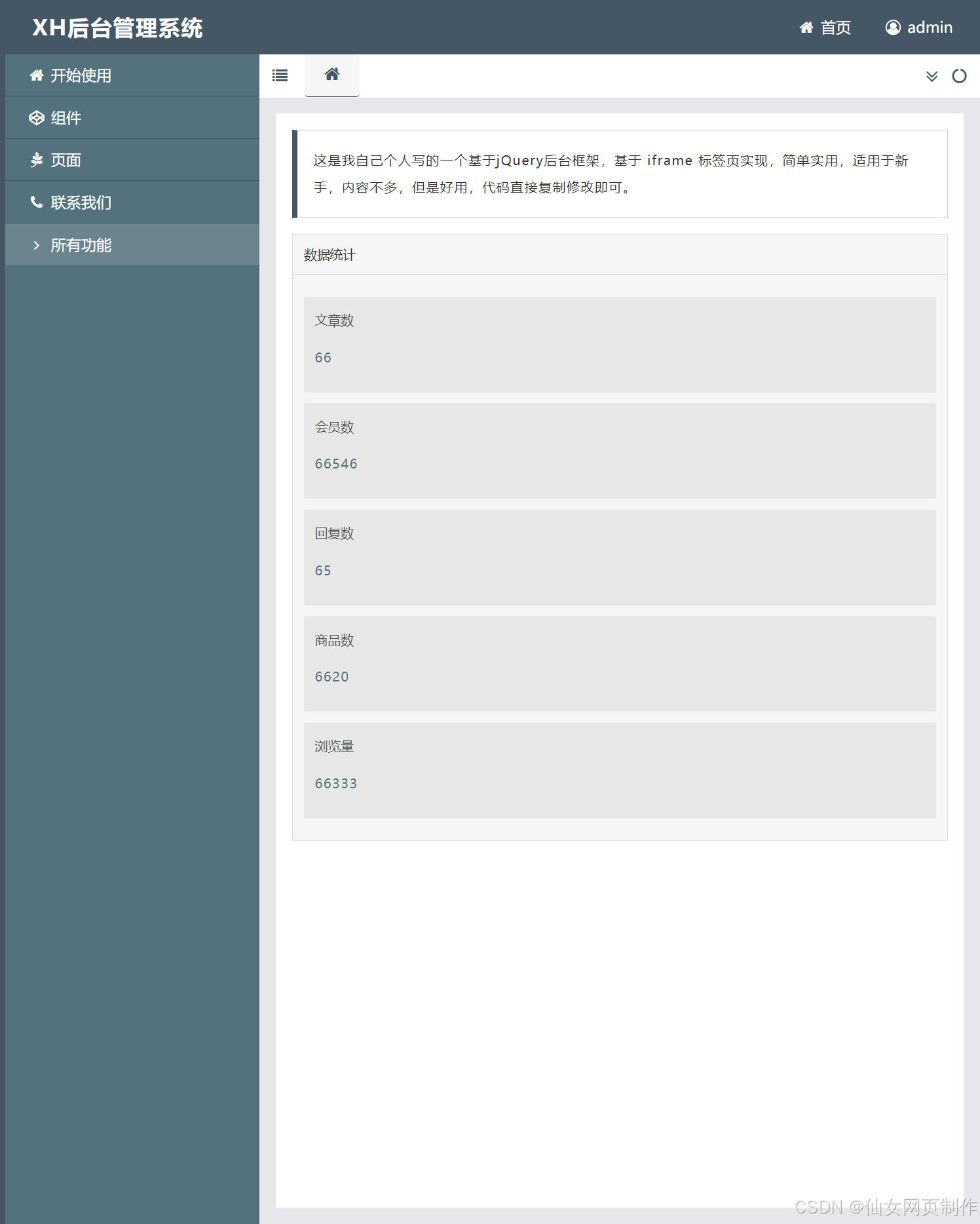
以下是本篇文章正文内容,下面案例仅供参考(节选示例):
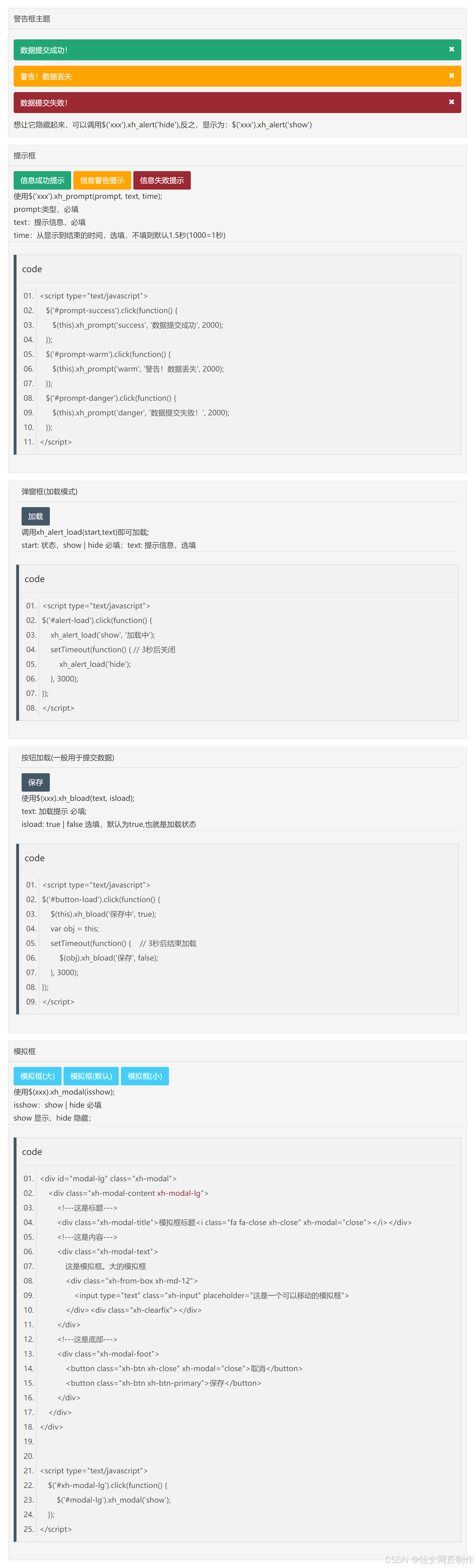
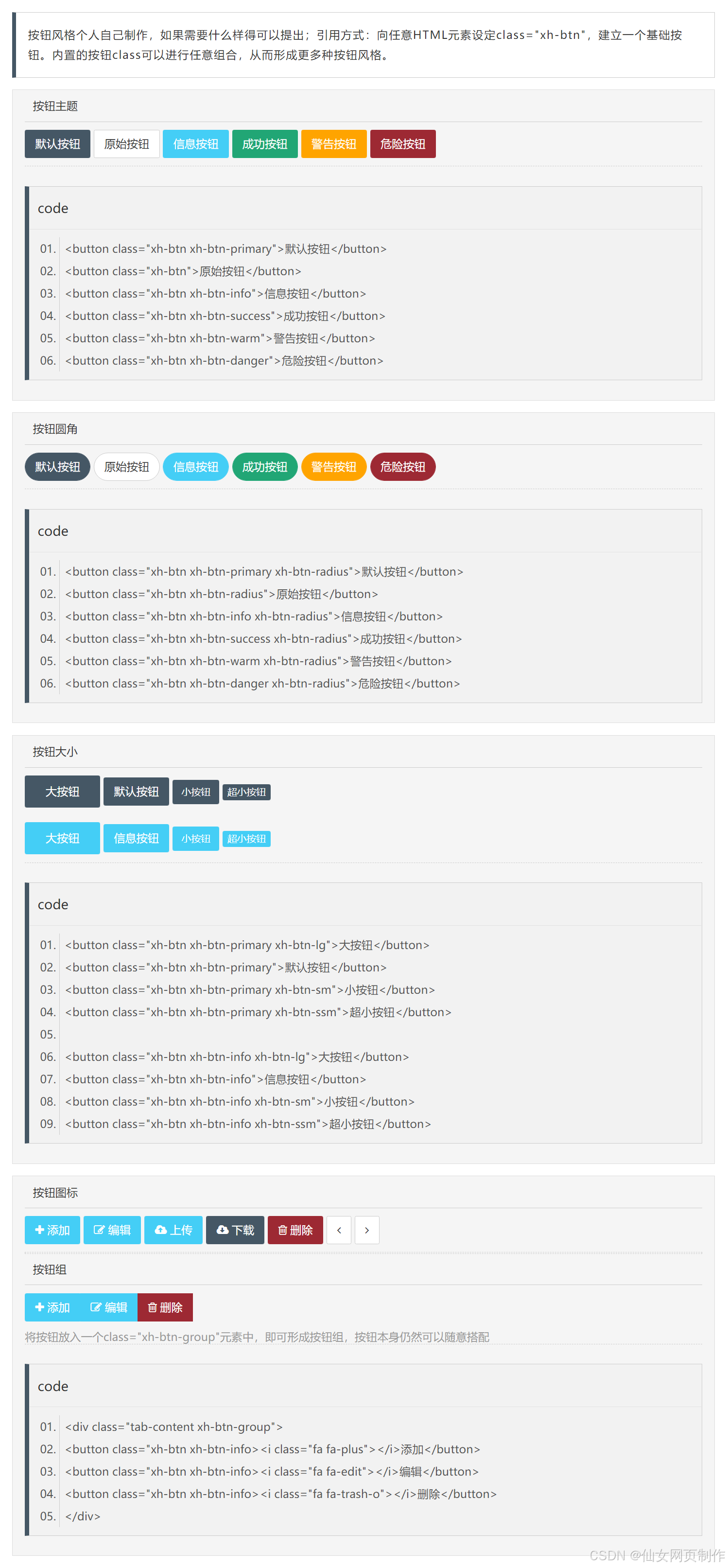
四、代码展示
1.html
<!doctype html>
<html>
<head>
<meta charset="utf-8">
<title>XH后台管理系统</title>
<meta content="IE=edge,chrome=1" http-equiv="X-UA-Compatible">
<meta name="viewport" content="width=device-width, initial-scale=1.0">
<meta name="description" content="">
<meta name="author" content="">
<link rel="shortcut icon" href="/favicon.ico" />
<link rel="stylesheet" type="text/css" href="public/css/xh.css">
<link rel="stylesheet" type="text/css" href="public/css/xhico.css">
<link rel="stylesheet" type="text/css" href="public/Font/font-awesome-4.7.0/css/font-awesome.min.css">
<link rel="stylesheet" type="text/css" href="public/css/main.css">
<script src="public/js/jquery.js" type="text/javascript"></script>
<script src="public/js/xh.js?tmp=123" type="text/javascript"></script>
</head>
<body class="xh-oflow-h">
<div class="xh-main">
<div class="xh-header">
<h1 class="xh-fleft">XH后台管理系统</h1>
<a id="modal_admin" class="xh-fright"><i class="fa fa-user-circle-o fa-fw"></i> admin</a>
<a href="#" class="xh-fright"><i class="fa fa-home fa-fw"></i> 首页</a>
</div>
<div class="xh-content">
<div class="xh-menu">
<ul>
<li class="xh-nav" xh-nav-id="#child-first">
<xh><i class="fa fa-home fa-fw"></i> 开始使用</xh>
<ul id="child-first" class="xh-nav-child">
<li class="xh-href" xh-href="iframe.html"><i class="fa fa-angle-right fa-fw"></i> 如何跳转页面</li>
<li class="xh-href" xh-href="cookie.html"><i class="fa fa-angle-right fa-fw"></i> cookie的调用</li>
</ul>
</li>
<li class="xh-nav" xh-nav-id="#child-second">
<xh><i class="fa fa-codepen fa-fw"></i> 组件</xh>
<ul id="child-second" class="xh-nav-child">
<li class="xh-href" xh-href="grid.html"><i class="fa fa-angle-right fa-fw"></i> 栅格</li>
<li class="xh-href" xh-href="button.html"><i class="fa fa-angle-right fa-fw"></i> 按钮</li>
<li class="xh-nav" xh-nav-id="#child-second-first">
<xh><i class="fa fa-angle-right fa-fw"></i> 验证</xh>
<ul id="child-second-first" class="xh-nav-child">
<li class="xh-href" xh-href="slider.html">滑块验证</li>
<li class="xh-href" xh-href="photossliding.html">图片滑动验证</li>
</ul>
</li>
<li class="xh-href" xh-href="icon.html"><i class="fa fa-angle-right fa-fw"></i> 图标</li>
<li class="xh-href" xh-href="alert.html"><i class="fa fa-angle-right fa-fw"></i> 弹窗</li>
<li class="xh-href" xh-href="tabel.html"><i class="fa fa-angle-right fa-fw"></i> 表格</li>
<li class="xh-href" xh-href="pro_bar.html"><i class="fa fa-angle-right fa-fw"></i> 进度条</li>
<li class="xh-href" xh-href="upload.html"><i class="fa fa-angle-right fa-fw"></i> 上传</li>
<li class="xh-href" xh-href="page.html"><i class="fa fa-angle-right fa-fw"></i> 分页</li>
<li><i class="fa fa-angle-right fa-fw"></i> 日历</li>
<li class="xh-href" xh-href="dropmenu.html"><i class="fa fa-angle-right fa-fw"></i> 下拉菜单</li>
</ul>
</li>
<li class="xh-nav" xh-nav-id="#child-third">
<xh><i class="fa fa-pagelines fa-fw"></i> 页面</xh>
<ul id="child-third" class="xh-nav-child">
<li><i class="fa fa-angle-right fa-fw"></i> 注册</li>
<li><i class="fa fa-angle-right fa-fw"></i> 登录</li>
</ul>
</li>
<li class="xh-nav">
<xh><i class="fa fa-phone fa-fw"></i> 联系我们</xh>
</li>
</ul>
<div class="xh-menu-all" xh-show-id="#xh-nav-show"><i class="fa fa-angle-right fa-fw"></i> 所有功能</div>
<ul class="xh-nav-yc" id="xh-nav-show">
<li class="xh-nav-down" xh-nav-id="#child-1">
<i class="fa fa-home fa-fw"></i> 开始使用<i class="fa fa-angle-down fa-fw xh-fright"></i>
</li>
<!---二级菜单--->
<li>
<ul id="child-1" class="xh-nav-child-down">
<li class="xh-href" xh-href="iframe.html"><i class="fa fa-angle-right fa-fw"></i> 如何跳转页面</li>
<li class="xh-href" xh-href="cookie.html"><i class="fa fa-angle-right fa-fw"></i> cookie的调用</li>
</ul>
</li>
<!---->
<li class="xh-nav-down" xh-nav-id="#child-2">
<i class="fa fa-codepen fa-fw"></i> 组件<i class="fa fa-angle-down fa-fw xh-fright"></i>
</li>
<!---二级菜单--->
<li>
<ul id="child-2" class="xh-nav-child-down">
<li class="xh-href" xh-href="grid.html">栅格</li>
<li class="xh-href" xh-href="button.html">按钮</li>
<li class="xh-nav-tdown" xh-nav-id="#child-2-1">
验证<i class="fa fa-angle-down fa-fw xh-fright"></i>
</li>
<!---三级菜单--->
<li>
<ul id="child-2-1" class="xh-nav-child-tdown">
<li class="xh-href" xh-href="slider.html">滑块验证<i class="fa fa-angle-right fa-fw xh-fright"></i></li>
<li class="xh-href" xh-href="photossliding.html">图片滑动验证<i class="fa fa-angle-right fa-fw xh-fright"></i></li>
</ul>
</li>
<!---->
<li class="xh-href" xh-href="icon.html">图标</li>
<li class="xh-href" xh-href="alert.html">弹窗</li>
<li class="xh-href" xh-href="tabel.html">表格</li>
<li class="xh-href" xh-href="pro_bar.html">进度条</li>
<li class="xh-href" xh-href="upload.html">上传</li>
<li class="xh-href" xh-href="page.html">分页</li>
<li>日历</li>
<li class="xh-href" xh-href="dropmenu.html">下拉菜单</li>
</ul>
</li>
<!---->
<li class="xh-nav-down" xh-nav-id="#child-3">
<i class="fa fa-pagelines fa-fw"></i> 页面<i class="fa fa-angle-down fa-fw xh-fright"></i>
</li>
<li>
<ul id="child-3" class="xh-nav-child-down">
<li>注册</li>
<li>登录</li>
</ul>
</li>
<li><i class="fa fa-phone fa-fw"></i> 联系我们</li>
<li id="xh-back"><i class="fa fa-angle-left fa-fw"></i> 返回</li>
</ul>
</div>
<div class="xh-context">
<div class="xh-text-top">
<i class="fa fa-list fa-fw xh-pointer" id="xh-isopen" title="展开/收起"></i>
<!--横向列表菜单-->
<ul id="xh-menubar">
<li xh-id="home.html" class="xh-tactive"><i class="fa fa-home fa-fw"></i></li>
</ul>
<!---->
<i class="fa fa-circle-o-notch fa-fw" id="xh-refresh" title="刷新页面"></i>
<i class="fa fa-angle-double-down fa-fw" id="xh-menulist"></i>
</div>
<div class="xh-text">
<iframe src="home.html" class="xh-iframe"></iframe>
</div>
</div>
</div>
</div>
<!---修改账号密码--->
<div id="modal-admin" class="xh-modal">
<div class="xh-modal-content">
<div class="xh-modal-title">模拟框标题<i class="fa fa-close xh-close" xh-modal="close"></i></div>
<div class="xh-modal-text">
<div class="xh-from-box xh-md-12">
<span>账号:</span>
<input type="text" class="xh-input xh-disabled" value="admin" disabled>
</div>
<div class="xh-from-box xh-md-12">
<span>新密码:</span>
<input type="password" id="pass" class="xh-input" placeholder="请输入新密码">
</div>
<div class="xh-from-box xh-md-12">
<span>确认新密码:</span>
<input type="password" id="newpass" class="xh-input" placeholder="请再次输入新密码">
</div>
<div class="xh-clearfix"></div>
</div>
<div class="xh-modal-foot">
<button class="xh-btn xh-close" xh-modal="close">取消</button>
<button class="xh-btn xh-btn-primary" id="act" xh-bload='true'>保存</button>
</div>
</div>
</div>
<script type="text/javascript">
$('#modal_admin').click(function() {
$('#modal-admin').xh_modal('show');
});
$('#act').click(function() {
var pass = $('#pass').val();
var newpass = $('#newpass').val();
if (pass == "" || newpass == "") {
$(this).xh_prompt('warm', '请保证两次新密码都不为空', 2000);
} else if (pass != newpass) {
$(this).xh_prompt('warm', '请保证两次新密码的一致性', 2000);
} else {
$(this).xh_bload('保存中', true);
var obj = this;
setTimeout(function() {
$.ajax({
type: 'post',
url: 'ajax.php?act=admin',
async: false,
dataType: 'json',
success: function(data) {
// 返回的信息
},
error: function(res) {
$(obj).xh_bload('保存', false);
$(this).xh_prompt('danger', '请求接口出现错误', 2000);
}
});
}, 400);
}
});
</script>
</body>
</html>
...
2.CSS
代码如下(节选示例):
.xh-home-ico {
background: url("data:image/svg+xml,%3Csvg class='icon' viewBox='0 0 1024 1024' xmlns='http://www.w3.org/2000/svg' width='103' height='103'%3E%3Cpath d='M562.805 80.698a72.135 72.135 0 0 0-96.93 0L73.925 452.87a36.157 36.157 0 0 0 48.42 53.708l6.233-5.918V889.1a72.315 72.315 0 0 0 72.315 72.405h210.442v-217.71a50.917 50.917 0 0 1 50.94-50.985h99.023a50.917 50.917 0 0 1 50.94 50.985v217.71h215.437a72.315 72.315 0 0 0 72.338-72.405V505.408c16.064 14.535 38.857 13.432 52.222-1.463a36.157 36.157 0 0 0-2.61-51.075L562.805 80.72z' fill='%23fff'/%3E%3C/svg%3E") no-repeat center center;
display: inline-block;
width: 15px;
height: 15px;
background-size: 100% 100%;
vertical-align: middle;
margin-right: 8px;
}
.xh-bhome-ico {
background: url("data:image/svg+xml,%3Csvg class='icon' viewBox='0 0 1024 1024' xmlns='http://www.w3.org/2000/svg' width='103' height='103'%3E%3Cpath d='M562.805 80.698a72.135 72.135 0 0 0-96.93 0L73.925 452.87a36.157 36.157 0 0 0 48.42 53.708l6.233-5.918V889.1a72.315 72.315 0 0 0 72.315 72.405h210.442v-217.71a50.917 50.917 0 0 1 50.94-50.985h99.023a50.917 50.917 0 0 1 50.94 50.985v217.71h215.437a72.315 72.315 0 0 0 72.338-72.405V505.408c16.064 14.535 38.857 13.432 52.222-1.463a36.157 36.157 0 0 0-2.61-51.075L562.805 80.72z' fill='%23455765'/%3E%3C/svg%3E") no-repeat center center;
display: inline-block;
width: 15px;
height: 15px;
background-size: 100% 100%;
vertical-align: middle;
margin-right: 8px;
}
.xh-down-ico {
background: url("data:image/svg+xml,%3Csvg class='icon' viewBox='0 0 1024 1024' xmlns='http://www.w3.org/2000/svg' width='103' height='103'%3E%3Cpath d='M994.97 312.783c15.746-16.373 15.239-42.41-1.136-58.155-16.373-15.747-42.41-15.238-58.155 1.136L514.257 681.04 86.946 257.564c-16.143-16.006-42.203-15.894-58.211.25-16.006 16.141-15.894 42.202.25 58.21l454.142 450.065c.696.706 1.604.872 2.298 1.524.155.155.198.364.364.528l.01.008c16.126 15.99 42.16 15.877 58.15-.25l450.099-454.186c.314-.303.621-.615.922-.93z' fill='%23fff'/%3E%3C/svg%3E") no-repeat center center;
display: inline-block;
width: 15px;
height: 15px;
background-size: 100% 100%;
vertical-align: middle;
margin-right: 8px;
}
.xh-menu-ico {
background: url("data:image/svg+xml,%3Csvg class='icon' viewBox='0 0 1024 1024' xmlns='http://www.w3.org/2000/svg' width='103' height='103'%3E%3Cpath d='M334.933 187.307h561.28v123.306h-561.28zm0 262.293h561.28v123.307h-561.28zm0 263.68h561.28v123.307h-561.28zM189.44 187.307a61.653 61.653 0 1 0 61.547 61.653 61.547 61.547 0 0 0-61.547-61.653zm0 261.973a61.547 61.547 0 1 0 61.547 61.547 61.547 61.547 0 0 0-61.547-61.547zm0 263.147a61.547 61.547 0 1 0 61.547 61.546 61.547 61.547 0 0 0-61.547-61.546z' fill='%23455765'/%3E%3C/svg%3E") no-repeat center center;
display: inline-block;
width: 15px;
height: 15px;
background-size: 100% 100%;
vertical-align: middle;
margin-right: 8px;
}
.xh-component-ico {
background: url("data:image/svg+xml,%3Csvg class='icon' viewBox='0 0 1024 1024' xmlns='http://www.w3.org/2000/svg' width='103' height='103'%3E%3Cpath d='M510.272 59.04l435.2 233.6v473.6l-435.2 230.4-435.2-233.6v-470.4l435.2-233.6zm0 108.8l-339.2 182.4v358.4l339.2 179.2 339.2-182.4v-355.2l-339.2-182.4z' fill='%23fff'/%3E%3Cpath d='M561.472 555.04v403.2h-96v-403.2l-352-201.6 48-83.2 352 201.6 348.8-201.6 48 83.2z' fill='%23fff'/%3E%3C/svg%3E") no-repeat center center;
display: inline-block;
width: 15px;
height: 15px;
background-size: 100% 100%;
vertical-align: middle;
margin-right: 8px;
}
.xh-page-ico {
background: url("data:image/svg+xml,%3Csvg class='icon' viewBox='0 0 1024 1024' xmlns='http://www.w3.org/2000/svg' width='103' height='103'%3E%3Cpath d='M648.533 245.76h-430.08c-76.8 0-138.24 66.56-138.24 146.773v399.36c0 80.214 61.44 146.774 138.24 146.774h430.08c76.8 0 138.24-66.56 138.24-146.774v-399.36c0-80.213-61.44-146.773-138.24-146.773zm0 628.053h-430.08c-42.666 0-76.8-35.84-76.8-81.92v-399.36c0-44.373 34.134-81.92 76.8-81.92h430.08c42.667 0 76.8 35.84 76.8 81.92v399.36c0 44.374-34.133 81.92-76.8 81.92zM262.827 150.187h537.6c42.666 0 76.8 35.84 76.8 81.92v513.706h61.44V232.107c0-80.214-61.44-146.774-138.24-146.774h-537.6v64.854z' fill='%23fff'/%3E%3C/svg%3E") no-repeat center center;
display: inline-block;
width: 15px;
height: 15px;
background-size: 100% 100%;
vertical-align: middle;
margin-right: 8px;
}
.xh-contact-ico {
background: url("data:image/svg+xml,%3Csvg class='icon' viewBox='0 0 1024 1024' xmlns='http://www.w3.org/2000/svg' width='103' height='103'%3E%3Cpath d='M512 761.4h13.2c44.1-4.4 79.4-35.3 92.7-75 0-4.4 0-4.4-4.4-8.8-4.4 0-4.4 0-8.8 4.4 0 0-17.7 26.5-83.9 35.3h-26.5c-44.1 0-66.2-17.7-66.2-17.7h-8.8c-4.4 0-4.4 4.4 0 8.8 17.7 30.9 53 53 92.7 53zm353.1-406.1c-4.4 0-4.4 0 0 0C825.4 187.6 679.7 64 503.2 64c-181 0-331 132.4-361.9 304.6-30.9 4.4-57.4 35.3-57.4 70.6V576c0 39.7 30.9 70.6 70.6 70.6 22.1 0 39.7-8.8 53-26.5 30.9 79.4 92.7 145.7 172.1 181 0 0 0-4.4 4.4-4.4l4.4-4.4h4.4c-17.7-13.2-83.9-83.9-97.1-181-4.4-44.1 26.5-83.9 61.8-92.7 61.8-8.8 119.2-22.1 181-35.3 39.7-8.8 61.8-26.5 79.4-61.8 4.4-8.8 8.8-26.5 13.2-48.6 0-4.4 4.4-4.4 8.8-4.4s4.4 0 4.4 4.4c22.1 35.3 70.6 110.3 75 189.8 8.8 92.7 4.4 154.5-66.2 220.7v4.4s0 4.4 4.4 4.4h4.4c70.6-39.7 123.6-105.9 150.1-181 8.8 13.2 26.5 26.5 44.1 30.9-30.7 136.9-149.9 220.8-300 234-8.8-22.1-30.9-39.7-57.4-39.7-35.3 0-61.8 26.5-61.8 61.8 0 30.9 26.5 61.8 61.8 61.8 26.5 0 48.6-17.7 57.4-39.7C728.3 907 865.1 805.5 896 642.2c26.5-8.8 44.1-35.3 44.1-66.2V434.8c-4.4-48.6-39.7-79.5-75-79.5zM798.9 395c-44.1-123.6-163.3-207.4-300.1-207.4S247.2 275.9 203 395l-8.8-8.8c26.5-145.7 154.5-260.4 304.6-260.4s278.1 110.3 304.6 256c-.1 4.4-.1 8.8-4.5 13.2zM375.2 801.1z' fill='%23fff'/%3E%3C/svg%3E") no-repeat center center;
display: inline-block;
width: 15px;
height: 15px;
background-size: 100% 100%;
vertical-align: middle;
margin-right: 8px;
}
.xh-left-ico {
background: url("data:image/svg+xml,%3Csvg class='icon' viewBox='0 0 1000 1000' xmlns='http://www.w3.org/2000/svg' width='103' height='103'%3E%3Cpath d='M783.067 510.603L446.485 148.036H291.193l336.582 362.567-336.582 336.57h155.293l336.581-336.57zm0 0' fill='%23fff'/%3E%3C/svg%3E") no-repeat center center;
display: inline-block;
width: 15px;
height: 15px;
background-size: 100% 100%;
vertical-align: middle;
margin-right: 8px;
}
.xh-right-ico {
background: url("data:image/svg+xml,%3Csvg class='icon' viewBox='0 0 1000 1000' xmlns='http://www.w3.org/2000/svg' width='103' height='103'%3E%3Cpath d='M244.195 476.247l359.021 386.738h165.645l-359.02-386.737 359.021-359.006H603.217L244.196 476.248zm0 0z' fill='%23fff'/%3E%3C/svg%3E") no-repeat center center;
display: inline-block;
width: 15px;
height: 15px;
background-size: 100% 100%;
vertical-align: middle;
margin-right: 8px;
}
.xh-bottom-ico {
background: url("data:image/svg+xml,%3Csvg class='icon' viewBox='0 0 1000 1000' xmlns='http://www.w3.org/2000/svg' width='103' height='103'%3E%3Cpath d='M513.397 783.067l362.567-336.582V291.193L513.397 627.775l-336.57-336.582v155.293l336.57 336.581zm0 0' fill='%23fff'/%3E%3C/svg%3E") no-repeat center center;
display: inline-block;
width: 15px;
height: 15px;
background-size: 100% 100%;
vertical-align: middle;
margin-right: 8px;
}
.xh-top-ico {
background: url("data:image/svg+xml,%3Csvg class='icon' viewBox='0 0 1000 1000' xmlns='http://www.w3.org/2000/svg' width='103' height='103'%3E%3Cpath d='M510.603 240.933L148.036 577.515v155.292l362.567-336.582 336.57 336.582V577.514l-336.57-336.581zm0 0' fill='%23fff'/%3E%3C/svg%3E") no-repeat center center;
display: inline-block;
width: 15px;
height: 15px;
background-size: 100% 100%;
vertical-align: middle;
margin-right: 8px;
}
...
3.JS
代码如下(节选示例):
;
(function(global, factory) {
"use strict";
if (typeof module === "object" && typeof module.exports === "object") {
module.exports = global.document ?
factory(global, true) :
function(w) {
if (!w.document) {
throw new Error("Page requires a window with a document");
}
return factory(w);
};
} else {
factory(global);
}
})(typeof window !== "undefined" ? window : this, function(window, noGlobal) {
function xh_Page(options) {
this.el = options.el;
this.nums = options.nums; //数据总条数
this.counts = options.counts || 10; //每页数据条数
this.parent = document.querySelector(this.el);
this.parent.classList.add('xh-page-elem-field-root');
this.parentNode = document.createElement('div');
this.parent.appendChild(this.parentNode);
this.defaultPage = Number(options.defaultPage) || 1;
this.last = this.nums % this.counts;
this.pages = parseInt(this.nums / this.counts);
this.jumpToOrder = !!options.jumpToOrder; // 是否显示跳转到指定页
this.showNowAndAll = !!options.showNowAndAll; // 显示当前第几页,共几页
this.showHeadFoot = !!options.showHeadFoot;
//this.head = options.head || '首页';
//this.foot = options.foot || '尾页';
this.prev = '<i class="fa fa-angle-left"></i>';
this.next = '<i class="fa fa-angle-right"></i>';
this.headfoot = [];
if (this.last != 0) {
this.pages++;
}
this.div = options.div || 'div';
this.domList = [];
this.showDomList = [];
var that = this;
function noop() {
if (options.clickEvent && typeof options.clickEvent == 'function') {
options.clickEvent(that.currect);
}
}
this.clickEvent = noop;
this.init();
}
xh_Page.prototype = {
init: function() {
this.createDom();
this.showDom();
// 监听当前页的数字变化
this.watcherCurrect();
this.addDom();
this.reanderHeadFoot();
this.jumpToOrderPage();
this.showNowAndAllPage();
},
showNowAndAllPage: function() {
if (this.showNowAndAll) {
var pagesbox = document.createElement('div');
var allPages = document.createElement('div');
//var currectPage = document.createElement('div');
var line = document.createElement('div');
pagesbox.classList.add('xh-pagesbox');
allPages.classList.add('xh-allPages');
//currectPage.classList.add('xh-currectPage');
//line.classList.add('xh-line');
//currectPage.innerText = this.currect;
allPages.innerHTML = '<span class="xh-total">共 ' + this.pages + ' 页</span>';
//line.innerText = '/';
//pagesbox.appendChild(currectPage);
pagesbox.appendChild(line);
pagesbox.appendChild(allPages);
this.parent.appendChild(pagesbox);
this.showNowAndAllPageDom = {
pagesbox: pagesbox,
allPages: allPages,
// currectPage: currectPage,
line: line
};
}
},
jumpToOrderPage: function() {
if (this.jumpToOrder) {
var toPage = document.createElement('div');
var inputBox = document.createElement('div');
var input = document.createElement('input');
// var showInputVal = document.createElement('div');
toPage.classList.add('xh-toPage');
inputBox.classList.add('xh-inputBox');
input.classList.add('xh-inputborder');
input.type = 'text';
input.value = this.currect;
...
五、总结
设计一个样式美观又人性化的网页,除了具备扎实的专业知识,还需具备美学和人机工程学等相关知识,优秀的网页应具备以下几个特点:
1.简洁实用
尽量以最高效率的方式将用户所要想得到的信息传送给他就是最好的,要去掉所有的冗余的东西;
2.使用方便
要满足使用者的要求,网页适合使用,显示出其功能美;
3.整体性好
围绕一个统一的目标设计,强调整体的功能性;
4.形象突出
尽量符合网页美的标准,能够使网站的形象得到最大限度的提升,追求雅俗共赏。页面用色协调,布局符合形式美的要求:布局有条理,充分利用美的形式,使网页富有可欣赏性,提高档次。
5.交互式强
发挥网络的优势,想方设法使每个使用者都参与到其中来。
六、网页简介
更多优质博客文章、完整代码案例模板,点击以下链接查阅:
Web前端网页制作、大学生期末大作业、课程设计、毕业设计、完整代码案例模板、Web前端网页定制、教学课程、学习资料等,有需要的添加以下微信交流👇🏻👇🏻👇🏻

码道开发者社区,聚焦华为云码道 CodeArts 代码智能体,沉淀 Agent、Skill、鸿蒙开发实战内容,供开发者查阅资料、交流技术、分享工程实践
更多推荐



 23
23 0
0- 0


 已为社区贡献1条内容

所有评论(0)